Participant
February 21, 2025
Question

Indesign Data merge for schoolboys watering timetable (schedule)

  • February 21, 2025
  • 3 replies
  • 254 views

Hi everyone !

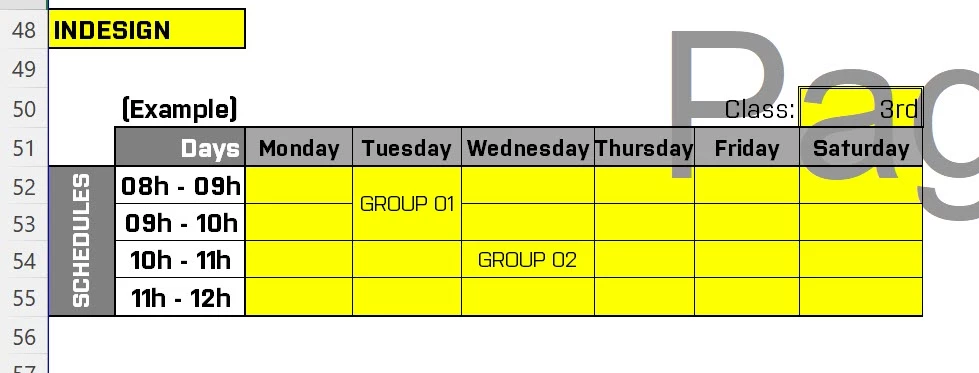
Here I wanna make a Watering timetable (schedule) for each of my 6 Classes

1- Each Class is divided into 2 groups : Group 01 and Group 02 with a LIST of NAMES

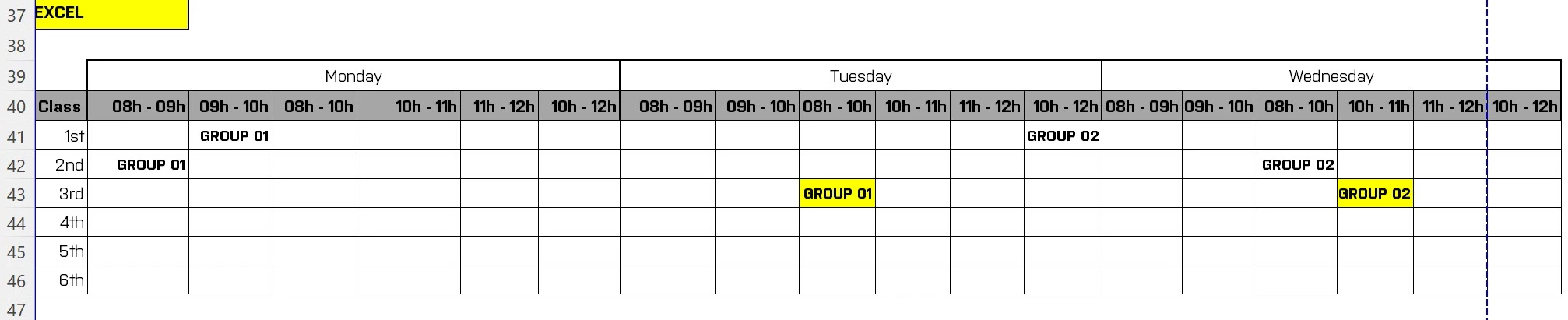
2- Schedules (8h to 9h, 9h-10h, 8h-10h (sometimes for merged cells) , 10h-11h, 11h-12h, 10h-12h (sometimes for merged cells))

3- Days from monday to saturday

Can someone help please with Screenshots or Excel sheet !


IMAGES below:
3 replies

Robert at ID-Tasker
Legend
February 21, 2025

@Boulakgnobot 


How do you "describe" your merged ranges?


If you have them merged in Excel - it can be read directly by my ID-Tasker tool - but it's Windows only and not free.


Joel Cherney
Community Expert
Community Expert
February 21, 2025

Data Merge is pretty powerful, but there is one thing in your example that isn't easy to do with Data Merge and requires some additional clicks, which would be to transform the differences in blocks of time from one format to the other. In Excel, the Tuesday time blocks look like

08h-09h

09h-10h

08h-10h

and these time blocks are, in your target, meant to be represented with merged cells for Group 01 across both the 08-09 and the 09-10 fields. I feel like that kind of transformation is actually much easier to do natively in Excel. Once you're in there working in Excel, you may as well match the formatting in Excel, as James points out.


If there is some compelling reason for you to ignore the time & effort spent in doing so, I'd suggest that you consider investing in a plugin like InData. The added cost of the plugin, plus the time spent learning a brand-new scripting language unique to the plugin, might be worth it? I remember the InData scripting language as being easy to work with, being an Applescript-style English-noun-and-verb kind of scripting language.

James Gifford—NitroPress
Legend
February 21, 2025

Not to dismiss any need or wish for better esthetics, etc. — but why not just format and print it from Excel? It's not the greatest layout tool but you can do very nice "formatted number" lists within it.