


Indesign displaying faded colours despite correct colour breakdown
Hi all,
Apologies if this already exists on the forum somewhere, if it does I have been unable to find anything that helps. I'll list all the facts that I have below. Hoping that someone out there knows something!
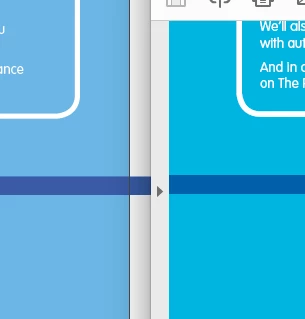
My Indesign is displaying colours as faded/washed out. This is happening with whatever documents I work on. I have checked and double checked that the documents have the correct colour break-downs - when I export to PDFs (or JPG or whatever else) the colours show correctly, so I know that the problem is not with my Mac screen. Document colours also display correctly when my colleague opens and works on them on his Mac, so I deduce that it the problem lies with my Indesign.
My indesign is fully up to date and the problem persists no matter what display performance I chose. Indesign is displaying faded on everything both created in indesign and assets imported in from illustrator however imported JPGs seems to be okay. So maybe the problem is with how swatches are displayed? (again, correct colour breakdowns and faded colours only on my Mac's Indesign, not my colleagues)
Swatches and colour breaks-downs display fine in illustrator.
This situation happens when working with both CYMK and RGB. Reds and magenta seems to display the closest to the actual colours - the problem is worst with blues.
Below are some screenshots of a document open within Indesign (left) and the exported PDF (right) open in acrobat.



 AdChoices