Participant
July 20, 2021
Question

InDesign Doc Roboto getting 2 different 7's

  • July 20, 2021
  • 1 reply
  • 243 views

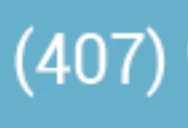
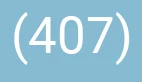
I am working with someone remotely on an indesign doc.  She opens the file from Creative Cloud on her PC and the "7" in Roboto Regular has a curve to it, but when I open it, the "7" is correct and straight.  We have tried having her activate her fonts, downloading a new font file...nothing is working.  I am putting in 2 screen shots so you can see the 2 different 7's.  
This topic has been closed for replies.

1 reply

Community Expert
July 20, 2021

Hi addiecooper,

you could check the font's version when in your InDesign and she when she has the same document open.

Maybe there is a difference? Open the document and look under Type > Find Font… , select the font style and then look up the details in More Info. Here a sample from my German InDesign 2021 where I used a Roboto font activated through AdobeFonts:


Regards,
Uwe Laubender

( ACP )

G_Man
Inspiring
July 13, 2023

I'm having the same issue. Downloaded and installed the Roboto family from Google yesterday and noticed that instead, it resembles Franklin Gothic, with curved ends. Deleted those and activated the family through Adobe.

My screenshot shows how it looks on Adobe/Google website vs InDesign. Why is this?