Participant
September 23, 2019
Answered

InDesign docs being saved as Microsoft

  • September 23, 2019
  • 2 replies
  • 229 views

I have recently updated to OS X 10.11.6. At the same time I updated from CS2 to CS5. Something in that process caused all my indd docs to show as microsoft documents in the "Kind" column even though the docs have the indd extension. If I click on a document, even with InDesign running, Word opens and the dialog box asks how I want to open the doc. The only way I can avoid that is to open from within InDesign. I have tried using "Save As" but the doc still shows up as Kind-Microsoft Document. I can open from within InDesign, but it is awkward to have to do that every time. I am used to being able to simply click on an indd doc from my list of docs. Is there any fix?
    This topic has been closed for replies.
    Correct answer Bill Silbert

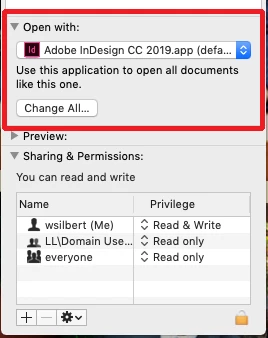
    To change all of your documents back to defaulting to InDesign click on any one of your InDesign files from within a folder or on the desktop and use Command-I to open the get info dialog window for that document. In the lower portion of that window (see screen shot) choose InDesign from the "Open with:" pull-down menu and then click on the "Change All" button to make that the default for all documents ending with .indd.

    2 replies

    Bill Silbert
    Community Expert
    Bill SilbertCommunity ExpertCorrect answer
    Community Expert
    September 23, 2019

    To change all of your documents back to defaulting to InDesign click on any one of your InDesign files from within a folder or on the desktop and use Command-I to open the get info dialog window for that document. In the lower portion of that window (see screen shot) choose InDesign from the "Open with:" pull-down menu and then click on the "Change All" button to make that the default for all documents ending with .indd.

    BobLevine
    Community Expert
    Community Expert
    September 23, 2019

    This is all operating system specific and has nothing to do with InDesign. Additionally, you are using ancient software that is unsupported under that operating system. All I can suggest is finding one of these docs, right clicking and choose get info. From there choose to always open with InDesign.