
Known Participant
January 3, 2022
Question

InDesign Document - Extremely Slow

  • January 3, 2022
  • 4 replies
  • 706 views

Hey everyone, any hints how to discover what's causing an InDesign document being extremely slow? My PC has really good specs and everything is updated so it's not an hardware issue also considering that all of the other documents are pretty fast and smooth.


The document has worked fine since today when it started becoming very slow while doing simple operations: scrolling, panning or unlocking objects.


What should I check?

I noticed also that on Task Manager there are several istances under the InDesign process:
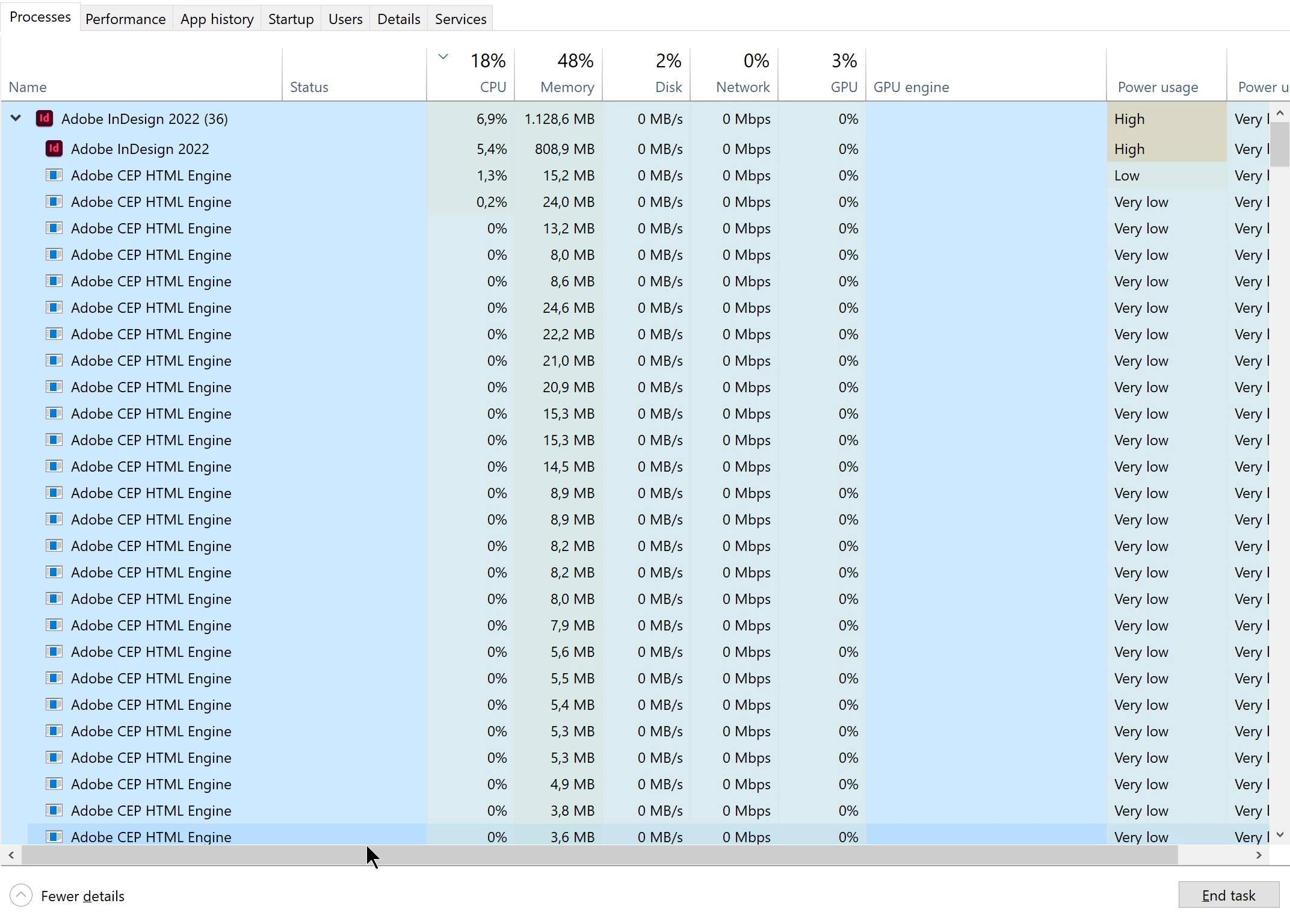


I never noticed that but I don't think they're causing the issue because the overall CPU usage is very low.

This topic has been closed for replies.

4 replies

Randy Hagan
Community Expert
Community Expert
January 3, 2022

Hard tellin' not knowin', but I think I may agree that you may be having challenges with your file.


If you have other jobs saved on your system, do they have the same issues you're having with this critical file? How large is the file you're working on? Without delving specifically with the content, can you share the size and materials contained in the file? Does it have lots of illustrations, or lots of small text frames like captions and detailed information outside the main text thread of the document? And importantly, what did you last add to the document before it started acting up on your system?


We're happy to sleuth this problem with you. Please share what you can about your problematic file and maybe we can help you past your issues.


Randy

Known Participant
January 3, 2022

Hey @Randy Hagan . I think the issues were "file-related" as by creating a blank new document and pasting each page in once again the new file seems to be smoother.


I don't know if some vector from Illustrator (copied and pasted in) was slowing down the whole thing... but it may be the case. I also must say that I'm working with +6MP images that may slow down the document too... but honestly speaking with the specs that I have and 32 GB or RAM I don't see this really be the case.


The last thing I did before the document started slowing dow has been just adding a swatch.

Randy Hagan
Community Expert
Community Expert
January 3, 2022

OK. I've got some ideas here:


  • You should be using InDesign's File>Place menu command to put graphics into your InDesign documents, rather than copying/pasting art into your InDesign documents. It greatly reduces file overhead and provides version control and tracking capabilities that you'll never get with copy/pasting your art.
  • You may want to check if your file swatches are being shared with you Creative Cloud files account on the cloud. That potential link between your system and Adobe's servers in the cloud through your internet connection can cause erratic and occasionally severe slowdowns navigating/handshaking in the background outside of the work you're doing with your file.
  • Similarly, if you're using Adobe Fonts in your document, you may also have a lag opening/closing files and occasionally while working with those files.
  • Finally, depending on where you are storing/linking with your InDesign document and linked files can cause problems. Working from one or multiple network drives/cloud storage resources while building your InDesign documents can cause unpredictable lags — and other, more severe complications — with InDesign performance as your system negotiates links from several disparate storage locations.


If you're having problems in any of these areas, reconciling them will hopefully reduce the slowdown issues you're having.


Hope this helps,


Randy

Randy Hagan
Community Expert
Community Expert
January 3, 2022

Could you please share your system's hardware specifications and what versions of Windows and InDesign you're using? That would help us isolate possible solutions for your issues.


For what it's worth, we have been hearing reports of users updating to Windows 11 and having significant slowdowns. Have you recently updated to Windows 11?


Randy

Known Participant
January 3, 2022

I've posted my hardware configuration above.


I'm on the latest version of InDesign. Everyrthing is up to date.


I'm still on Windows 10.


BobLevine
Community Expert
Community Expert
January 3, 2022

First, it would be good to define "really good specs," but if it's only one document giving you problems, try exporting it to IDML and then open that to see if it fixes it.

Known Participant
January 3, 2022


I didn't mention the specs in the first message because I don't think they're causing the issue...


I'll try to export it to IDML and the re-open it. Do I loose some features by doing that?


BobLevine
Community Expert
Community Expert
January 3, 2022

You won't be hurting the original file, and typically, this cleans out any corruption, but you should absolutely check the file after you open it to make sure nothing moved around.