Participant
December 3, 2021
Answered

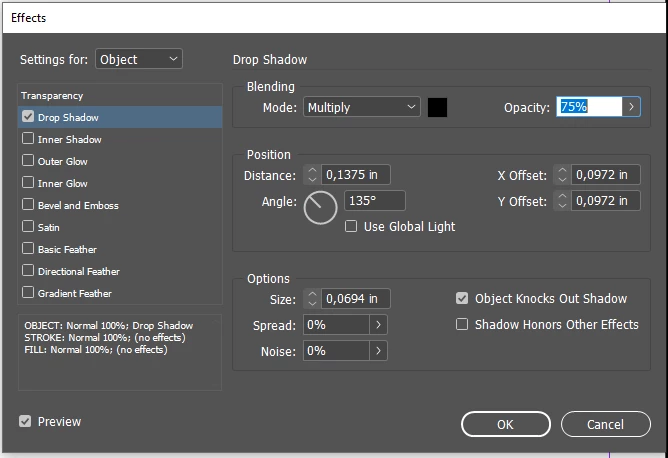
Indesign drop shadow distance and size options not working

  • December 3, 2021
  • 1 reply
  • 1096 views

Hello everyone,


I have strange problem with my Indesign on my Windows 10.

When I try to add a shadow to the object in parameters I can't click arrows on distance and size parameters in Effects window, they are locked. However I can edit the amount manually. Arrows also does not work if I want to change the amount. 


I was trfying to reset the preferences, it didn't help.

Thank you for your help.


This topic has been closed for replies.
Correct answer KarolinaMagnowska

I have little update:

I decided to restart my PC after that process, and now it works. 

Maybe it is a tip for Windows users and can be helpful in the future.

1 reply

BobLevine
Community Expert
Community Expert
December 3, 2021

Are you sure you successfully reset your preferences? What method did you use?

Participant
December 3, 2021

Hello Bob,

When I opened Indesign I clicked Shift+Ctrl+Alt. All my windows get back to original mode, so I can say I did it properly. 


KarolinaMagnowskaAuthorCorrect answer
Participant
December 3, 2021

I have little update:

I decided to restart my PC after that process, and now it works. 

Maybe it is a tip for Windows users and can be helpful in the future.