
Participating Frequently
June 2, 2017
Answered

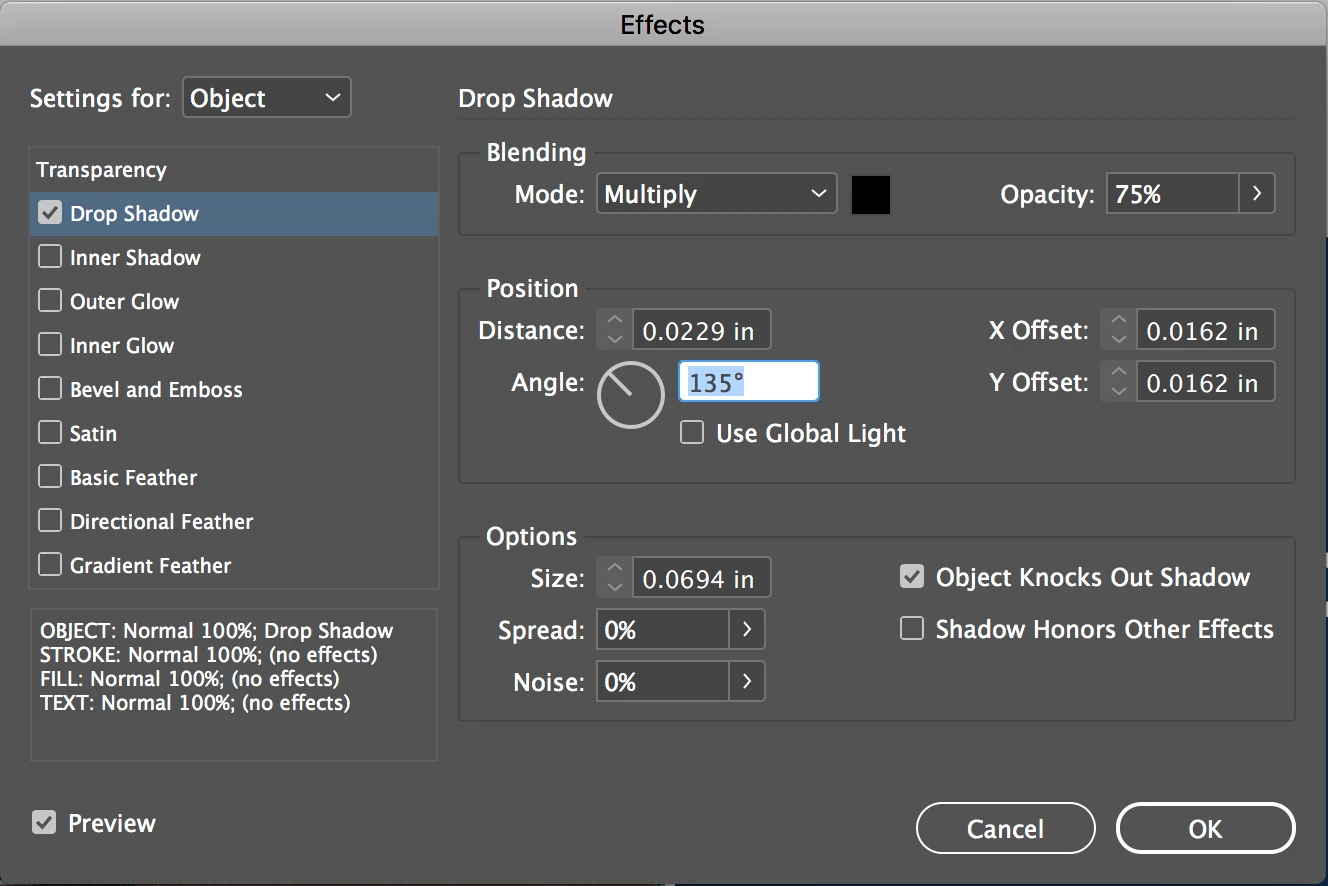
InDesign drop shadow increments greyed out

  • June 2, 2017
  • 2 replies
  • 2421 views

I am having an issue I have never seen before - when applying a drop shadow to objects in InDesign, the arrows that allow me to incrementally adjust the shadow are suddenly greyed out and not functioning. I have tried quitting/re-opening InDesign, creating a fresh document and trying it there, and restarted my computer and the issue is still there. I wonder if I hit some shortcut, or if anyone knows how to restore this setting? Thanks in advance, here are a few details:

Working in Adobe CC 2017 on Mac
This topic has been closed for replies.

2 replies

Bill Silbert
Community Expert
Community Expert
June 2, 2017

Missing or greyed out options in dialog boxes and panels may be a problem solved by deleting InDesign caches. To do this on a Mac open your Home folder and with your finger on the option key go under the Finder Go menu and choose Library. Once in the Library folder open the Caches folder and then the Adobe InDesign folder. Delete the folder that says the Version of InDesign you're using. Make sure that InDesign is not open when you do this.

Participant
May 8, 2018

Bill thanks!

Eugene TysonCommunity ExpertCorrect answer
Community Expert
June 2, 2017