
InDesign drop shadows have been broken for 6 months.
For the past few months, I’ve been able to work around this issue, but it has now reached a point where I can’t. When exporting PNG files in Adobe InDesign, the drop shadows shift position during export. The shadows appear correctly within InDesign, but once the PNG is exported, the shadows are visibly displaced from their original placement. I am currently using Adobe InDesign version 21.3.
Here’s a longer forum:
This forum has been marked as “answered” but it is only suggested workarounds from the community.
Here’s an example:
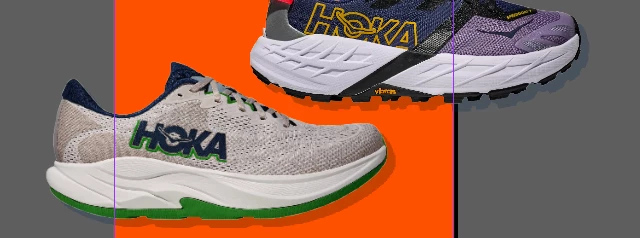

I’ve gone back into InDesign multiple times to correct the shadow placement and re-export the files, but the shadows continue to export incorrectly, which has become a major issue in my workflow.
I’ve been dealing with this bug daily for months, often having to resize assets in InDesign just to temporarily work around the problem. I’m hoping to bring more attention to this issue so it can hopefully be investigated and resolved.
Thank you.


 AdChoices