
BrittWarner
Participant
November 23, 2015
Question

Indesign: evented I/O for v8 javascript has stopped working

  • November 23, 2015
  • 18 replies
  • 13878 views

Hi Support team,

As of this morning every time I open In-design I am now getting the below error.
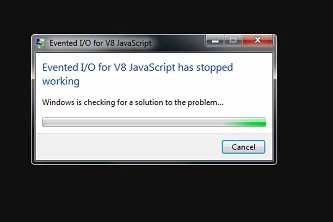
It pops up every 10 or so seconds.

I am running a windows 7 PC, I have updated java (after the error started), no windows updates have been installed. no plugins or add-ons added.

Event logs don't show any application error for in-design.

Can you please help me in rectifying this issue.

    This topic has been closed for replies.

    18 replies

    Participant
    February 22, 2016

    THIS is outrageous that this is happening at the prices they charge. I've updated all my CC files, done at least 3 suggested 'runarounds', can you tell I'm pissed? My small staff and I are feeling really frustrated!

    olovw86747279
    Participant
    November 27, 2015

    When does the update come to Sweden. How do I know that a new update is ready to download?

    /Olov

    Steve Werner
    Community Expert
    Community Expert
    November 27, 2015

    From the CC app preferences (under the "gear" icon), choose Sign Out from your Adobe ID, then sign in again. This should usually trigger any available update.

    olovw86747279
    Participant
    November 27, 2015

    It fixed the problem! Thank you. Three days of frustration is over...

    Participant
    November 27, 2015

    No update showing for me. Check for updates just tries to update Photoshop and Premiere and then eventually crashes with the 'Update failed Errors encountered during installation.(U44M1P7).' Not been able to find a solution to this issue yet.

    Participant
    November 27, 2015

    That's nice, so, how do you get the update? It's not in "check for apps updates", and I do get the feeling that what's crashing is the Adobe CC app trying to update itself automatically in the background =>,<=

    More specifically, I also tried uninstalling (all ACC programms and then) ACC, got a new installer from the website, which was Version 3.4.1.181, used it to install ACC, and now I still have ACC V 3.4.0.180, and the bug continues to ravage my computer.

    On a related topic, sometimes when this bug occurs, it also crashes my windows explorer. Anyone made similar observations?

    chrisbryant13
    Participating Frequently
    November 27, 2015

    I had to restart the computer then it updated automatically.

    Kind regards

    Chris

    Participating Frequently
    November 26, 2015

    I'm having the same error after Creative Cloud's update. I thought it was just an issue that needs to be resolved by our IT team. So the question is when are we going to have a resolution for this one because we use Photoshop and Dreamweaver on a daily basis. This one needs to be fixed ASAP.

    Richard_of_Opus
    Participant
    November 26, 2015

    Just saw another update for my cloud app and this seems to have resolved this problem. It would be good if others could confirm though.

    chrisbryant13
    Participating Frequently
    November 27, 2015

    I have had no new update yet, which update version do you have?

    Participant
    November 25, 2015

    We have had the same problem today on two of our computers when trying to use Indesign.  It seems to have worked when we have suspended the node.exe file but that it only a temporary fix to a problem that automatically installed it self, not good enough Adobe. I hope a patch is sorted soon so I don't have to keep rushing around to every computer.

    Participant
    November 25, 2015

    Same issue here. New install of both Windows 7 and CC. Had the issue BEFORE I installed InDesign CC2015. Haven't got it as bad as appearing every 20 seconds...

    Participant
    November 25, 2015

    Renaming all node.exe files to node.bak seems to make the problem go away until Adobe releases a patch.

    See Error: "Evented I/O for V8 JavaScript has stopped working" post #11 from peterk26211024

    Participant
    November 25, 2015

    Hi I am receiving the same error.  CC2015 in win7..
    Is any message from Support Team?

    Peter Spier
    Community Expert
    Community Expert
    November 25, 2015

    There won't be any messages from Adobe until the patch is released.

    Participant
    November 25, 2015

    I got this error immediately after the Creative Cloud app updated itself automatically to 3.4.0.180 this morning. Now I can't use Indesign. This error pops up every 10 sec and takes over both my mouse and keyboard.

    Running Win 7 and CC 2015 with all the latest updates.