
Participant
February 25, 2021
Question

InDesign export 300dpi to 72dpi

  • February 25, 2021
  • 4 replies
  • 2787 views

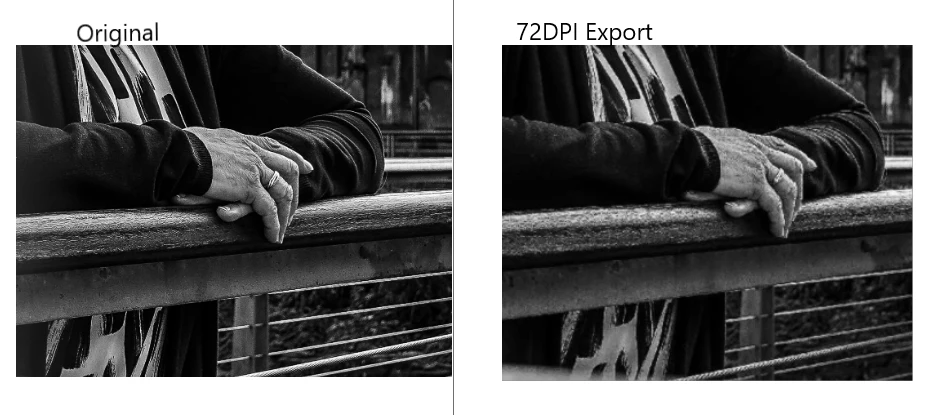
Hi! I am creating some social media graphics and I have some issues when exporting from InDesign. The project has 1 picture of 300dpi (dimensions 6000x4000) and some graphics on top. When I export it at 72dpi to fit the social platform requirements, the picture becomes slightly pixelated/blurred. Do you have any suggestions on what might be the issue?
Thank you!

    This topic has been closed for replies.

    4 replies

    rob day
    Community Expert
    Community Expert
    February 25, 2021

    Also the amount you have scaled the image on the InDesign page will affect the JPEG export pixel dimensions. 


    If you place your 300ppi, 6000px x 4000px image at 100%, its dimensions in Inches will be 20" x 13.333"—(6000/300 = 20, 4000/300 = 13.333):


    The export to JPEG at 72ppi will have a pixel dimension of 1440 x 960—(20"x72 = 1440px, 13.333"x72=960)


    If I scale the placed image down, the JPEG Export pixel dimensions will scale accordingly. The placed image scaled down to 25% has an output dimension of 5" x 3.33", so the export to JPEG at 72ppi produces an image that is only 360 x 240 pixels (5"x72=360, 3.33"x72=239.9)


    So if I needed to export the scaled image for Instagram, where the recommended pixel dimensions are 1024 x1024, I would export the selected 5" image at 205ppi (1024/5"= 204.8)


    Scott Falkner
    Community Expert
    Community Expert
    February 25, 2021

    Try exporting to PDF and rasterizing in Photoshop. As another user stated, PPI is irrelenant. All images on scren are 1 ppp; that is one pixel per pixel. When you rasterize just worr about using the correct image dimensions in pixels.

    Legend
    February 25, 2021

    The ppi (dpi) is absolutely irrelevant. You need to look at the size in pixels NOT the ppi. Social media has no ppi needs: it could be 72, 300, 3000 or 12.

    rob day
    Community Expert
    Community Expert
    February 25, 2021

    Your 6000 x 4000 pixel image is beig reduced to 1440 x 960 pixels—the down sample affects image detail

    Lavinia BAuthor
    Participant
    February 25, 2021

    Thanks Rob! And yes, that makes sense. It's just that I have done this with other pictures and that hasn't happened. 
    Could it be anything related to the edit of the picture/a preset added on Lightroom?

    rob day
    Community Expert
    Community Expert
    February 25, 2021

    Try exporting the page to PDF/X-4, and open the PDF at 72ppi and see if that makes a difference. The InDesign JPEG export doesn’t always do a good job with placed images.