
Participant
August 11, 2021
Answered

InDesign export to PDF dialog box completely missing

  • August 11, 2021
  • 4 replies
  • 2473 views

I'm on MacOS Big Sur 11.5, using the latest version of InDesign. 


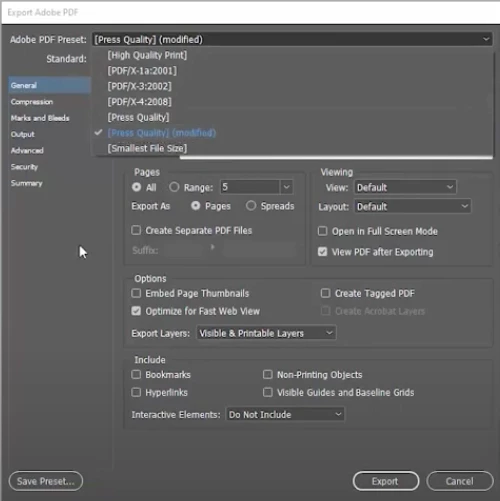
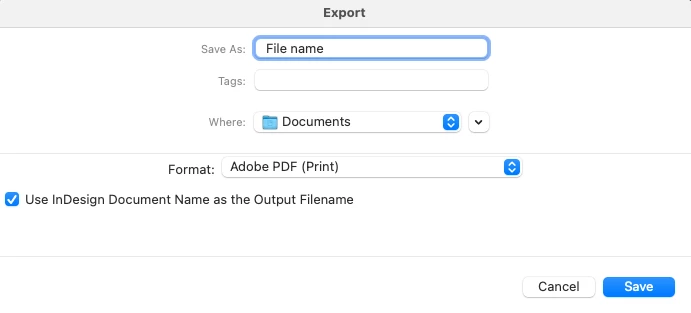
I want to export to PDF and change spread to pages. I used to get a detailed PDF Export dialog box (first image below), but now I just get the standard MacOS 'save as' dialog box (second image). 

Any ideas how to get my PDF export settings back?


I have tried restarting the computer as well as uninstalling and reinstalling InDesign. I have also tried all of this on another machine and it's the same issue.
 

This topic has been closed for replies.
Correct answer Laubender

Hi Cody,

the first part of the export is always the dialog where you determine the name of the file you want to export and the folder; of course also the format, Adobe PDF (Print). If you go on by pressing the Save button you should see Export Adobe PDF dialog window.


If the Export Adobe PDF dialog window is not showing I'd suggest you reset preferences and caches:

https://helpx.adobe.com/indesign/kb/indesign-preferences-support-file-locations.html


Before you do this:

[1] Quit InDesign

[2] Do a backup of the two mentioned Version 16.0 folders so that you can restore your preferences and caches.


Regards,
Uwe Laubender

( ACP )

4 replies

Lukas Engqvist
Community Expert
Community Expert
August 12, 2021

What version of OS and InDesign? Are you using Command-E to export? If you chose PDF interactive– do you get that dialog box? Is there a previous version of the PDF with that exact name that is open (locked) in that folder? 

LaubenderCommunity ExpertCorrect answer
Community Expert
August 11, 2021

Hi Cody,

the first part of the export is always the dialog where you determine the name of the file you want to export and the folder; of course also the format, Adobe PDF (Print). If you go on by pressing the Save button you should see Export Adobe PDF dialog window.


If the Export Adobe PDF dialog window is not showing I'd suggest you reset preferences and caches:

https://helpx.adobe.com/indesign/kb/indesign-preferences-support-file-locations.html


Before you do this:

[1] Quit InDesign

[2] Do a backup of the two mentioned Version 16.0 folders so that you can restore your preferences and caches.


Regards,
Uwe Laubender

( ACP )

Brad @ Roaring Mouse
Community Expert
Community Expert
August 11, 2021

The Export Setting should follow as soon as you click Save. If THAT's not happening, something is up.

Cody5EF7Author
Participant
August 13, 2021

This is EXACTLY what was happening (or not happening?).

Had to completely uninstall Adobe CC (all apps) and then reinstall with no settings remembered. This fixed it, but at the same time... WHY!? 


Thank you all for your help with this!

BobLevine
Community Expert
Community Expert
August 11, 2021

You have Use InDesign Document Name as the output Filename. Just hit save or uncheck it and give it a name.