

MariaMongeon
Participant
October 15, 2020
Answered

InDesign Exporting Wrong Size PDFs

  • October 15, 2020
  • 2 replies
  • 7514 views

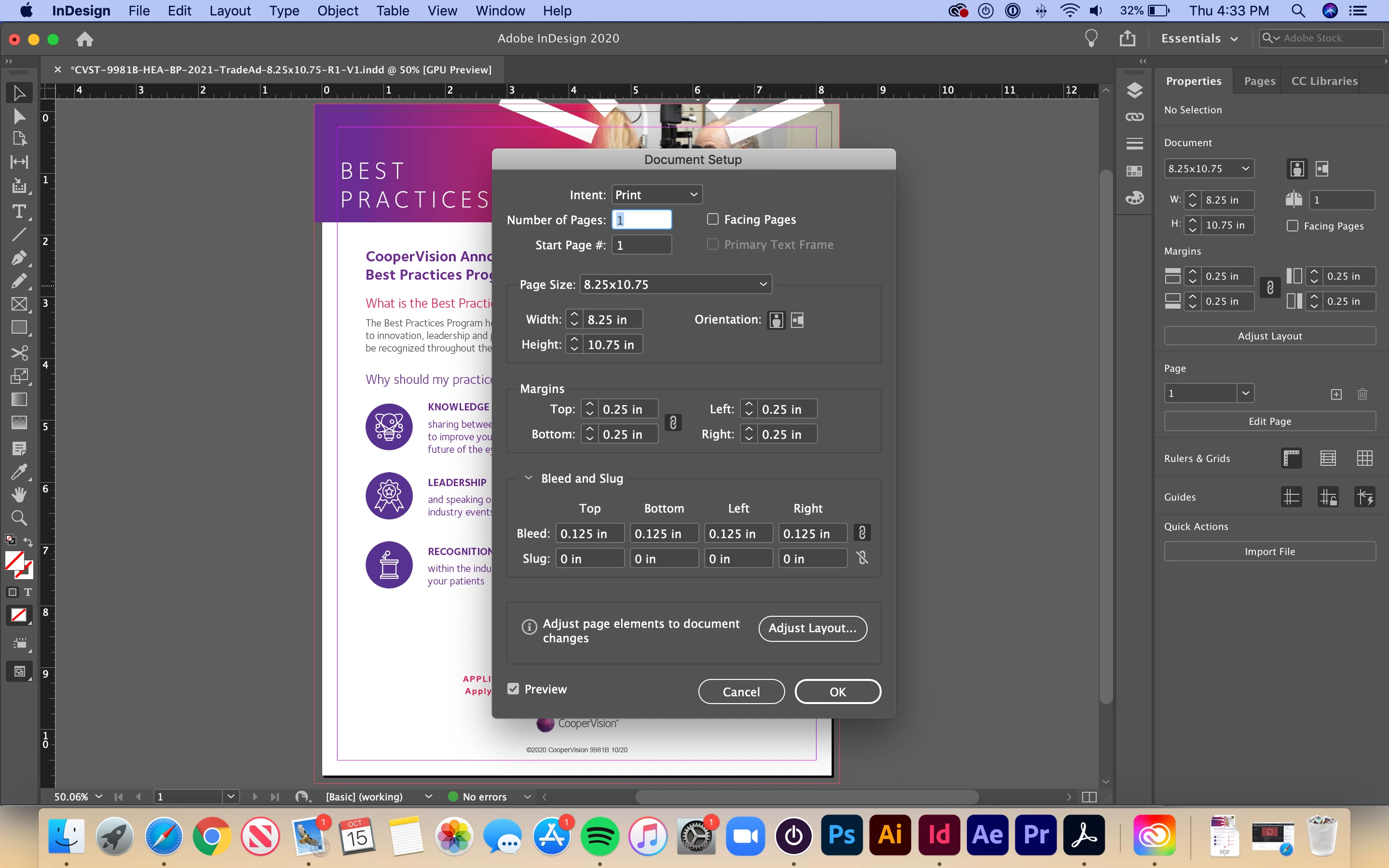
I'm having issues exporting PDFs with InDesign 15.1.2. They are exporting at the wrong size. I have an 8.25x10.75" document with a .125" bleed, which should result in a 8.5x11" PDF. For some reason, it comes out as 8.67x11.17". This has never happened to me before! I've attached screenshots of my project and its document set-up. Any advice would be extremely helpful. Thank you!
 

This topic has been closed for replies.
Correct answer Jens Trost

You're exporting with crop marks.
Look closely at your PDF - the blue border is your bleed box, the crop marks are a little bit larger.
If you export without crop marks you should get 8.5x11.

Also – IF you export with bleed marks – don't set the offset to 0. At least set them to the same size of your bleed.

2 replies

Barb Binder
Community Expert
Community Expert
October 15, 2020

OK. So how about sharing your File > Export > Adobe PDF (Print) > Marks and Bleeds settings?


~Barb

~Barb at Rocky Mountain Training
MariaMongeon
Participant
October 16, 2020

Yes, of course! Here's the screenshot


Jens Trost
Jens TrostCorrect answer
Inspiring
October 16, 2020

You're exporting with crop marks.
Look closely at your PDF - the blue border is your bleed box, the crop marks are a little bit larger.
If you export without crop marks you should get 8.5x11.

Also – IF you export with bleed marks – don't set the offset to 0. At least set them to the same size of your bleed.

Barb Binder
Community Expert
Community Expert
October 15, 2020

Can you show us the size in the resulting PDF? It will be visible in File > Properties > Description > Page Size.


~Barb 


~Barb at Rocky Mountain Training
MariaMongeon
Participant
October 15, 2020

Yes, of course! Here's the screenshot below

rob day
Community Expert
Community Expert
October 16, 2020

The Page Size listed in Acrobat’s Document Properties doesn’t necessarily give you the document’s trim size, which is what you are looking for—an exported PDF could contain pages with different dimensions.


You have to use Preflight to get an accurate overview of the PDF’s pages. Here I’m verifiying PDF/X compliance and the Page 1 dropdown gives me the Trimbox and Mediabox dimensions: