

tRiv
Inspiring
October 5, 2018
Answered

InDesign file icons are generic white box

  • October 5, 2018
  • 11 replies
  • 32669 views

Yesterday I had a new profile added to my desktop (Win7) at work so that it wasn't under the old designers name but this morning I noticed that all InDesign files had been disassociated with InDesign. So, I did the whole "open with x program always" by browsing for InDesign but instead of the regular file icon, it now shows the generic white thumbnail with a tiny InDesign logo:
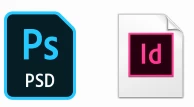
example of photoshop file with icon vs indesign file with generic icon

I've tried deleting/reinstalling InDesign and refreshing the icon cache, and checking out the other discussions on the topic. No success.

The files still work fine but it's mostly just an aesthetic issue. I need it to be fixed or it will drive me crazy.

Any help would be greatly appreciated.

This topic has been closed for replies.
Correct answer Jose M. Ramos

I think you found the problem friend. It's your user profile. Just delete your said profile and start fresh. That should do it.

11 replies

maxwithdax
Community Expert
Community Expert
October 5, 2018

Try changing the indd file association from InDesign to something else and then change it back and see if it resets the icon.

1. Go to: Start > Settings > Apps > Default apps >

2. Then scroll down to the .indd file type.

3. Change it to photoshop  (just for a second. Actually wait like 10 seconds)

4. Then change it back to InDesign

That should reset it.

Let me know if that worked.

- Dax

tRiv
tRivAuthor
Inspiring
October 5, 2018

Didn't work

When I changed it to photoshop it actually changed to the white box with the photoshop logo in it instead of the full icon.