sreekarthikeyank
Known Participant
October 24, 2019
Answered

Indesign footnote split option

  • October 24, 2019
  • 5 replies
  • 1170 views

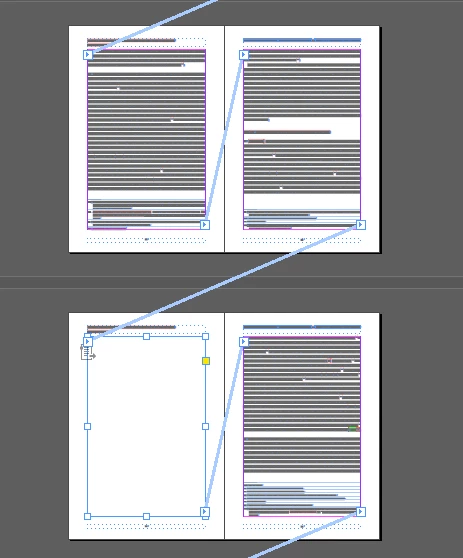
When I flow the text if the docuemnt has footnote split option. Its create blank pages with linked story. If i disabled its not rendering


Any one facing this issue.


indesign version 14.3


    This topic has been closed for replies.
    Correct answer Laubender

    So be it. That's the nature of this bug.

    I'd report it at InDesign Uservoice:

    https://indesign.uservoice.com/


    Regards,

    Uwe Laubender

    ( ACP )

    5 replies

    Community Expert
    October 31, 2019

    Bug report:

    Footnote split options create blank pages

    sreekarthik.k · October 24, 2019

    https://indesign.uservoice.com/forums/601180-adobe-indesign-bugs/suggestions/38882860-footnote-split-options-create-blank-pages


    To the OP:
    Give more details of the configuration, software, hardware.

    Also provide a sample document and sample script to the developers.


    Regards,
    Uwe Laubender

    ( ACP )

    LaubenderCommunity ExpertCorrect answer
    Community Expert
    October 30, 2019

    So be it. That's the nature of this bug.

    I'd report it at InDesign Uservoice:

    https://indesign.uservoice.com/


    Regards,

    Uwe Laubender

    ( ACP )

    sreekarthikeyank
    Known Participant
    October 31, 2019

    Its flagged one week ago and am awiting for responce

    Community Expert
    October 30, 2019

    "… the blank pages collapse the entire placement"

    What do you mean by that? Could you show a screenshot?


    By moving a path point of the text frame I really mean moving a single path point and not the whole frame.

    Just change the anchor value of one path point after flowing the text and change it back in a second step afterwards so that the frame is a rectangle again.


    Regards,
    Uwe Laubender

    ( ACP )

    sreekarthikeyank
    Known Participant
    October 30, 2019

    based on your solution i needs to check each and evey page text frames. if the text frame is empty in needs to change the path point via script

    Community Expert
    October 30, 2019

    So you tried the keyboard shortcuts and they worked?

    If you are doing this with a script did you enable screen redraw?

    app.scriptPreferences.enableRedraw = true;


    Or are you working with InDesign Server?

    Then it could help to move a path point of the text frame and explicitely move it back.


    Regards,
    Uwe Laubender

    ( ACP )

    sreekarthikeyank
    Known Participant
    October 30, 2019

    Am using server only. when I move the object via script the blank pages collapse the entire placement. 


    I needs to fix this issue before place the objects according to their citiation.


    Community Expert
    October 24, 2019

    Hm. Could be a text redrawing issue I thought beeing fixed long ago. Sigh.


    To flow text again you could try to recompose all stories.

    The keyboard shortcut to that menu item that is invisible in the UI is:


    Ctrl+Alt+/

    ( English InDesign on Windows )


    Strg+Alt+#

    ( German InDesign on Windows )


    Regards,
    Uwe Laubender

    ( ACP )

    sreekarthikeyank
    Known Participant
    October 30, 2019

    Thanks for your suggestion. When I do the same via script (recompose all stories) its not workig propely. please help me to resovle the same.
