
sarahm23500858
Participating Frequently
June 6, 2019
Question

InDesign forms: "Show until triggered" instead of "Hidden until triggered."

  • June 6, 2019
  • 1 reply
  • 509 views

I have a form that's rather complicated and I'm trying to handle it without javascriptting since I don't have much experience with that. I am using radio buttons to do this. What you see below has them in "normal" state. See the screenshot below...
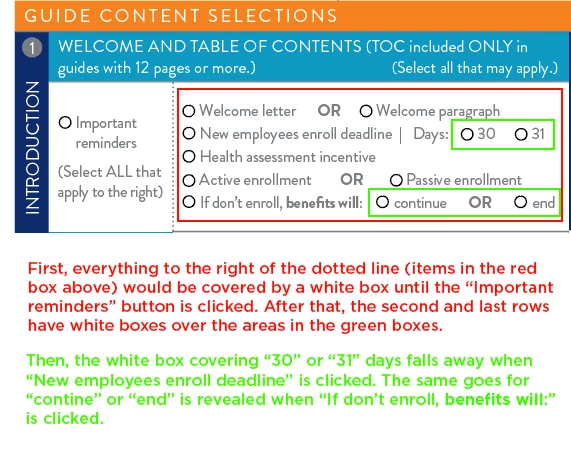
So... I need to SHOW until triggered" instead of "Hidden until triggered." Any ideas how I can make that work? Please advise. Thank you!

This topic has been closed for replies.

1 reply

Jeff Witchel, ACI
Community Expert
Community Expert
June 6, 2019

First, I have a question. Your "Important Reminder" Radio Button, shouldn't that be a checkbox. Radio Buttons are for making a single choice of two or more possible choices.

Now for a thought on how to solve this. This is going to sound a little strange, but make your white object that's covering the info into a Button with no Action.

Add an action to your "Important Reminder" Button of Show/Hide Buttons and Forms and turn off the visibility of your white box Button. In the listings of buttons, click the X to the left of the listing twice to get an eye with a strikethrough. This will turn off the visibility of the white shape.

Hope this helps!