
Participant
April 9, 2020
Answered

InDesign, Gradient Fill Not Working

  • April 9, 2020
  • 1 reply
  • 7607 views

Hello.

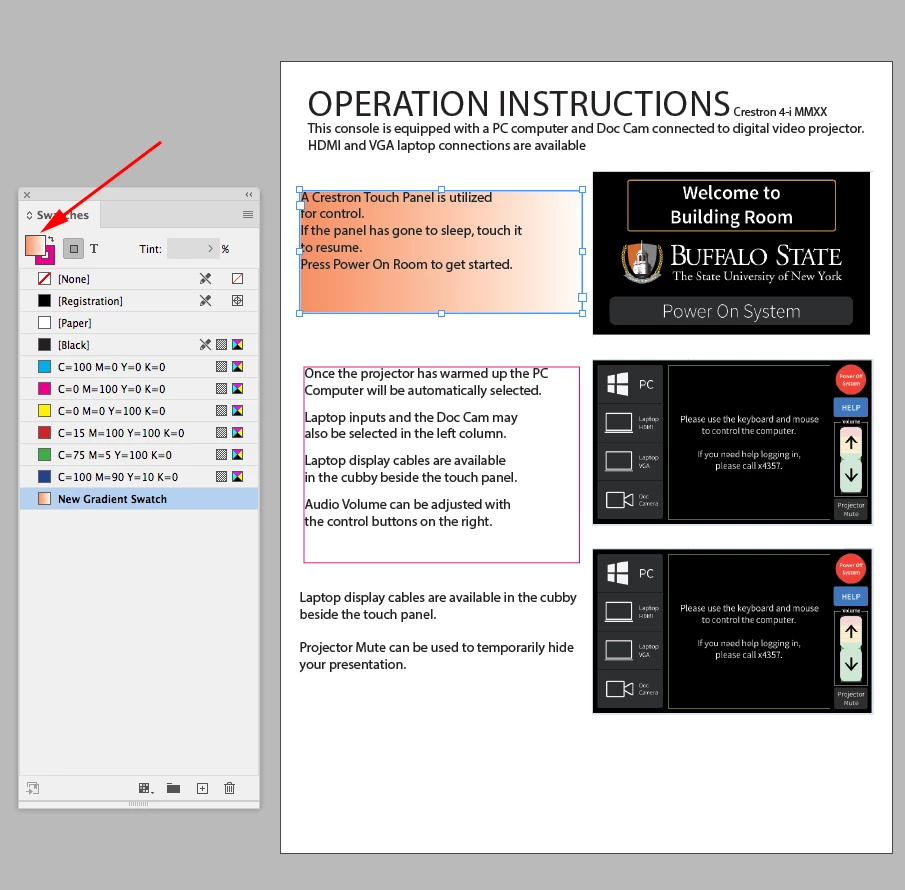
I'm new to InDesign and am working on a single page layout.  I would like to put a gradient fill into the background.  I'm familiar with the gradient fill tool and have set that up but somehow it won't fill any of the frames I select.  Attached is my file.  Any suggestions appreciated.
This topic has been closed for replies.
Correct answer rob day

In your capture you are applying the gradient to the selected frame’s stroke. Toggle the Fill/Stroke icon in your Tool or Swatches panel to apply the gradient as the Fill


1 reply

rob day
Community Expert
Community Expert
April 9, 2020

Have you made a Gradient Swatch and set it has the fill—Swatches panel>New Gradient Swatch?


Participant
April 9, 2020

I created another one for good measure and tried again. My understanding is that once the swatch is selected I can use the Gradient Swatch tool by selecting a frame, then dragging across the frame.  It's still not working for me.

Specifics about my setup: Win 10 with InDesign version 12.1.0.56 x64 build


rob day
Community Expert
rob dayCommunity ExpertCorrect answer
Community Expert
April 9, 2020

In your capture you are applying the gradient to the selected frame’s stroke. Toggle the Fill/Stroke icon in your Tool or Swatches panel to apply the gradient as the Fill