
Inspiring
February 15, 2026
질문

InDesign GREP Style Not Applying Correctly to Italic Text

  • February 15, 2026
  • 1 답변
  • 81 조회

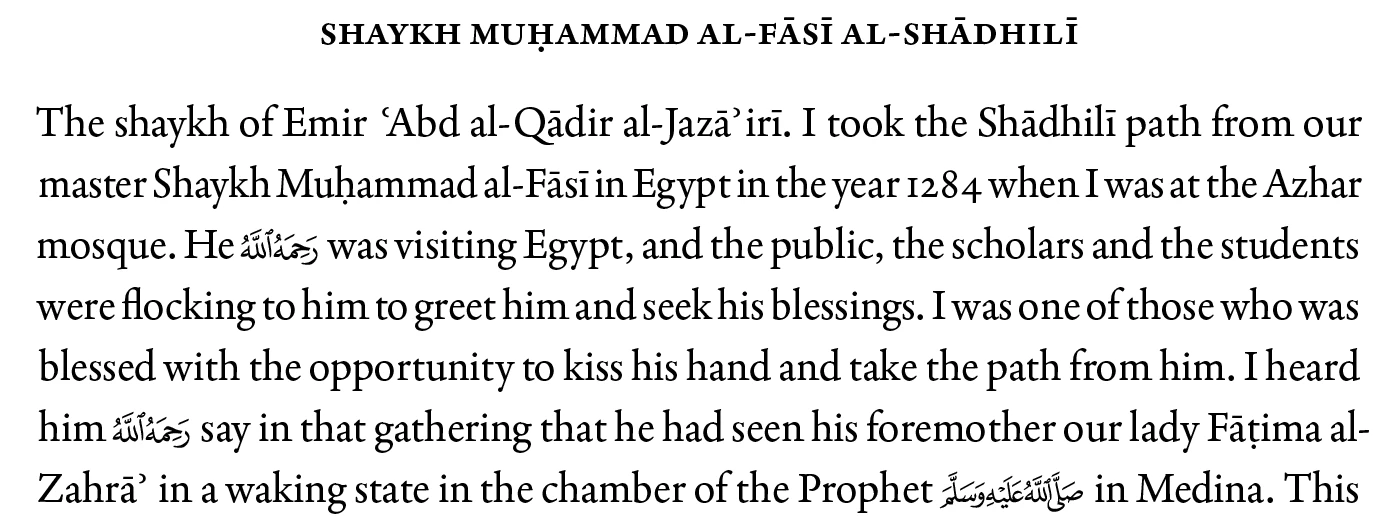
I apply a grep style to the letter ā which appears before the symbol ʾ


The grep style applies negative tracking of 100 to the letter ā.


However it also applies the tracking to all instance of the combination in italics which appears too squashed.

I don’t want this grep style applied when it is italic.


Is there a way to apply the above grep style only to the combination of letters that are not italic and only regular?


I have tried to manually override but that doesn’t work.
 

    1 답변

    Community Expert
    February 16, 2026

    Wrap your italic text in a separate character style (e.g., Italic) and leave the rest as normal. Then your GREP style that applies ā(?=ʾ) with negative tracking will only affect non-italic text, because InDesign GREP styles shouldn’t override existing character styles.


    Italic text > Italic Character Style

    GREP style > applies -100 tracking to āʾ only for regular text

    I can’t remember what order the styles follows - some won’t override other styles.
    So if you find the GREP style is not behaving, try using a Nested Style along with the Grep Style

    You might need to switch the order - but the main idea is to apply a regular text style and an italic text style using different applications like Grep Style and Nested Style ((or a regular character style). 

    Once you figure out the order it will be easy to be implement.

    FRIdNGE
    February 16, 2026

    Eugene and Peter,


    Sorry but I don’t understand what you mean!


    (^/)  The Jedi

    Peter Kahrel
    Community Expert
    Community Expert
    February 16, 2026

    I wouldn’t either! Well spotted.

    You can’t look for font style using a grep style.

    (I deleted my reply)