
Participant
March 29, 2018
Question

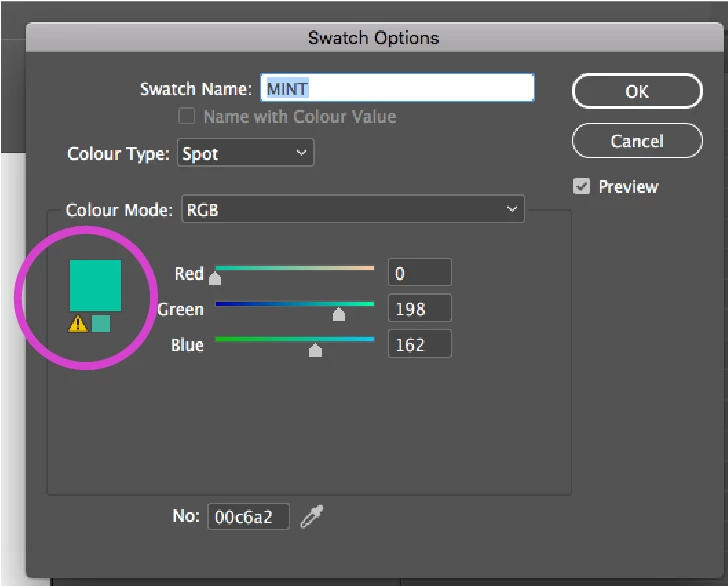
InDesign Hex colour error

  • March 29, 2018
  • 2 replies
  • 1234 views

I have to create an interactive pdf.

I have been given 18 HEX colours to work with.

8 of these numbers show an error by the colour, and the colour doesn't seem to display properly.

If I click the warning, the colour changes and looks better, but the HEX number changes to a different number to what I typed in, no longer matching my guidelines.

Why is this happening and how do I fix it?

Thanks!
    This topic has been closed for replies.

    2 replies

    rob day
    Community Expert
    Community Expert
    March 29, 2018

    the colour doesn't seem to display properly. Why is this happening and how do I fix it?

    The appearance of an RGB or hex value depends on the document's RGB profile assignment (Edit>Assign Profiles). Clicking the out-of-gamut triangle won't help because you are selecting a new color—the closest RGB color inside of the document's CMYK space.

    Here you can see the affect of different document RGB profiles on the same RGB hex color:

    sRGB assigned:

    ProPhotoRGB assigned:

    Doug A Roberts
    Community Expert
    Community Expert
    March 29, 2018

    that means it is outside of the process colour gamut. if you're making something in RGB, it's not important.

    Doug A Roberts
    Community Expert
    Community Expert
    March 29, 2018

    to be more accurate there, if you're making something that won't be printed in process, it's not important.

    Participant
    March 29, 2018

    This won't be printed. The part that will be, I have requested cmyk colours.
    Thank you.