
Inspiring
January 14, 2019
Answered

Indesign highlighted text red/pink

  • January 14, 2019
  • 6 replies
  • 19860 views

Hello,

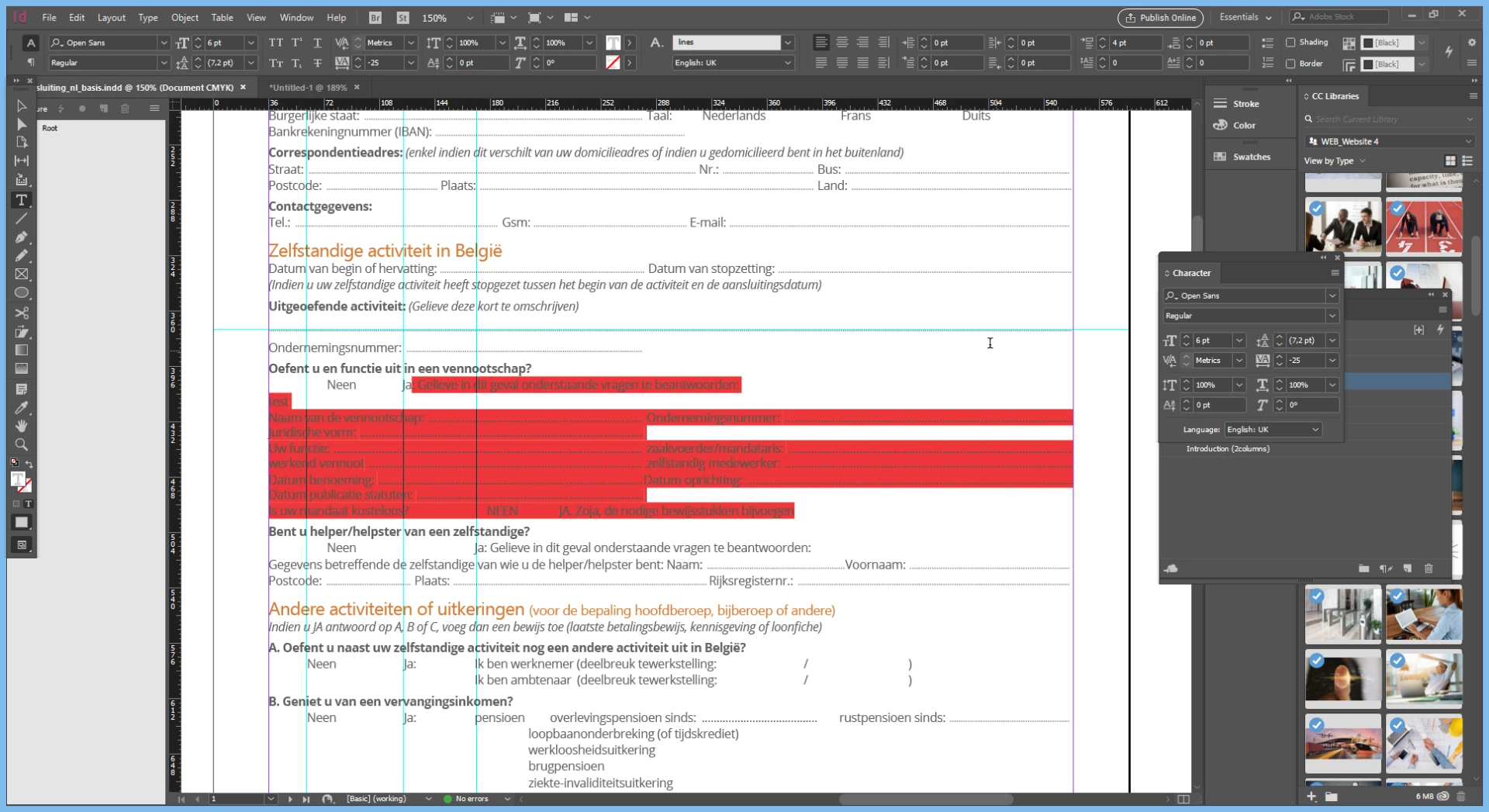
Can anybody help me in the right direction please? I'm getting this red/pinkish highlighted text (only when overprint preview is off and/or screen mode on normal) and it got me questioning where it's coming from. However, i can't seem to find that out.

As far as i can tell, the font is okay, and there is no offsetted underline going on. Please see screenshot:
Thanks in advance!

Greetz
    This topic has been closed for replies.
    Correct answer Laubender

    Hi,

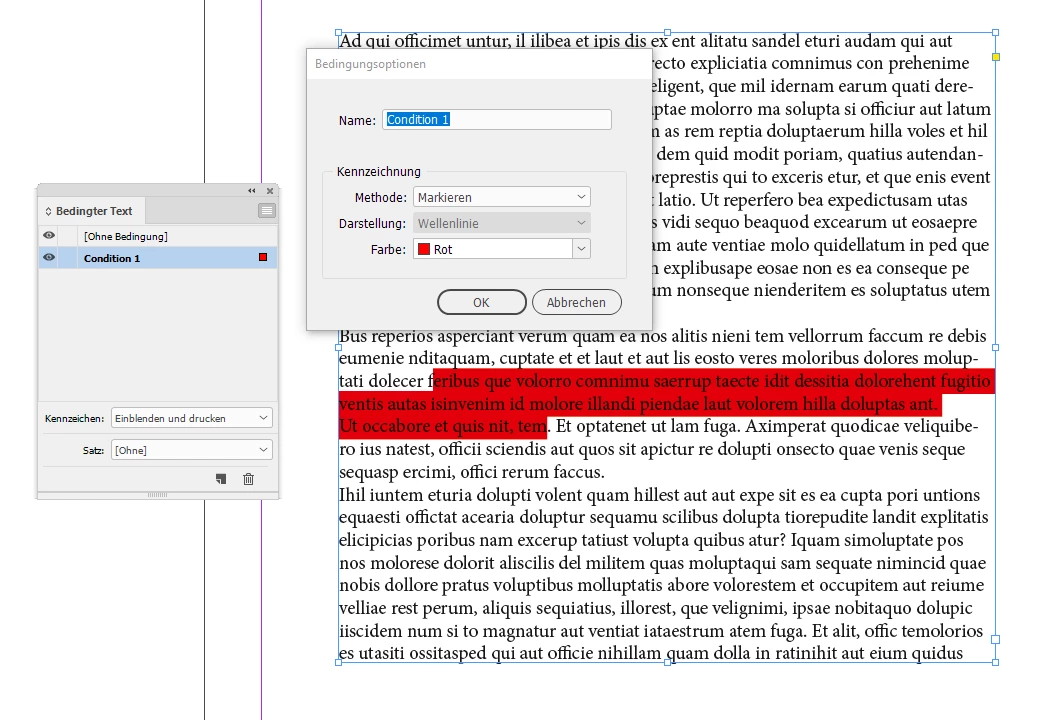
    did you check for Conditional Text ?

    Window > Type & Tables > Conditional Text

    One example from my German InDesign where the Conditional Text panel ( "Bedingter Text" in German ) is visible:

    Regards,
    Uwe

    6 replies

    michael jv47952597
    Participant
    January 24, 2020

    All I do is pick another font, then repick the one you want.. and it works. 

    Inspiring
    January 15, 2019

    This one got me pulling my hair and i can't afford to lose more time . I have to abandon the search for now.

    In following screenshot:

    • No paragraph styles applied
    • No character styles applied
    • Switched font to Minion Pro
    • Removed tabs
    • Created newline (after "test") with space selected (see turqoise color)

    Seeing i can enter newlines, i guess this means it's a paragraph thing right?

    LaubenderCommunity ExpertCorrect answer
    Community Expert
    January 15, 2019

    Hi,

    did you check for Conditional Text ?

    Window > Type & Tables > Conditional Text

    One example from my German InDesign where the Conditional Text panel ( "Bedingter Text" in German ) is visible:

    Regards,
    Uwe

    Inspiring
    January 15, 2019

    Hi Uwe,

    Yes, that was it! Thank you!

    I guess i put some conditional textfields in the file in a previous version and forgot all about that this week..

    I think i erased the "condition" and that's why the conditional text is red.

    oh man

    question solved.

    Have a great day all. Thanks again.

    Greets

    Kristof

    Randy Hagan
    Community Expert
    Community Expert
    January 14, 2019

    I'm happy to help. And it's always good to learn more about the tools you work with — that's how we work better with what we've got, even if what we learn is not immediately needed to solve issues at hand.

    Because I'm not only a teacher at all this stuff, I'm also a student. I learn a lot here too.

    Community Expert
    January 14, 2019

    Another thing it might be is Paragraph Shading

    Format paragraphs in Adobe InDesign

    And this can be set to non-printing - hence why you do not see it in other preview modes.

    Inspiring
    January 14, 2019

    Thanks Eugene and Randy,

    Will investigate further tomorrow. Like you said, i CAN go forward, it's just i'd like to know/learn what's happening.

    I'll put some more feedback up tomorrow.

    Community Expert
    January 14, 2019

    As above

    In your preferences there are settings to highlight where things are being pushed or pulled too much in the compostion

    You can see that there are highlighted areas for text, Keep Violations, H&J and so on (h&j being hyphenation and justifcation, why they haven't spelled that out is beyond me, they didn't do Custom T/K - anyway)

    So in short, it's just highlighting to show you if something is off kilter, but if you're happy with how it looks then continue on.

    https://indesignsecrets.com/why-am-i-seeing-yellow-highlighting-on-my-text.php

    Inspiring
    January 14, 2019

    Hi Eugene,

    Thank you for your thoughts. I also checked this, was off

    Randy Hagan
    Community Expert
    Community Expert
    January 14, 2019

    My suspicion is that those lines may "violate" minimum settings for word/character spacing by compressing the space between characters/underlining inside of preset spacing minimums. I'm guessing that you typed in the underline characters due to the variation in indents for the second "column" of your highlighted area.

    It's probably not an issue for you, since as you say it seems to work fine for you. One way to check would be by trying tab leaders instead of manually typing the underlines into the text and see if the affected type is still highlighted. You can find out more on this here:

    Set tabs and indents in Adobe InDesign

    Setting tab leaders can help speed layout of forms in a whole lot of ways, but as you've shown it's not the only way to get the results you want.

    Hope this helps,

    Randy