Known Participant
February 15, 2018
Answered

InDesign Hot Spots/Roll Overs - can you print them also?

  • February 15, 2018
  • 3 replies
  • 304 views

I created a few Hot Spots in an Interactive InDesign PDF that contain definition text. I am wondering if the viewers wants to print as a PDF, is there the ability to print that text. If not, I will include as a separate page.

Thanks
    This topic has been closed for replies.
    Correct answer Luke Jennings

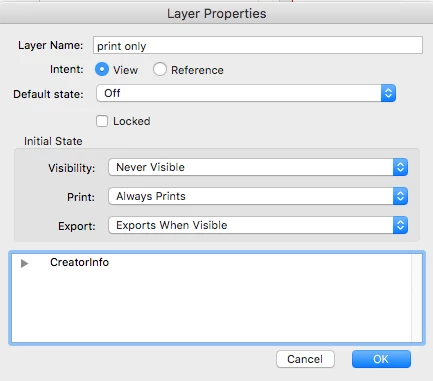
    If you are wanting to print the descriptions you can apply to interactive elements (AKA tool tips), I don't know if this is possible. You could include a copy of the descriptions on a separate layer that you would turn off for export to PDF, then in Acrobat, change the layer property to print, but never view. This would print the descriptions whether you wanted to or not. Alternately, you could add a button to turn on the descriptions layer, the button would have a title such as- click here to show definitions.

    3 replies

    Known Participant
    February 15, 2018

    Thank you Steve and Luke.

    You both gave me ideas to think about using!

    Luke Jennings
    Luke JenningsCorrect answer
    Inspiring
    February 15, 2018

    If you are wanting to print the descriptions you can apply to interactive elements (AKA tool tips), I don't know if this is possible. You could include a copy of the descriptions on a separate layer that you would turn off for export to PDF, then in Acrobat, change the layer property to print, but never view. This would print the descriptions whether you wanted to or not. Alternately, you could add a button to turn on the descriptions layer, the button would have a title such as- click here to show definitions.

    Steve Werner
    Community Expert
    Community Expert
    February 15, 2018

    What do you mean by Hot  Spots? How are you creating the text?

    If you put text in a button, and you turn on Printable in the Buttons & Forms panel, it can print out:

    But the words "Please Print Me" appear as a floating tool tip: