Participant
December 6, 2017
Answered

Indesign: How to create character style setting based on current selected formatted text?

  • December 6, 2017
  • 3 replies
  • 2670 views

Thank you for taking the time to read my question. 

I know how to create a brand new character style guide in Indesign.  But what I haven't figured out is how to format a body of text - and then create a character style guide based on that particular text I just formatted. 

I tried to select the text I formatted and then press the new character style button.  But it didn't apply the text style to that new character style. 

What should I do?

Thanks

    This topic has been closed for replies.
    Correct answer hammer0909

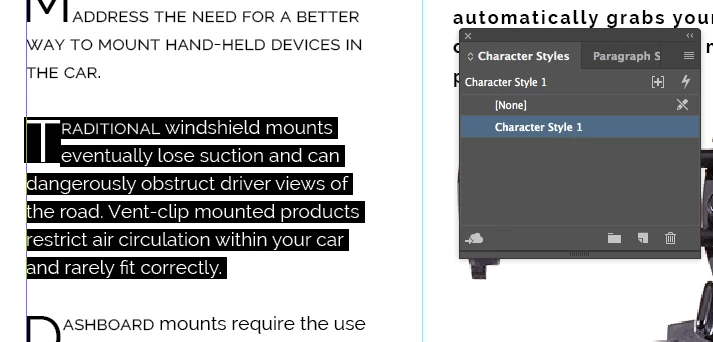
    Based on your screen shot, I fear that you may not understand how paragraph and character styles work. You should NEVER create a character style with an entire paragraph highlighted. That would be the job of the paragraph style. For what you are trying to do, you would want to do create a paragraph style for that paragraph of text. That paragraph style will record the:

    • font
    • size
    • leading
    • alignment
    • drop cap setting

    The character style in your case would only come into play if you wanted the drop-cap character to be in a different font, face, color, etc. Then within the paragraph style, you could choose that character style to adjust the formatting of the cap. By doing this, you would be able to simply click inside of the paragraph (not necessarily selecting any text), and then apply the paragraph style to produce the formatting that you're trying to achieve.

    Another thing to remember is that character styles always win! Whenever you apply a paragraph style to text and then apply a character style to some of the text within that paragraph, the character style formatting will take precedence (win).

    I hope that helps.

    3 replies

    hammer0909
    Community Expert
    hammer0909Community ExpertCorrect answer
    Community Expert
    December 6, 2017

    Based on your screen shot, I fear that you may not understand how paragraph and character styles work. You should NEVER create a character style with an entire paragraph highlighted. That would be the job of the paragraph style. For what you are trying to do, you would want to do create a paragraph style for that paragraph of text. That paragraph style will record the:

    • font
    • size
    • leading
    • alignment
    • drop cap setting

    The character style in your case would only come into play if you wanted the drop-cap character to be in a different font, face, color, etc. Then within the paragraph style, you could choose that character style to adjust the formatting of the cap. By doing this, you would be able to simply click inside of the paragraph (not necessarily selecting any text), and then apply the paragraph style to produce the formatting that you're trying to achieve.

    Another thing to remember is that character styles always win! Whenever you apply a paragraph style to text and then apply a character style to some of the text within that paragraph, the character style formatting will take precedence (win).

    I hope that helps.
    Participant
    December 6, 2017

    Thanks!  That worked!

    amaarora
    Inspiring
    December 6, 2017

    Hi,

    Style on text is a combination of paragraph style and character style. You will need to create and apply them both (unless you create nested/grep styles) to have the same style settings.

    In your case i  suppose, you need a drop caps as part of the style setting. Select the text and when you see [Basic paragraph]+ in the paragraph style panel, click on the new style button. When you do that, you will get a new style based on this style that has the styling of the selected text.

    -Aman

    vladan saveljic
    Inspiring
    December 6, 2017

    we need some more info

    what is your Character Style 1: Cap Height? Normal text? Small caps?

    What are you try to obtain?