
Indesign: How to find out the special effects being used in existing type
My goal: To make the type over a photo really clear to read (instead of only so-so readable).
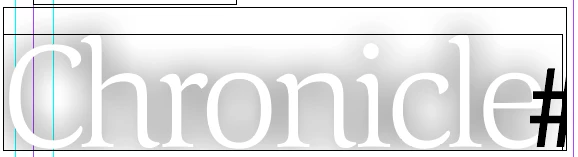
I have an existing type box that was created by someone else and I'm trying to duplicate the effects of the type/text in this box. But I can't determine which effect was used. Nor can I adjust the effect--make it darker or lighter. Each character (which is white or no color) is surrounded by a halo of grey. This effect makes the type easier to read when layered over a photo--the photo is darkened somewhat but is still readable, but the type is somehow more readable/clear/prominent. It is NOT on the effects menu, so it is not a drop shadow, inner shadow, outer glow, inner glow, bevel and emboss, satin, etc. What is the effect? Very puzzled. See example below:


 AdChoices