
Known Participant
December 20, 2023
Question

Indesign how to make hyperliks with automated page number in it

  • December 20, 2023
  • 4 replies
  • 987 views

Hi,


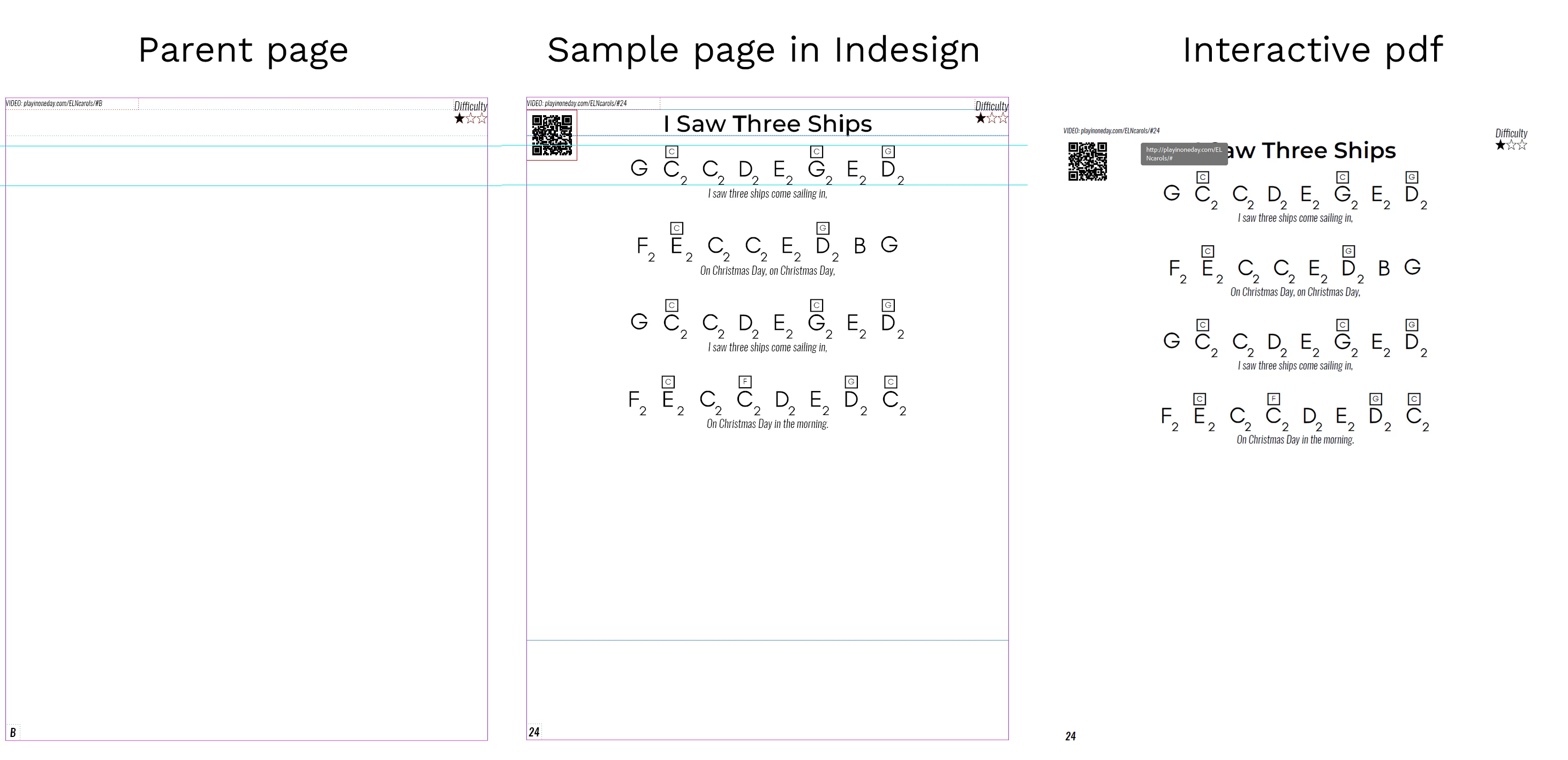
I've got a problem with hyperlinks in Indesign. Each page of my book has a text (which I want to be a hyperlink in ebook) to a video that references its page number, but when I try to convert it to hyperlinks Indesign omits page number and makes hyperlinks without the page number. Do any of you know how to fix this? I have attached a screenshot for a better understanding of the problem.
This topic has been closed for replies.

4 replies

Mike Witherell
Community Expert
Community Expert
December 20, 2023

In the Cross-References panel menu button flyout > Hyperlink Destination Options, did you choose URL or Page?

Mike Witherell
Known Participant
December 20, 2023

I do not see any url option in this panel but why would I use cross references in the first place if I do not want my hyperlinks to change in any case, they have to be fixed to the page number in a physical book. 

Mike Witherell
Community Expert
Community Expert
December 20, 2023

As Willi suggests, try using cross-references (a form of hyperlink); not just the hyperlinks panel.

Mike Witherell
Known Participant
December 20, 2023

I tried with cross references without success. I have everything I want, the text is correct I do not want to change it in any way, just want Indesign to make the correct hyperlink from it. playinoneday.com/ELNcarols/#24 where 24 is the page number instead of playinoneday.com/ELNcarols/# why does it omit page number when creating hyperlinks? this is my only question.

Mike Witherell
Community Expert
Community Expert
December 20, 2023

Are you making a PDF or a fixed-layout epub? Or something else? Proszę bardzo konkretnie.

Mike Witherell
Known Participant
December 20, 2023

At the end, it will be a fixed layout epub. But I export it as an interactive pdf and hyperlinks don't contain page number which is a only issue I have. It does not matter what format it will be if Indesign makes incorrect hyperlinks, does it?

Mike Witherell
Community Expert
Community Expert
December 20, 2023

Dzien Dobry, Lukasz,

Conceptually, reflowable ebooks don't have physical pages and so don't have physical page numbers.

You show a PDF, which is not an ebook. What exact kind of ebook are you trying to make?

Mike Witherell
Known Participant
December 20, 2023

It will not be reflowable, it needs to have a fixed layout and it is a physical book in the first place. I just want to make an ebook out of it to give customers a choice. It is a guide on how to play an instrument for beginners, and every song has a video recording with the guide how to play that relates to page in the book.

Willi Adelberger
Community Expert
Community Expert
December 20, 2023

Use cross references. You find them in the type menu and in Window > Type & Tables. They are interactive. In my experience, with EPUB 3.0 it shows with my EPUB browsers the page number with even liquid layout correctly.