Participant
February 25, 2016
Answered

InDesign - I need help with hyphenation

  • February 25, 2016
  • 1 reply
  • 842 views

Hi there,

I'm working on something huge. Let me explain a bit:

There is going to be a huge print with a lot of names. The names will be given inside an excel sheet.


Because it's about this many names (100.000) everything needs to fit within a system. I got the system working now but now I have a problem...

After every name there is a space and than a star(*) and again a space. The star must be BEFORE every name. I don't want to check every single line and place an enter to get it to the next line. So this star may not be at the END of the line.

I already am working with Paragraph styles and Character styles.

The star(*) after every name is a certain character style so it's easy to change.

Finally my real question: Is there a setting for the Hyphenation so a star(*) doesn't stay at the end of the line?

You are all hero's!

Regards,

Thomas
This topic has been closed for replies.
Correct answer winterm

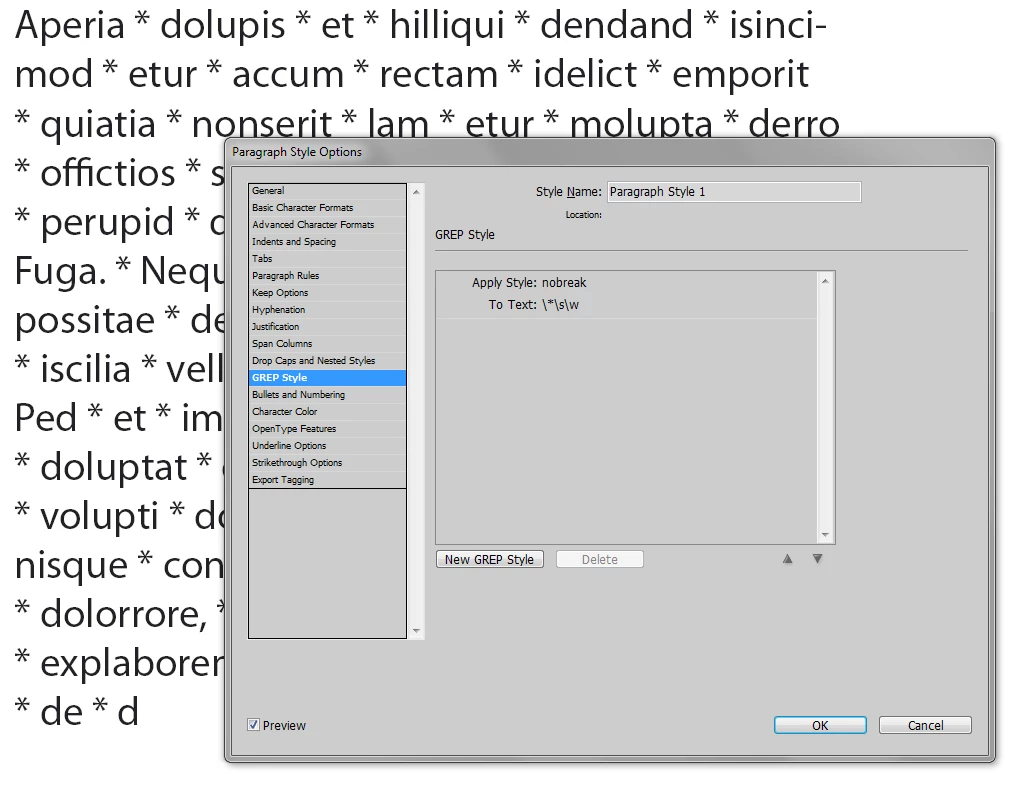
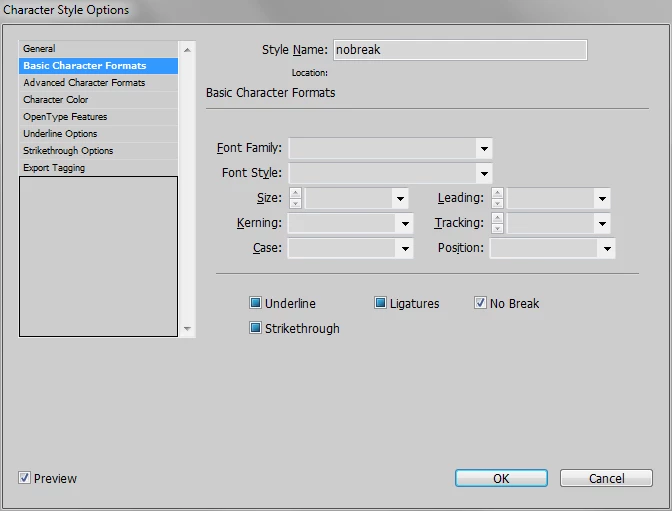
Create Char Style with No Break on (see screenshot).

The edit your Para Style (see screenshot) or, alternatively, you can use Find/Change dialog (Grep tab) for one-time replace.

Sure, in most cases it's better to work through style.

1 reply

winterm
Legend
February 25, 2016

Hm, how it's related to hyphenation? Why not use grep?

\*\s\w

that means:

\*    Literal asterisk

\s    Any white space

\w    Any word character (A..Z, a..z, _, 0..9)

Then apply a "No-Break" to this.

Participant
February 25, 2016

This looks great already! Never really worked with GREP styles. So what do I do now? I use the Find/Change window to get those stars to the next line? Or do I have to create a new GREP style for this in my Paragraph style?

winterm
wintermCorrect answer
Legend
February 25, 2016

Create Char Style with No Break on (see screenshot).

The edit your Para Style (see screenshot) or, alternatively, you can use Find/Change dialog (Grep tab) for one-time replace.

Sure, in most cases it's better to work through style.