Participant
April 2, 2024
Answered

InDesign index in other languages?

  • April 2, 2024
  • 4 replies
  • 914 views

I am writing a book in Gujarati and must set up an index. The index I got is in the English alphabet. I need to convert the alphabet into Gujarati alphabets. Can someone help?

This topic has been closed for replies.
Correct answer Joel Cherney

I suspect it's because it's a feature request that simply isn't getting enough attention. The current development team is using indesign.uservoice.com to rank interest in bugs and potential new features by vote count. If someone were to post a "Please add Gujarati to index sorting options" I'd vote on it, of course, but due to the nature of the voting system, there are lots of requests for improvements in multilingual index sorting, or just Better Sorting For More Languages (for example). 


While you patiently wait for your request for Gujarati index sorting to slowly acquire enough votes to get your request in front of the development team (can you tell that I don't like this method of handling bug reports and feature requests?), you do have some other options. I'd suggest a third-party indexing plugin or script, like IndexMatic3 from IndiScripts.  It certainly seems like it supports Gujarati:
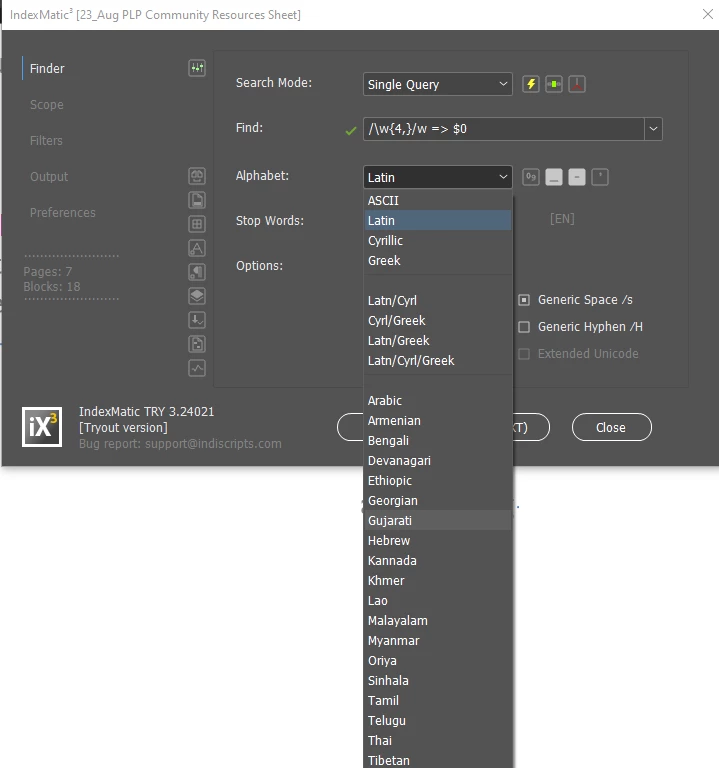
It's not a particularly inexpensive solution, but in the end it might be less time-consuming and therefore less expensive than e.g. making tiny little  almost-zero-width invisible Latin-script characters and hiding them throughout your document and in your index, in order to force correct sorting. (Don't do that. I've done it before, and I'd rather eat glass than do it again.)


4 replies

Community Expert
April 4, 2024

As Joel mentioned, the only way to get additional languages into the Index panel's Sort Options window is to submit a feature request in User Voice. But that's completely pointless: InDesign's index feature hasn't been touched since its introduction many years ago (apart from a cosmetic change about ten years ago), and it doesn't look likely Adobe will spend any time or money on InDesign's index -- they're too obsessed with AI. And they don't realise that producing an index is a nice candidate for AI, but they think that the users want daft pictures.


Anyway, there is a solution. Generate the index without section headings, then run this Grep query:

Find what: (\u).+\r(\1.+\r)+\K(?=(.))
Change to: $3\r

This query looks for blocks of lines that start with the same letter, then inserts the first letter following the block after the block.

It works fine for Latin and Cyrillic scripts, it may need a tweak for Gujarati -- we'll see.

Barb Binder
Community Expert
Community Expert
April 3, 2024

Hi @Pushtidas:


Well, I wondered about that yesterday when I was answering the question, but didn't bring it up because it wasn't what you were asking. I'm not sure I know the answer because I work primarly in English and Spanish (and of course, both use the same alphabet). 


There are a few folks who help out here who are more knowledgeable about working with other alphabets and with indexing who may have a clear answer. Let me see if I can reach out to get this part answered for you.


~Barb

~Barb at Rocky Mountain Training
PushtidasAuthor
Participant
April 3, 2024

Thanks anyway. In Index Sort option there are few langages allowed to sort according to that language, but Gujarati or Hindi option is not available. I am not sure why. I will suggest to Adobe to set Gujarati alphabet. I wonder why Gujarati or Hindi options are not included. 

Joel Cherney
Community Expert
Joel CherneyCommunity ExpertCorrect answer
Community Expert
April 3, 2024

I suspect it's because it's a feature request that simply isn't getting enough attention. The current development team is using indesign.uservoice.com to rank interest in bugs and potential new features by vote count. If someone were to post a "Please add Gujarati to index sorting options" I'd vote on it, of course, but due to the nature of the voting system, there are lots of requests for improvements in multilingual index sorting, or just Better Sorting For More Languages (for example). 


While you patiently wait for your request for Gujarati index sorting to slowly acquire enough votes to get your request in front of the development team (can you tell that I don't like this method of handling bug reports and feature requests?), you do have some other options. I'd suggest a third-party indexing plugin or script, like IndexMatic3 from IndiScripts.  It certainly seems like it supports Gujarati:

It's not a particularly inexpensive solution, but in the end it might be less time-consuming and therefore less expensive than e.g. making tiny little  almost-zero-width invisible Latin-script characters and hiding them throughout your document and in your index, in order to force correct sorting. (Don't do that. I've done it before, and I'd rather eat glass than do it again.)


PushtidasAuthor
Participant
April 3, 2024

Thank you Barb. I have set the Index in Gujarati but the alphabet that I get is in English. Can this alphabet converted into Gujarati Alphabet ? 

Barb Binder
Community Expert
Community Expert
April 3, 2024

Hi @Pushtidas:


An index in InDesign is a alphabetical list of references. Add the index references in Gujarati into your documents and then generate the index. 


~Barb


~Barb at Rocky Mountain Training