


Inspiring
May 28, 2026
Answered

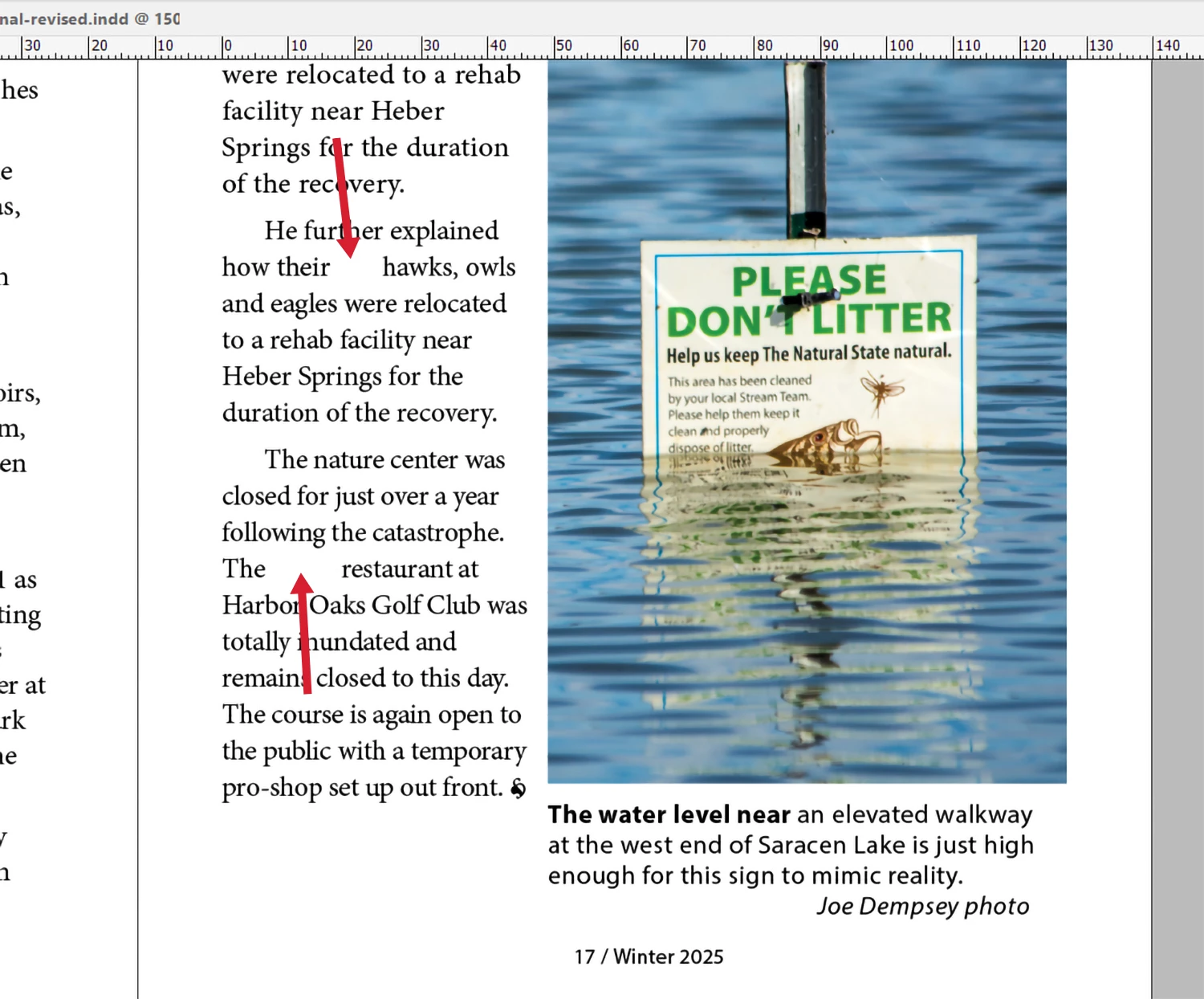
Indesign inserting spaces between words

  • May 28, 2026
  • 4 replies
  • 108 views

Windows 11/64 - INDD 2026 up-to-date - Intel Ultimate 9 3.5 - 96 Gig Ram - Nvdia 5080

I am trying to finish a historical quarterly and InDesign is inserting spaces between words that I cannot remove. I am trying to get this job to the printer and this is holding me up. Screen shot attached. Any help appreciated.

Thanks to those who know more than me. 

Joe
 

    Correct answer Joseph374224441v8g

    Thanks to all your interest and replies. I did try the showing marks and did not see an issue. The section was narrow. I had the image on the left side of the page and decided to switch the image to the right -- and then the type flowed OK. I am still stumped as to exactly what the problem was, but the workaround got it to the press on time.

    Thanks again,

    Joe

    4 replies

    Abhishek Rao
    Community Manager
    Community Manager
    June 2, 2026

    Hi ​@Joseph374224441v8g,


    Just following up on this. Were you able to try the suggestions shared by the experts?

    Could you please let us know whether the issue has been resolved or if you're still seeing the unexpected spacing? If it persists, please share an updated screenshot with Type > Show Hidden Characters enabled so we can investigate further and proceed accordingly.


    Looking forward to your update.

    Thanks,
    Abhishek

    rob day
    Community Expert
    Community Expert
    May 31, 2026

    Hi ​@Joseph374224441v8g , Maybe an errant Right Indent Tab?


    Joseph374224441v8gAuthorCorrect answer
    Inspiring
    June 4, 2026

    Thanks to all your interest and replies. I did try the showing marks and did not see an issue. The section was narrow. I had the image on the left side of the page and decided to switch the image to the right -- and then the type flowed OK. I am still stumped as to exactly what the problem was, but the workaround got it to the press on time.

    Thanks again,

    Joe

    Dave Creamer of IDEAS
    Community Expert
    Community Expert
    June 4, 2026

    Can you upload the problem page/file?

    David Creamer: Community Expert (ACI and ACE 1995-2023)
    Dave Creamer of IDEAS
    Community Expert
    Community Expert
    May 29, 2026

    What is your Justification Composer set to?
    Also, depending on your hyphenation settings, your text column may just be too narrow.

    David Creamer: Community Expert (ACI and ACE 1995-2023)
    TᴀW
    Legend
    May 31, 2026

    I’m not sure if that would explain why the space between their and hawks is so wide but not between the other words on that line, though.

    Another screenshot with Show Hidden Characters would help...

    id-extras.com | InDesign tools & scripts for typesetters, form designers, and translators
    Dave Creamer of IDEAS
    Community Expert
    Community Expert
    May 31, 2026

    You are correct of course. Could be a tab, extra spaces, or any number of things...

    David Creamer: Community Expert (ACI and ACE 1995-2023)
    Mike Witherell
    Community Expert
    Community Expert
    May 28, 2026

    When you Show Hidden Characters (Type menu) do you see anything like extra characters like spacebar spaces or tabs?

    What happens if you open the textframe in Edit > Story Editor mode Cmd/Ctrl+Y ? What do you see?

    Mike Witherell