mel11
Participating Frequently
March 20, 2019
Question

InDesign is resizing my images

  • March 20, 2019
  • 2 replies
  • 772 views

Hi, I have an InDesign document that I am editing for a pull-up banner.

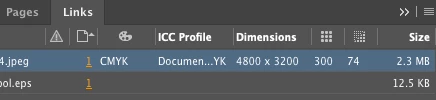
I purchased a license for an adobe stock image - it's a large image 4800px x 3200px, 300ppi.

When I place this image into the InDesign document it places it in at less that half it's size (this is without placing it in an object frame). If I make the image larger the Effective PPI drops to 72?

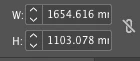
At the moment the size is 1654px  x 1103px - which is smaller than its native size. So I don't understand why the effective PPI is 72?

If I drop the same image into a blank document it's fine. This is very confusing.

Current size
How it appears in the links panel
Any assistance would be greatly appreciated.

Thank you

Melissa

This topic has been closed for replies.

2 replies

rob day
Community Expert
Community Expert
March 20, 2019

an InDesign document that I am editing for a pull-up banner.

When I place this image into the InDesign document it places it in at less that half it's size

By "pull-up banner" to you mean a large printed banner or a banner ad for a web page?

When you place an image InDesign does not consider the image’s pixel dimensions—its scale is based on its print output dimensions. Your 4800x3200 pixel image at the 300ppi would output at 16 x 10.667 inches (406.4x270.9 mm), at 74ppi the output dimensions would be 64.8 x 43.2 inches

mel11
mel11Author
Participating Frequently
March 20, 2019

Thank you Rob.

Its a large printed banner, 850mm x 2000mm.

the image only takes up the top part of the banner - less that half the height.

Can this still print well with an Effective PPI that low? Or do I need to source another image do you think?

Derek Cross
Community Expert
Community Expert
March 20, 2019

My height measurement in my example above should, of course, be 60" – not 60'!

Derek Cross
Community Expert
Community Expert
March 20, 2019

An original image 4800 x 3200px would produce at say 75PPI artwork suitable for a banner around 64 x 42 inches.

Posters that are to be viewed from a distance don't need a high resolution such as an image in a book that's viewed closely.

What is the size of your pull-up banner?

I note the image in your screen shot is in CMYK colour mode, it would be better if you use the original RGB image.

mel11
mel11Author
Participating Frequently
March 20, 2019

Thank you for getting back to me.

The Image size that it is in the document is smaller than the native size. So it’s strange that the Effective PPI is so low. I’ll have the printer check it, it’s just very strange.

Can I leave it as RGB if it’s being printed?

The banner size is 33.4646 x 78.74016. The image takes up less than half the height - it’s at the top.

Thanks again.

Derek Cross
Community Expert
Community Expert
March 20, 2019

Say your banner is sized 60' x 36''

Create a new InDesign document with Print as the intent, insert the size (as indicated above), untick Facing Pages.

Add 1/8" or 3mm for bleed for all edges.

Place your original RGB image in the document and adjust the image to crop to the TPS size plus bleed. Check the Effective PPI

Ask your printer what format s/he wants the artwork to be supplied in.