
mendyt24707823
Participant
February 6, 2019
Question

InDesign: Javascript Error
  • February 6, 2019
  • 3 replies
  • 6219 views

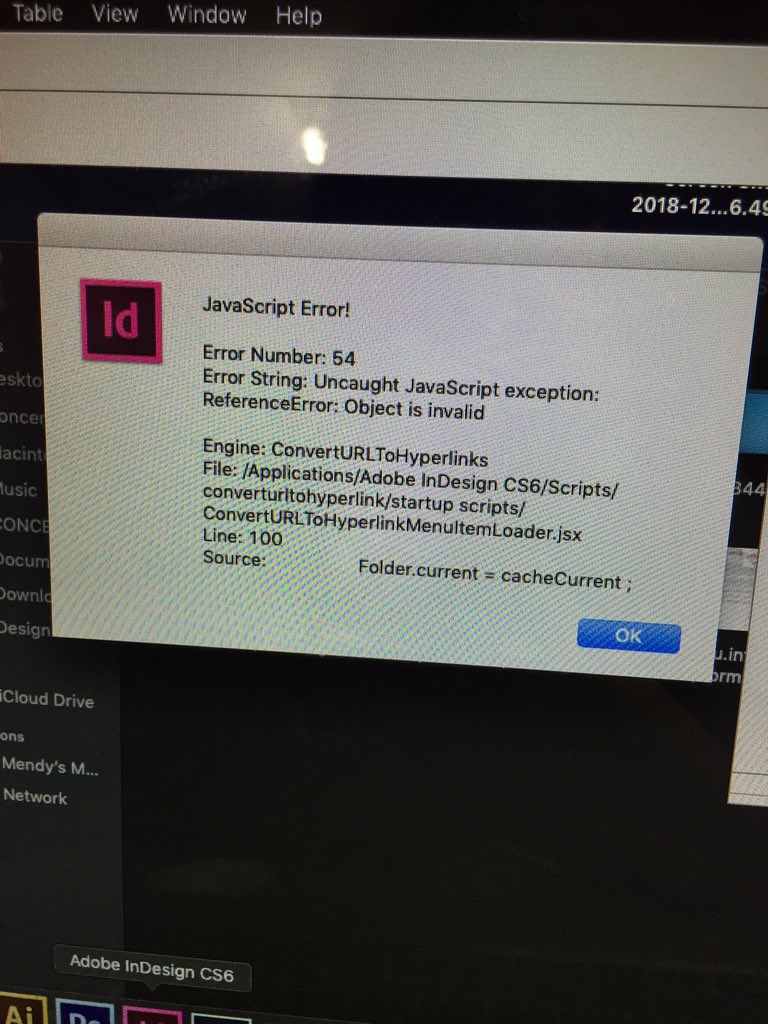
This is the error I've been getting. It still works - I'm unable to open files from the desktop, I have to open it from the program itself. I also am unable to delete items nor paste items. Once I do, it starts freezing and it will stop working for hours.

Currently:

InDesign CS6

Operating system: OS Mojave 10.14 (It made my computer slower but my inDesign still worked fine)

The only recent thing I've done is delete temporary files. I haven't reinstalled nor download Java yet. I wanted to hear some advice first before I touch it cause I don't wanna lose the program.

This topic has been closed for replies.

3 replies

rob day
Community Expert
Community Expert
February 6, 2019

I haven't reinstalled nor download Java yet. I wanted to hear some advice first before I touch it cause I don't wanna lose the program.

I think you'll have to do Java.

If you are worried make sure you have a TimeMachine backup or clone of the OS first. I use Carbon Copy Cloner for making OS clones.

rob day
Community Expert
Community Expert
February 6, 2019

Your JS error message is indicating that you have a startup script installed that is broken.

Open your Startup Scripts folder (Applications/Adobe InDesign CC xxxx/Scripts/startup scripts) and remove the script ConvertURLtoHyperlinkMenuItem.jsx.

The JS scripting error could happen on any OS version. You might want to remove any other startup scripts and 3rd party plugins when you are trying to get CS6 to run on Mojave. CS6 also requires an older version of Java (not to be confused with JavaScript). If you didn't drop back to the older version after the Mojave upgrade, you can download from Apple here: Download Java for OS X 2017-001 

Community Expert
February 11, 2019

https://forums.adobe.com/people/rob+day  wrote

Your JS error message is indicating that you have a startup script installed that is broken.

Open your Startup Scripts folder (Applications/Adobe InDesign CC xxxx/Scripts/startup scripts) and remove the script ConvertURLtoHyperlinkMenuItem.jsx. …

Hi Rob,

the script showing the error is part of a standard function of InDesign CS6. Don't know if it's a good idea to remove it.

That script is a menu item loader and requires another script to work well: ConvertURLToHyperlinkMenuItem.jsxbin. I briefly looked into its code. Don't know if it could help to set the DEBUG flag of line 34 to true…

Regards,
Uwe

rob day
Community Expert
Community Expert
February 11, 2019

Hi Uwe,

Thanks, I did misread the file path in the OP’s JS error message—read it as /Applications/Adobe InDesign CS6/Scripts/startup scripts, but as you are pointing out it is:

/Applications/Adobe InDesign CS6/Scripts/converturltohyperlink/startup scripts/ConvertURLToHyperlinkMenuItemLoader.jsx

The error is happening on Line 100, and it looks to me, as you are suggesting, the ConvertURLToHyperlinkMenuItemLoader.jsx script can’t find, or load, the needed ConvertURLToHyperlinkMenuItem.jsxbin to create the Hyperlink palette‘s flyout menu item, which is this:

So maybe ConvertURLToHyperlinkMenuItem.jsxbin or one of the resource files is missing or corrupted?

For what it's worth I tried removing the entire converturltohyperlink folder and CS6 launched fine on High Sierra—I just lost the flyout menu item. The OP probably needs to reinstall to get the menu to function, and it's hard to know how risky that would be with Mojave.

BobLevine
Community Expert
Community Expert
February 6, 2019

CS6 is unsupported under any operating system later than 10.10. Someone may come by and give you some magic fix that may or may not work but effectively, you are on your own.

You can either rollback to a much earlier operating system, upgrade to CC, or find an alternative pagelayout application. If this is mission critical work, you should consider the upgrade route.

mendyt24707823
Participant
February 6, 2019

Hello,

What's funny is that Photoshop and Illustrator still work in this operating system though. It's just InDesign after I deleted temporary files...

BobLevine
Community Expert
Community Expert
February 6, 2019

InDesign is coded in a completely different manner.