



B.A.S.
Participating Frequently
October 10, 2025
Question

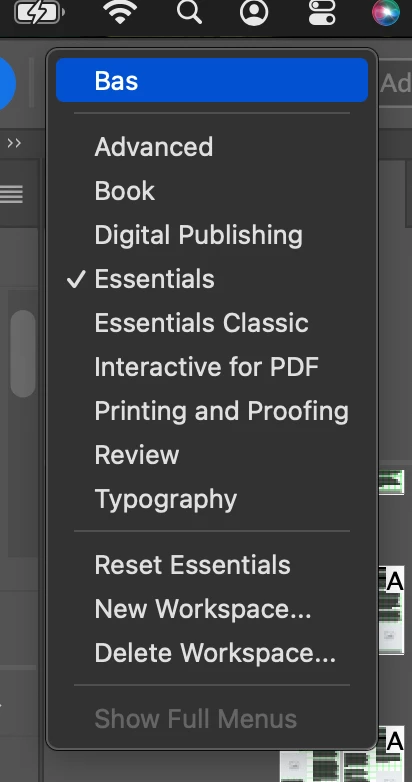
InDesign keeps reverting to ‘Essential’ workspace every time a file is opened

  • October 10, 2025
  • 14 replies
  • 815 views

Hi, why is my workspace when opening a indesing file always going back to 'Essenstial' setting?
This is an issue I have for a year now.
Very annoying.
thnaks BAS


<Titile renamed by MOD>

14 replies

Mike Choo
Inspiring
July 30, 2026

This happens to me a lot as well, not a huge issue but it does feel a little irritating to have to manually revert workspace every time. Would really appreciate a fix or workaround - for example After Effects has an option to retain workspace, so even if a document was saved with a different workspace you can choose to not have it override your current one.

graphics_4075
Inspiring
July 30, 2026

I experience this bug now and then but deal with this one I reported a month back every time I use InDesign: 


The response on my post above says “They've confirmed that this is a known issue and have identified it as another manifestation of an existing bug. The team has also identified the root cause.”


I would not be surprised if this is the existing bug being referenced as there seems to be similar behavior between them. Considering this one has been around for a lot longer, I worry both of these issues may persist. Apparently the team is aware of both and is working on a fix though, so fingers crossed they are fixed soon. 


“A little irritating” becomes “Very irritating” when a bug affects you during every session inside the app….

Cheers
Abhishek Rao
Community Manager
Community Manager
October 24, 2025

Hi @B.A.S.,


Thanks for confirming that, and I completely understand how frustrating it is when the workspace keeps reverting to Essentials. I'm checking this internally with the product team and will share an update here as soon as I have more information.


Appreciate your patience in the meantime.

Abhishek

B.A.S.
B.A.S.Author
Participating Frequently
October 27, 2025

Thank you Abhishek.
Would be great if this issue will be solved.
Regards Bas

Abhishek Rao
Community Manager
Community Manager
October 10, 2025

Hi @B.A.S.,


I understand how frustrating it can be. Please try resetting your workspace once by going to Window > Workspace > Reset [your workspace name]. Then, close and relaunch InDesign to see if it retains the layout. If the issue continues, try resetting the InDesign preferences after creating a backup. Ref: https://adobe.ly/3KKxxyb.
After that, set your preferred workspace again and check if it stays as expected.  Moreover, to isolate the issue from any third-party plug-in, please test the issue in safe mode. Ref: https://adobe.ly/4q9pUli


Let me know how this works for you.

Abhishek

davecourtemanche
Legend
October 10, 2025

That does not fix it. This is an un-addressed bug that goes back many versions, at this point. Mike's solution is the only way I've been able to address it.

Mike Witherell
Community Expert
Community Expert
October 10, 2025

Hi Dave,

Actually, IIRC, I was quoting you!

Mike Witherell
Mike Witherell
Community Expert
Community Expert
October 10, 2025

Hi BAS,

My install on Windows 111 does that, too. Some have suggested making your custom workspace; and then going into the folder where it lives and manually renaming it Essentials. Upon restarting InDesign, it will default back to Essentials, but your custom workspace will be there. Other than that, I haven't discovered a fix for the annoyance, yet.

Mike Witherell
B.A.S.
B.A.S.Author
Participating Frequently
October 10, 2025

Hi Mike

thanks, looks laike a bug or extention conflict.

Bas

Mike Witherell
Community Expert
Community Expert
October 10, 2025

BAS,

Can you cite a specific extension that you suspect is the cause?

Mike Witherell