

Participant
April 1, 2025
Question

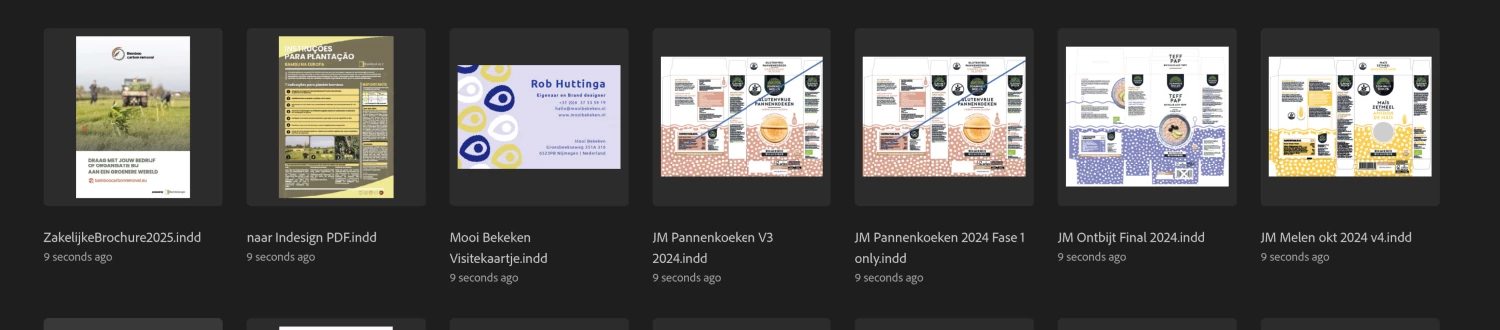
Indesign keeps showing all recent files to be last opened at the same moments

  • April 1, 2025
  • 2 replies
  • 151 views

As shown in the image;

It is very frustrating cause I need my last work to be shown there and not the work of last 6 months randomly, all opened at the same time according to confused InDesign. Someone has a solution?
 

2 replies

Dave Creamer of IDEAS
Community Expert
Community Expert
April 1, 2025

Did you try to reset your preferences and clean out your caches?

https://www.ideastraining.com/TutorialsAndTips/TroubeshootInDesign.html


David Creamer: Community Expert (ACI and ACE 1995-2023)
Abhishek Rao
Community Manager
Community Manager
April 1, 2025

Hi @Mrmelomaan,


Could you share which version of InDesign and operating system you’re using? Also, do you notice any pattern with these files? Are they all stored locally, on an external drive, a remote location, or in the cloud?

It would also help to know if this issue happens only in InDesign or if other Adobe Creative Cloud apps show the same behavior.

Additionally, try testing this in a new admin user account to see if the issue persists. You can find steps to create one here: Mac | Windows.

Let me know what you find!


^

Abhishek

Abhishek Rao
Community Manager
Community Manager
April 3, 2025

Hi @Mrmelomaan,


Just checking in to see if you had a chance to try Dave’s suggestion of resetting preferences and clearing caches. Did that help? If not, could you share more details on whether this issue is still happening and if you noticed any changes?

Looking forward to your update.  


Abhishek