
Inspiring
Jul 13, 2017 10:44 AM UTC
Answered

InDesign layers won't expand/extend/unfold

I am on Win7x64 Ultimate and InDesign CC v2017.1; 12.1.0.56 x64. This is the problem:
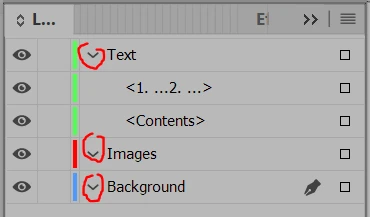
There are objects (text, pics, etc.) on all 3 layers. For some reason though, no matter what I mark, what I select, how I select it, or whatever I do, I simply cannot get the layers to expand/unfold and show their contents properly. If I click individually through the objects on my pages, then the respective layer does extend and show all its contents. However, when I clear my selection and just try to hit (unfold) the layer arrows (so as to see what each layer contains) I can at most expand one layer (as the image above shows). The other layers' contents won't  show. The arrows do flip from pointing sideways to pointing down, but they simply do not reveal the layer's contents (as seen on the image above).

Tried toggling on and off the layer panel options 'Suppress Text Wrap When Layer is Hidden' / 'Ungroup/Paste Remembers Layers' / 'Small panel rows' but still nothing.

What could be could be causing this and how to fix it? All I need is that when I toggle the arrows they would expand and show the layer's contents.

This topic is closed to new replies. Start a new post to keep the conversation going.
jonj99307322Correct answer
Inspiring
Jul 13, 2017 6:22 PM UTC

Can you post the file somewhere such as Dropbox?


Well that was a shock ... hadn't used InD for a while but apparently this would never have been on my mind. Turns out you could actually only be viewing 1 spread at a time. That is the spread where you've clicked on i.e. where you have your focus on. No matter how far out you zoom out, hoping that seeing all pages would reveal all layers and all their content. And no matter how many pages your spread contains ... you can only actively be viewing/interacting with 1 spread at a time, as far as I see it. That being said, your layers would only be showing you what the currently viewed spread contains. If you don't have objects from a certain layer on the current spread you're viewing, then that layer simply won't show anything, which is true for that one spread being viewed, but not necessarily true for the whole doc.

If that's how InD has worked always then I beg your pardon. I do see the logic behind this behaviour but I'd find it rather useful to have a toggle for this so that we could decide if we want to have the layers display all their contents, regardless of which spread we're on.

15 replies

BobLevine
Community Expert
Community Expert
Jul 13, 2017 10:56 AM UTC
Inspiring
Jul 13, 2017 11:52 AM UTC

Thanks for the reply Followed the instructions exactly as explained. Tried both methods together and individually, then together again (one right after the other) in mixed order. The problem is not resolved.

More suggestions?

Translate
Derek Cross
Community Expert
Community Expert
Jul 13, 2017 12:10 PM UTC

Try this way: Close InDesign. Then hold down Ctrl + Alt + Shift (Windows) or Cmd + Ctrl + Opt + Shift (Mac), and relaunch InDesign. Respond in the affirmative to the dialog asking if you really want to replace the preferences.

Let us know if it works (or not!).

Translate