
Participant
September 30, 2018
Answered

Indesign leading in headlines vs baseline grid

  • September 30, 2018
  • 4 replies
  • 2857 views

Hello Indesigners,

maybe this has been asked before but I'm still struggling. How do I get the space after a headline consistent when using different leadings? This is for a client of mine and I cannot change font size and must preferably not change the leading either, that's all been set. I would NEVER have set it up like that, but I have to do with what I got. Look at the screenshot of the problem (I reproduced it from memory, in the actual document the problem was a lot more visible!). I'm at a loss on how to get the spacing even. Changing the leading in the headlines with just one or two points seems the only option. Does anyone have a fitting solution for this?
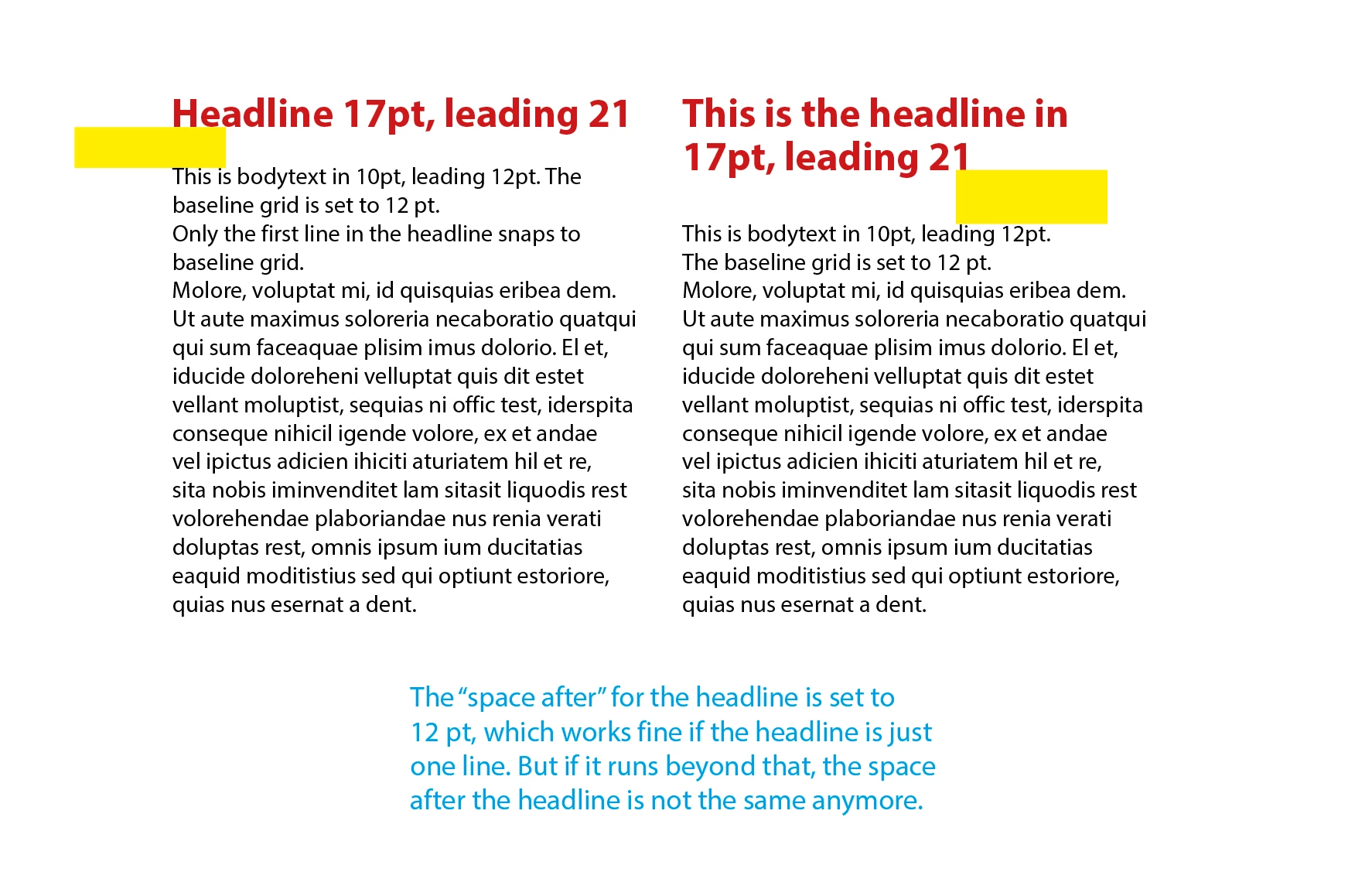
This topic has been closed for replies.
Correct answer Anna Lander

Do I understand well that you have the main text aligned to the Baseline Grid All Lines and the headlines alngned just First Line? In this case you could create 2 styles, for one-line heading and for 2-line one, with slightly different leading and Space After, to decrease the difference.

4 replies

ashleew44226948
Inspiring
October 1, 2018

Set your baseline to 3pt instead of 12. Using a smaller multiple for your baseline gives your text more wiggle room as far as where it "lands" between paragraphs, and in this case should allow your spacing to remain consistent regardless of how many lines the heading has.

The other good thing about the 3pt leading is that it works with BOTH 12 and 21pt leading; if the rest of the doc is set in leadings that are multiples of 3, you should be smooth sailing from here on out.

vinny38
Legend
October 2, 2018

Hi...

Technically ashleew44226948 you are absolutely right.

But the reason why I didn't suggest this approach is that dividing the baseline grid by 3 or 4 leads to unaligned paragraphs.

Using a multi-columns text frame make this non-alignment very obvious (see figure below). At this point, I wonder what is the point of using a baseline grid. I don't see any!

Even dividing the BL grid by 2 can lead to a non-alignment. It can be acceptable or not... That's the editor choice.

If you want to keep everything perfectly aligned with consistent spaces, you must set your BL grid to the smallest text leading (12pts here) and use only multiples for leading and spaces before/after.*

Just like Rob suggested.

Now, again, you might think that a 24pts leading is way too much for your header and inelegant.

You could then increase size font a little. Or reduce it and use a 12pts leading.

*To be very precise: space after heading between 1 and 12 pts will result in a 1 line gap. Space after between 13 and 24 will result in a 2 lines gap.

Figure:

rob day
Community Expert
Community Expert
October 1, 2018

To get a baseline grid alignment to work, all of the leading and space before/after have to be multiples of the leading. See this thread:

Re: Adding spacing after a paragraph?

So the heading would have to be 17/12 or 17/24 for the space after to be the same

Anna Lander
Anna LanderCorrect answer
Inspiring
September 30, 2018

Do I understand well that you have the main text aligned to the Baseline Grid All Lines and the headlines alngned just First Line? In this case you could create 2 styles, for one-line heading and for 2-line one, with slightly different leading and Space After, to decrease the difference.

Participant
September 30, 2018

Hi Anna, Derek,

Yes Anna, that's correct. I think Anna's answer might be worth the try, make a second style for the headline when it runs over two lines. Or three. *sigh* I might just beg with the designer if I can tweak it a little, otherwise the strange gaps will remain... Thanks all!

vinny38
Legend
October 1, 2018

Hi

I'm afraid that would not work...

Leading is supposed to be consistent and space after won't affect the gap since body text is aligned on the BL grid.

Imho you should not set the alignment on first line only, but on the whole header.

That way, no more spacing issues.

Problem is: with a 12pt grid, the header leading will look like a 24pts one. Which is probably more than expected.

Alternatively, you can set your baseline with a 6pts increment. Then you can set header leading to 18pts. Maybe not exactly what you want again.

But at some point, you'll have to make a choice.

Baseline grid is great, but comes with constraints...

Derek Cross
Community Expert
Community Expert
September 30, 2018

Check to see if you have a 21pt carriage return after the second line of the heading.