
Lorenzo.secchi
Participant
March 10, 2026
Question

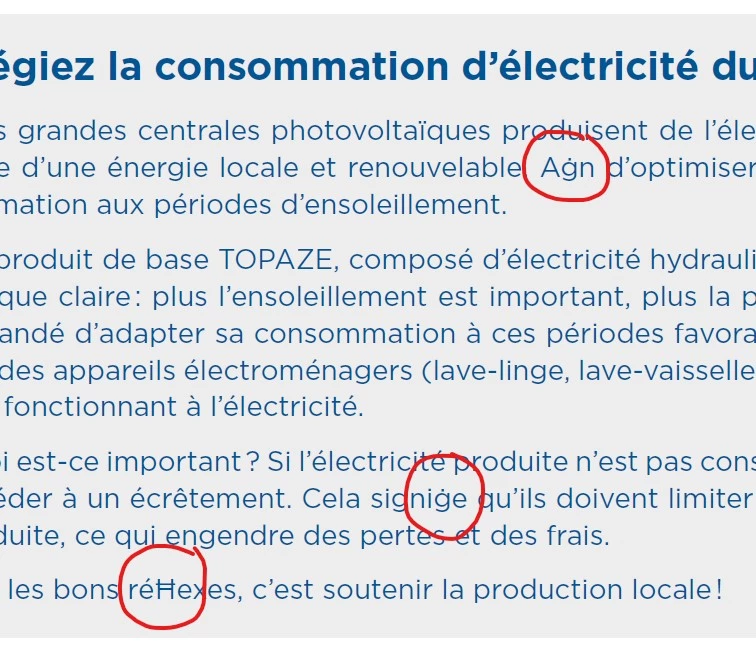
InDesign ligatures replaced by special caracters
  • March 10, 2026
  • 4 replies
  • 74 views

Recently, I noticed that InDesign sometimes replaces certain ligatures (fl, fi) with other special characters.

The problem is resolved by closing and reopening InDesign, but it can still cause serious errors if these incorrect characters go unnoticed.

    4 replies

    Lorenzo.secchi
    Participant
    March 12, 2026

    Thanks a lot everybody, I will try the proposed solutions and get back to you with the results !

    Abhishek Rao
    Community Manager
    Community Manager
    March 16, 2026

    Hi ​@Lorenzo.secchi,


    Just following up to check if the suggestions shared by the experts helped resolve the issue. Were you able to test the recommendations regarding the font activation or trying the Document Fonts folder?

    If the problem still persists, please let us know so we can continue investigating this further with you.


    Looking forward to your update.

    Abhishek

    Peter Spier
    Community Expert
    Community Expert
    March 12, 2026

    I stopped using Extensis products 20 years ago, so can’t comment on how reliable they are now, but perhaps you can get this to work by creating a Document Fonts (case sensitive, I believe) folder in the same folder as the .indd file and put a copy of your font in there.  InDesign is SUPPOSED to use fonts from there before loading any other.

    Community Expert
    March 10, 2026

    Usually a font clash, a version of that font is not supporting the glyphs for the ligatures. 

    Peter Spier
    Community Expert
    Community Expert
    March 10, 2026

    What version of InDesign? OS? What is the font? How is it installed? Do you use a font manager?

    Lorenzo.secchi
    Participant
    March 12, 2026

    It’s Windows 25H2 running InDesign 20.5.2.

    We use Extensis Connect Fonts.

    Community Expert
    March 12, 2026

    Yeh it’s trying to use a system font, or a font that is clashing in extenis. I use connect fonts too and have the same issue on Mac - except on mac it’s impossible to get rid of system fonts (well it’s not easy). I’ve come across it before, and need to get the correct font to activate.