Answered
InDesign line spacing
Hello,
I need help with line spacing.
I need to follow strict guidelines of 14pt font size and 1.5 line spacing. Word has this type of spacing, but InDesign has it in pt. How do I make it 1.5?
Erika

Hello,
I need help with line spacing.
I need to follow strict guidelines of 14pt font size and 1.5 line spacing. Word has this type of spacing, but InDesign has it in pt. How do I make it 1.5?
Erika
Hi Erika,
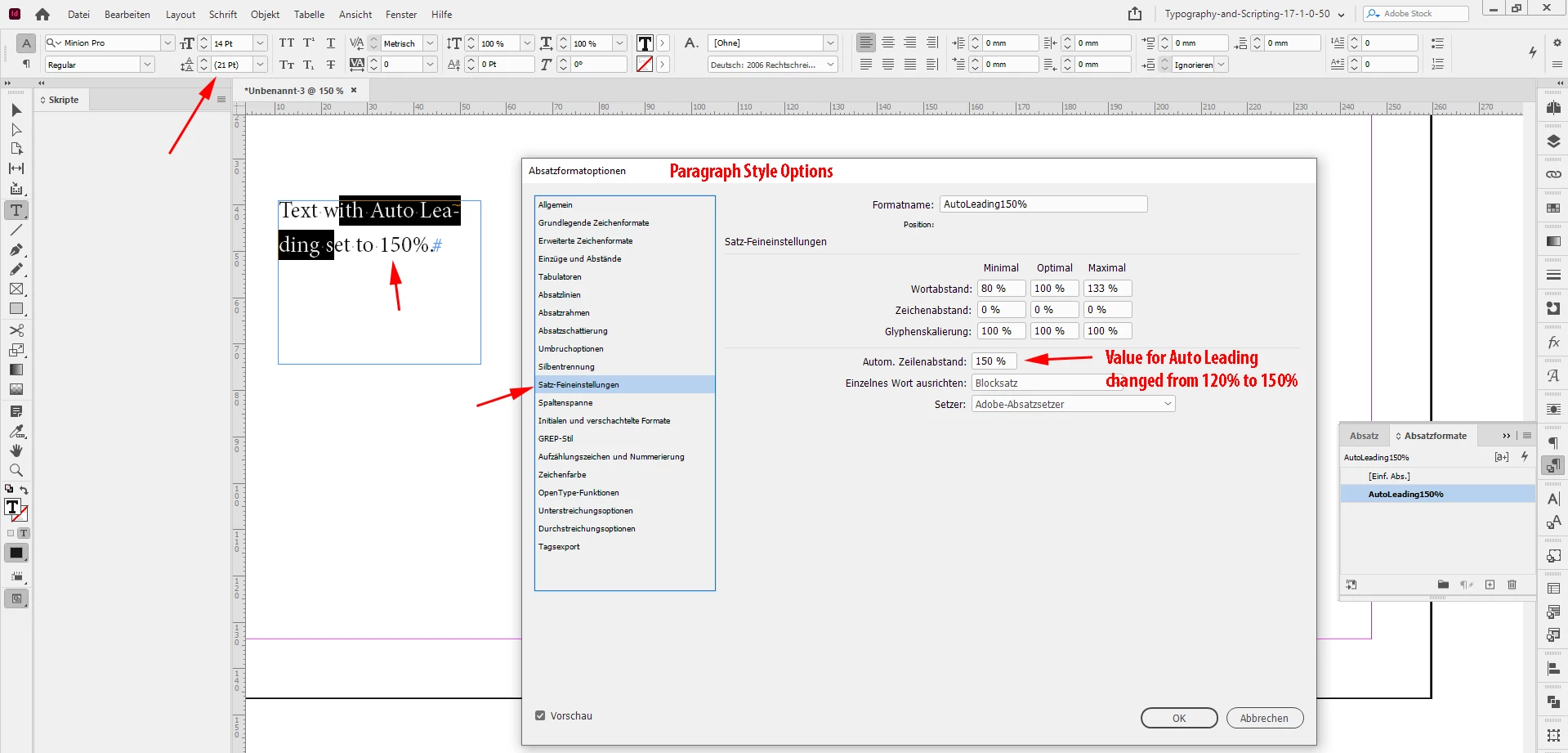
14 * 1.5 is 21. So your leading value must be 21 pt for your 14 pt text.
If you want to automate this define autoleading as 150% in your applied paragraph style.
From my German InDesign where the Paragraph Style Options are open and the applied font size of 14 Pt corrensponds with an Auto Leading value of 21 Pt, because I changed Auto Leading from 120% to 150%:
Regards,
Uwe Laubender
( ACP )
Already have an account? Login
Enter your E-mail address. We'll send you an e-mail with instructions to reset your password.
 AdChoices