
inDesign Link Fail
I was working on this handout and they have just put up a new building. After the first proof they asked me to Photoshop out some of the building lumber and plastic still visible in the photo. I did that. Updated my AI file with the type and new photo. Sent the proof. They liked it so I opened inDesign, told it to refresh the updated links and output the pdf. What I didn't notice was that the file never updated in inDesign. In fact I can't make it happen. I even clicked the edit icon to make sure that I hadn't saved a copy of the old version somewhere, but no what it is linking to just plain doesn't match what it is showing! My mind is blown on this. I can't figure out how this could possibly be pulling a file that was overwritten and therefore no longer exists instead of what I want. Here is a screenshot:
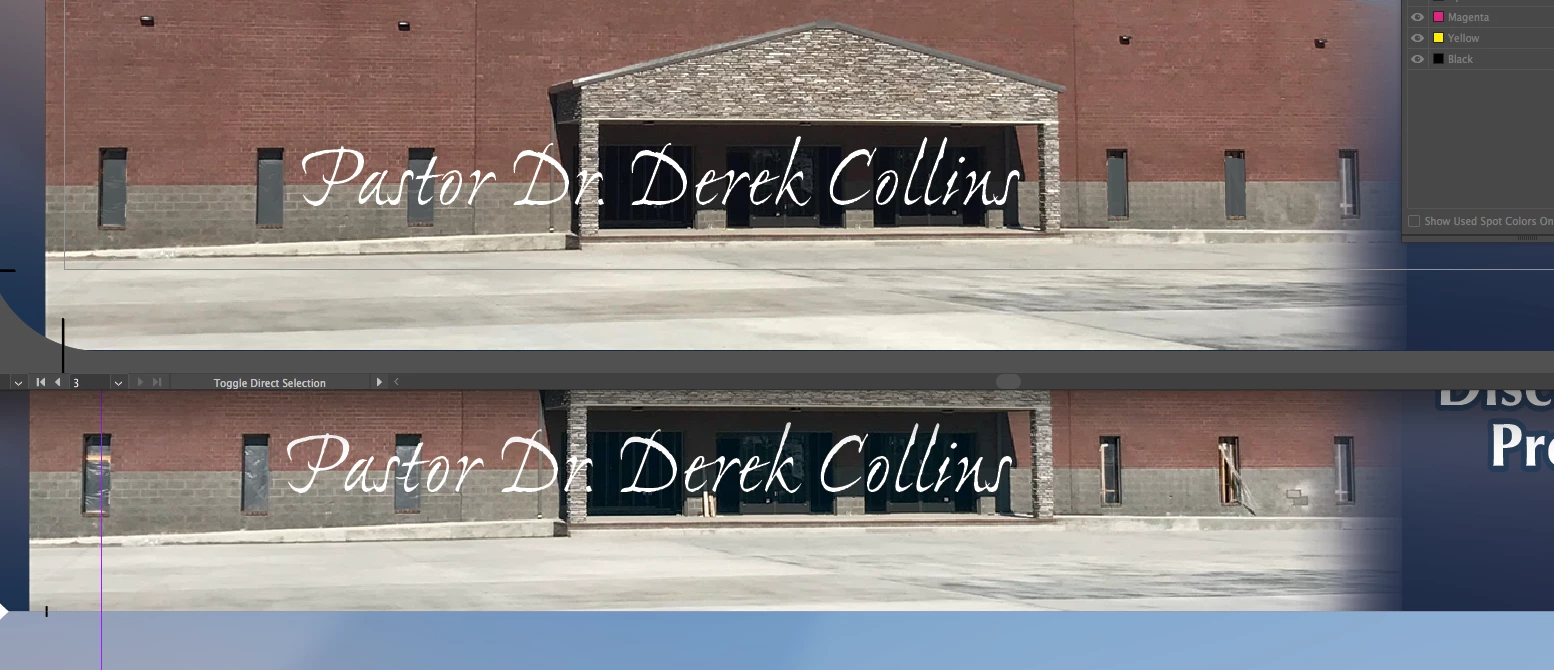
Notice the wood in the windows and the light spot on the gray brick on the right.
I was doing a different job earlier today and when I relinked a file it said that it had the label for the King bed mattress as a current link, but my layout still obviously had the Twin label showing in the body of the layout. I didn't save the file and restarted the computer and that layout appears to be working but my church card file is still messed up.
Any ideas? Is this a known bug? Running on OS X Yosemite 10.10.5
 AdChoices