

InDesign loses hyperlinks from InCopy (randomly)
____________________________________________________________________
1. InDesign Loses Hyperlinks from Placed InCopy Text
Hyperlinks created in InCopy are randomly dropping from InDesign documents. I can find no repeatable pattern or reason.
Documents that had placed InCopy text with Hyperlinks drop the link altogether from the Hyperlinks panel in InDesign.
Video of the process:
Problem and Workaround
I found this workaround, and it was fine last month, but the InCopy Hyperlinks are now dropping again!
- If I create a New document and place the InCopy text with a hyperlink, everything works fine.
- If I OPEN a previously created InDesign document with InCopy text, the hyperlinks drop intermittently.
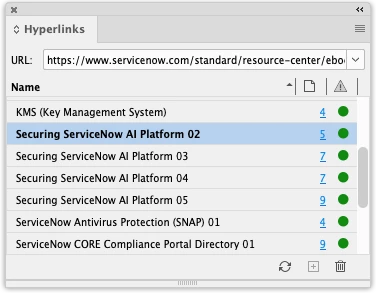
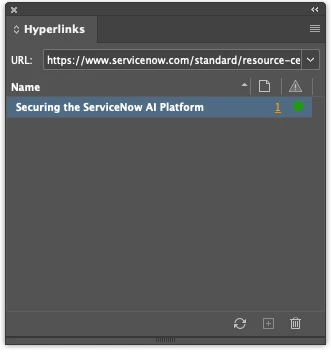
- My InDesign Hyperlinks panel is sorting alphabetically, so the Securing the ServiceNow AI Platform link should appear in the Hyperlinks panel after the InCopy text is updated.
- The hyperlink does not appear.
To make it work: - Copy the InCopy text frame from the previously created InDesign document.
- Paste the InCopy text frame into a New document.
- Confirm the Hyperlink appears in the panel in the new document.
- Copy that InCopy text frame from the New Document.
- Paste the InCopy text frame into the previously created document.
- The Hyperlink magically appears in the previously created document.
I’ve attached a video of the workaround and screenshots showing how I add the Hyperlink in InCopy, save, and update the modified link in InDesign.
— I am working on about 21 white papers that get updated every 2–3 months, and this keeps happening. 🤬
____________________________________________________________________
2. InCopy Accessibility BROKEN
Also, when I turn off Shared Hyperlink Destination (which was another whole can of worms a few months ago) and add the Accessibility text, that accessibility text gets completely REMOVED and doesn’t carry through to the PDF!
Steps
- Add a Hyperlink in InCopy.
- Un-check Shared Hyperlink Destination.
- Add Accessibility text (for the visually impaired).
- Click OK and Save.
- Place that text in InDesign.
- Open the InCopy text (in InCopy).
- Double-click the Hyperlink.
- BOTH settings are GONE.
- Shared Hyperlink Destination is BACK ON, and the Accessibility field is EMPTY!
This InDesign issue with placed text from InCopy keeps coming up. It popped up a little over a month ago. I found a workaround, and now the hyperlinks are dropping again. PLEASE HELP!
This issue keeps rearing its ugly head. Please fix this, ADOBE! It popped up a little over a month ago and keeps coming back randomly.
____________________________________________________________________
InDesign and OS Version
I am on InDesign 21.3, running macOS Tahoe 26.5.
____________________________________________________________________
Screenshots
- Hyperlinks panel on a previously created InDesign document with InCopy text (no Securing the ServiceNow AI Platform [with no number]):
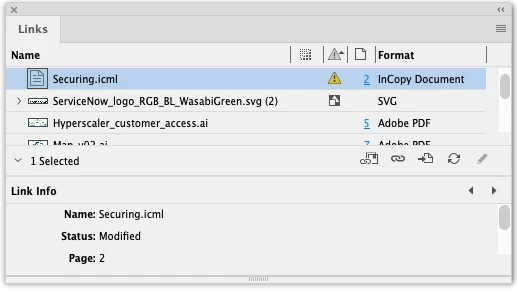
- InCopy link modified in InDesign:
- Confirmed link is there in InCopy and saved:
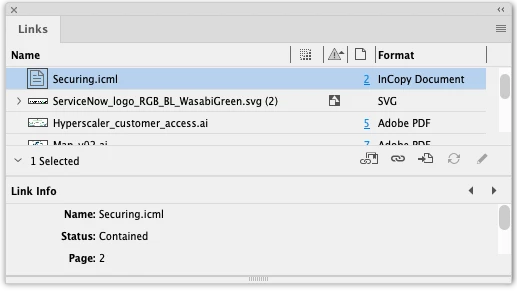
- InCopy link updated in InDesign (after confirming the link is correct in InCopy):
- Still no Securing the ServiceNow AI Platform (with no number) hyperlink:
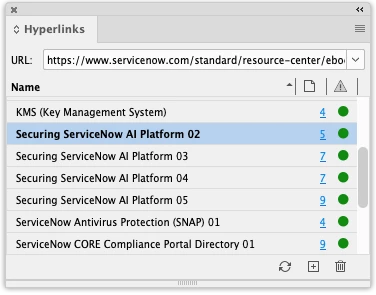
- Created a new doc, copied the InCopy text from a previously created InDesign doc, and pasted that text frame from the new doc (confirming the Hyperlink is there):
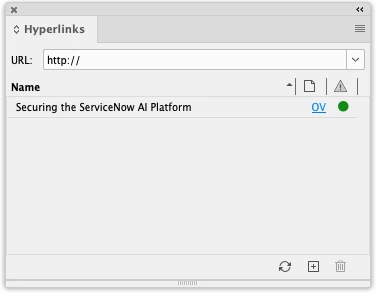
- Pasted the InCopy text frame from the new InDesign to the previously created InDesign white paper:

- Hyperlink is there!


 AdChoices