


Community Manager
October 14, 2024
Question

InDesign MAX release: Contextual Task Bar – Your Workflow Booster!

  • October 14, 2024
  • 8 replies
  • 1961 views


Hello Everyone,

We’re excited to unveil the Contextual Task Bar, a powerful new feature designed to enhance your workflow! This floating bar adapts to your needs, providing the most relevant next actions based on your selected frame or tool.

By default, the Contextual Task Bar is pinned to ensure quick access to important actions, but feel free to personalize your workspace by moving it around, unpin it, or hiding it whenever you like.


Contextual Task Bar in the blank workspace

  1. Create a new document in InDesign.
  2.  You can choose any of the options available in the Contextual Task Bar, as illustrated in the below image:-
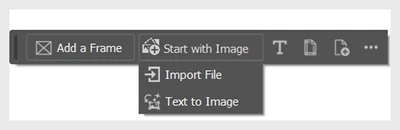
    3. Select the ellipsis icon to Show Properties PanelStart with a TemplateHide Context Bar, or Unpin Context Bar.

Text options in the Contextual Task Bar

  1. Open any document in InDesign and choose the Type tool from the Contextual Task Bar.
  2.  Click and drag anywhere in the workspace to create a text frame and begin typing.
  3. Customize the Font Name , Font Style , Font Size , Fill  icon, and Align  icon.
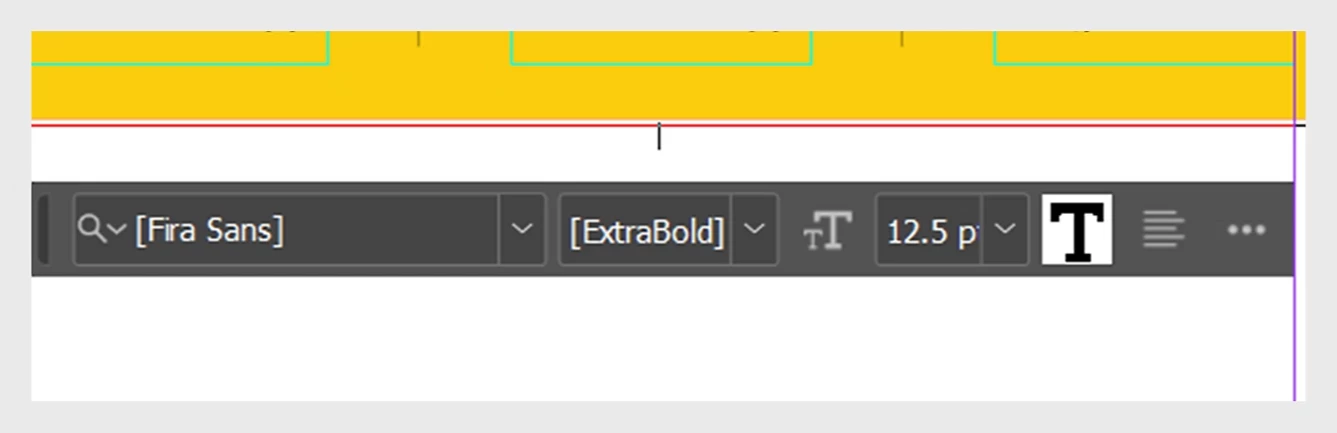
    4. Select the ellipsis icon to Show Properties Panel, Text Frame Options, Hide Context Bar, or Unpin Context Bar
 

Frame options in the Contextual Task Bar

  1. Open any document in InDesign, and select Add a frame from the Contextual Task Bar.
  2. Click and drag anywhere in the workspace to create an image frame.
  3. Select Text to Image to generate an image with a simple text prompt or Import Image.
    4. Select the ellipsis icon to Show Text to Image Panel, Hide Context Bar, or Unpin Context Bar.


For more details, please click here.  

If this was helpful, please click the Upvote icon in the top left corner of this post. Your feedback helps us improve the experience. Thank you!


Have questions? Click 'Reply' below to ask.

Click 'Follow' below to bookmark this post for easy reference.

8 replies

Colin Flashman
Community Expert
Community Expert
October 31, 2024

Is there a keyboard shortcut that can turn the contextual taskbar on/off; or can it be invoked using javascript - and if so, what is the syntax for it?

If the answer wasn't in my post, perhaps it might be on my blog at colecandoo!
AlanGilbertson
Community Expert
Community Expert
October 26, 2024

The saving grace of this feature in InDesign, unlike other apps, is that whenever you move it, "Pin" is turned on automatically so that it stays there. In general, the recent fixation on user-obsequious (but not actually useful) UI/UX, targetting untrained amateurs, annoys professionals and is of questionable value for beginners because it doesn't teach best practices.

Community Expert
October 26, 2024

Immediately disabled it - what is it with Adobe just thinks that people love pop-ups appearing all over the work space, from new features, to the History panel just appears when you press undo. 


I can't wrap my head around how these are useful features. 

Contextually, I already know what my next actions are going to be and how I'm going to get there, and have done for 25 years. 


I really see no need for this Contextual Bar just appearing on the screen in the middle of doing actual work. 


Just my 2 cents.

@mj
Community Expert
Community Expert
October 31, 2024

Valuable 2 cents imho

Community Expert
October 26, 2024

As with the one in Photoshop, it just gets in the way and presents you with things that I access in other ways already so it provides little value to me. 

@mj
Community Expert
Community Expert
October 18, 2024

Have not tried it yet, but will give it a whirl.

Tx

mj

iMSD

Community Expert
October 25, 2024

And you wonder how we worked without this for so many years!

headTrix, Inc. | Adobe Certified Training & Consulting
Participating Frequently
October 17, 2024

Would love to see this functionality folded into the Control panel. It's always been one of my favourites because of its chameleon nature. So a few extra tool-specific operations would be welcome ... but only where they already live.

Vivek12Community ManagerAuthor
Community Manager
October 18, 2024

Hi, Thank you for your feedback. We appreciate your input, and it will help us enhance our product. We'll pass this along to our product team for consideration and further action based on feasibility.

^VS

Community Expert
October 17, 2024

I like the task bar but sometimes he just gets in my way.

Frans v.d. Geest
Community Expert
Community Expert
October 15, 2024

Such a terrible terrible experience when you use a Text frame: this contextual bar causes delays in working with text, even seconds long delays. I've turned it off as all options are accessible already in so many ways (right click, menu bar, panels, Control panel, short cuts etc.).

Bevi Chagnon - PubCom.com
Legend
October 16, 2024

Agree with Frans.

quote

I've turned it off as all options are accessible already in so many ways (right click, menu bar, panels, Control panel, short cuts etc.).

By @Frans v.d. Geest


Plus, I can't customize what's in the Contextural Bar. It's populated with outdated methods of formatting content...the methods we used 35 years ago when we started this desktop publishing revolution.


Today's designers must be able to format text almost exclusively with Styles, not the manual overrides in the Contextural Bar which work fine only for the nearly-dead printing industry.


They must be able to quickly design for all kinds of media. Styles are required for:

  • Publishing to digital formats like EPUBs.
  • Making accessible PDFs, which are being required worldwide by new revised laws.
  • Providing HTML content from the INDD layout.
  • Exporting XML and other database-driven forms of automated publishing.


Is there a chance to customize the features in the Contextural Bar so that it's useful to each designer?


I've turned all of them off because I don't see any benefit in what's in them, whether it's for frames, text, or graphics.


|    Bevi Chagnon   |  Designer, Trainer, & Technologist for Accessible Documents ||    PubCom |    Classes & Books for Accessible InDesign, PDFs & MS Office |
Steve Werner
Community Expert
Community Expert
October 16, 2024

It would be good if there could be an InDesign preference to be able turn OFF the Contextual Bar (which when set with no documents open would always take effect with every new document).


If you feel strongly about this make a feature request in the InDesign User Voice:
https://indesign.uservoice.com/