Participant
March 19, 2019
Question

InDesign(ME) Composer can not show CJK Composer

  • March 19, 2019
  • 2 replies
  • 670 views

Dears,

When I do desktop publishing with CJK languages on InDesign ME,  I can not find CJK Composer, as Image 1. It is very important to Asian languages.

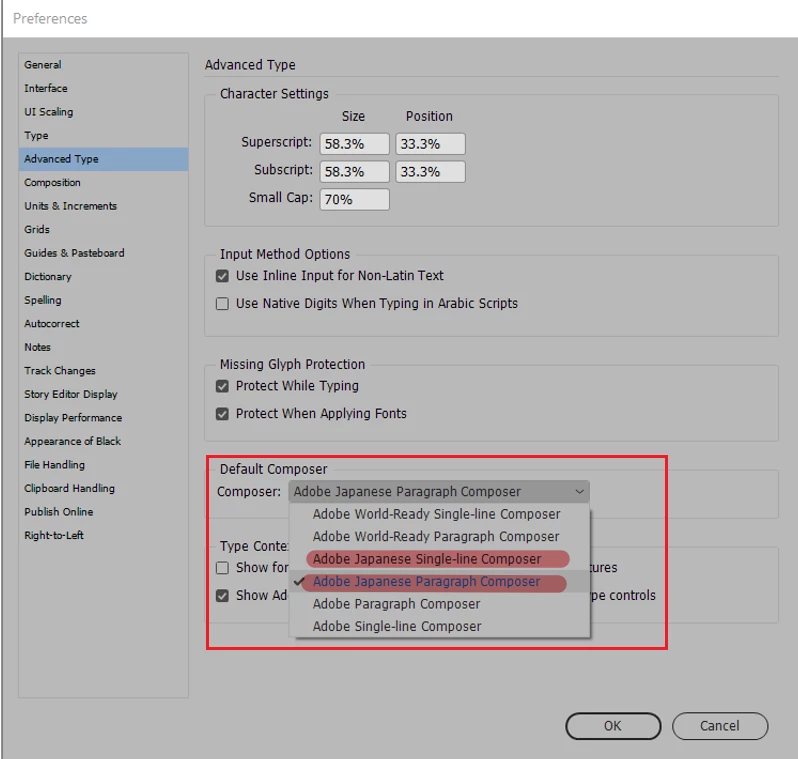
But In the Preferences -> Advance Type -> Default Composer, As Image 2, we can find Japanese Composer.

I really need both six alternatives to do global languages.

Could some friend help it, many thanks

Image 1
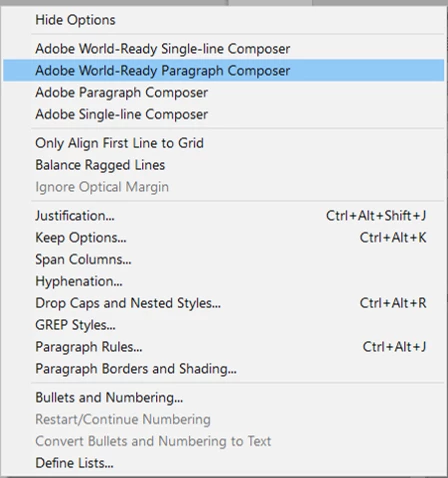
Image 2
Kind regard,

Lisa Li

Message was edited by: Lisa

    This topic has been closed for replies.

    2 replies

    Community Expert
    March 20, 2019

    Hi Lisa,

    don't know if the Japanese Composers should be visible in a MENA version of InDesign.

    You could apply two different Japanese Paragraph composers to selected text with two different ExtendScript (JavaScript) scripts:

    // When text is selected:

    // Single Line Japanese Paragraph Composer

    app.selection[0].composer = "$ID/HL Single J";

    // When text is selected:

    // Japanese Paragraph Composer

    app.selection[0].composer = "$ID/HL Composer J";

    After the script's action you could build a new paragraph style out of the selected text.

    From my German InDesign CC 2019:

    Regards,
    Uwe

    kglad
    Community Expert
    Community Expert
    March 19, 2019