Participant
November 23, 2018
Answered

Indesign ME install problem

  • November 23, 2018
  • 2 replies
  • 7579 views

Hello guys,

I have InDesign CC 2019 (Italian version) installed on my computer.
I tried to install the InDesign Arabic ME version, and I used the suggestion I found here:

Find and install Hebrew or Arabic editions of InDesign CC or Illustrator CC

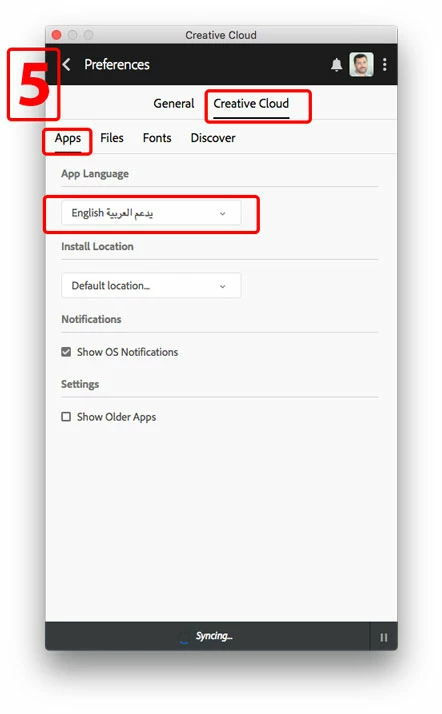
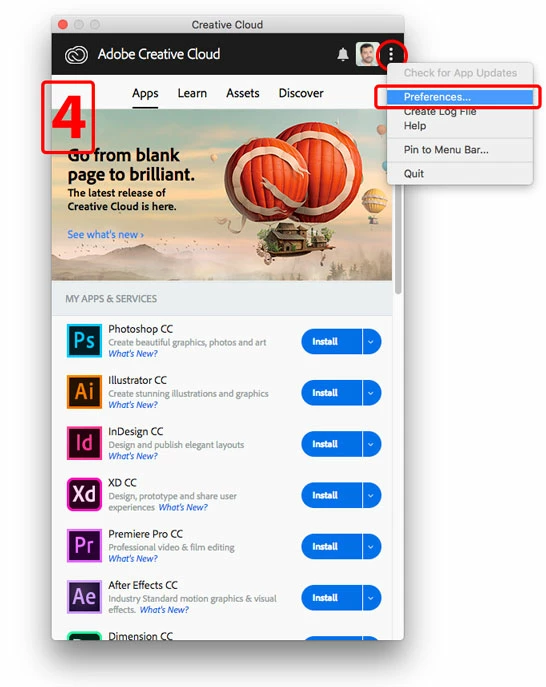
I chose from Adobe CC: Preferences/English Arabic and I started the new Install.

I did it, but in the end, the version is always the same, there are no English menu, no Arabic features, and the paragraph palette is always the same. I can't manage the Arabic language at all. The only present feature is "Paragraph World ready", a feature I had in the previous version too.

It's quite annoying to pay for a feature I can't use.

Thank you for a suggestion,
Tom
    This topic has been closed for replies.
    Correct answer Zaid Al Hilali

    Hello Tom,

    Changing the language alone is not enough to add Arabic specific features in your copy of InDesign. You need to consider either options below.

    Option 1: Uninstall your InDesign, then change Language from Preferences to make it "English يدعم العربية"

    Now, you can reinstall InDesign. This method will give you only one InDesign that is English with full Right-to-Left support for Middle Eastern languages.

    Option2: This more preferred option by many users including myself.

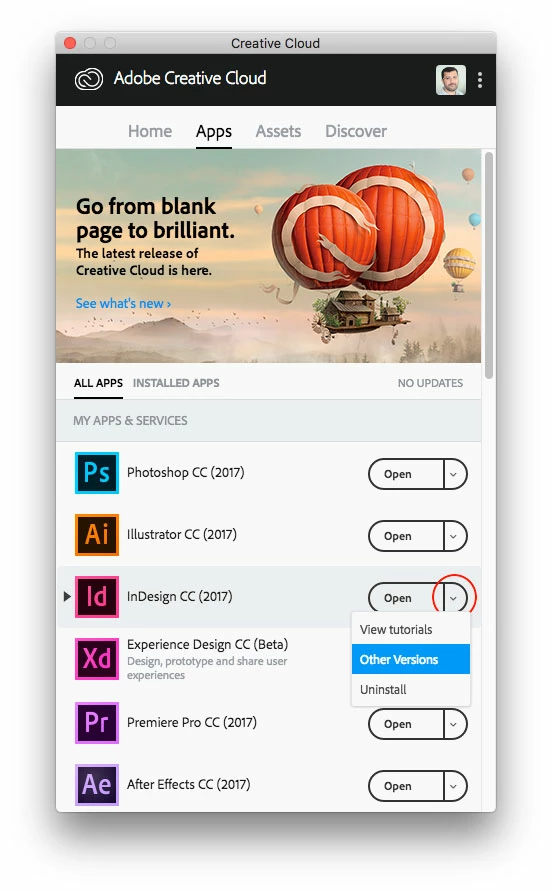
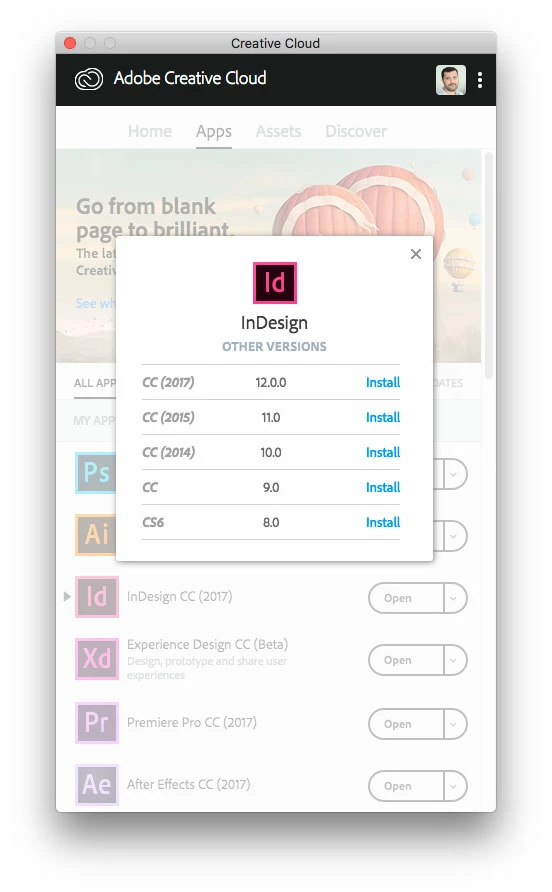
    You don't need to remove existing InDesign copy, just add another copy that supports Arabic but it has to be different version. Here are the steps illustrated…

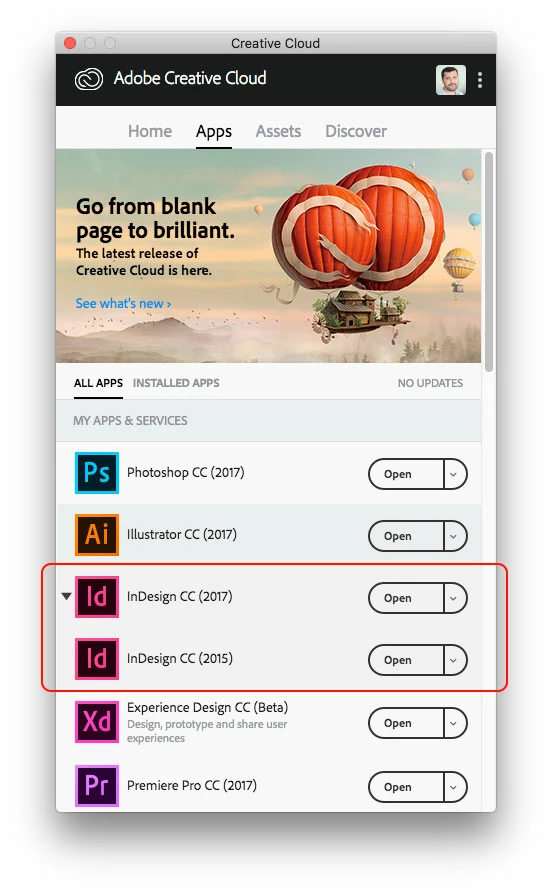
    At the end, you will have one copy of InDesign CC2019 that supports Italian, and an older version that supports Arabic on the same machine.

    2 replies

    Known Participant
    January 11, 2021

    Hello Zaid,

    I'm using InDesign CC 2020 and need to do a couple of Arabic pieces. Searched and found this thread. If I use option 1 (uninstall and re-install English/Arabic language version) is it going to mess up my existing English language-only work when I open it?


    Thanks, Steve

    Zaid Al Hilali
    Community Expert
    Community Expert
    January 12, 2021

    Hi Steve.

    This is the scenario from my experience.

    A document created in English version of InDesign, open it in Middle Eastern version of InDesign, all left-to-right text will appear fine, punctuations will appear at the end of the paragraphs ie. on the right of the text. In this scenario, you may add your Arabic text without any issues.


    It is the other way around that you need to watch out for any problems… When you have a documentthat was created or at least gone through and saved within Middle Eastern version of InDesign, open it in English version of InDesign, we notice misbehaviour in punctuation marks in left-to-right text wheras full stop, question mark, and the like will appear at the beginning of the last line ie. on the left of the scentence.


    Although, above mentioned issue is fixable, however, some of these may slip under the radar and have your document published or printed with such issues in it.


    In your case, I would recommend to go for Option2, so you have English version of InDesign for strictly Left-to-Right content, and another Middle Eastern InDesign for multilingual and mixed direction projects.

    Known Participant
    January 12, 2021

    Zaid, thank you so much for the information and wisdom on this. I will do as you suggest to avoid issues. 


    Best wishes. 

    Zaid Al Hilali
    Community Expert
    Zaid Al HilaliCommunity ExpertCorrect answer
    Community Expert
    November 24, 2018

    Hello Tom,

    Changing the language alone is not enough to add Arabic specific features in your copy of InDesign. You need to consider either options below.

    Option 1: Uninstall your InDesign, then change Language from Preferences to make it "English يدعم العربية"

    Now, you can reinstall InDesign. This method will give you only one InDesign that is English with full Right-to-Left support for Middle Eastern languages.

    Option2: This more preferred option by many users including myself.

    You don't need to remove existing InDesign copy, just add another copy that supports Arabic but it has to be different version. Here are the steps illustrated…

    At the end, you will have one copy of InDesign CC2019 that supports Italian, and an older version that supports Arabic on the same machine.

    Tom atoAuthor
    Participant
    November 25, 2018

    Hello Zaid,

    Thank you for your prompt reply!

    As I said, I didn't change the language only, I uninstalled the Italian version and re-installed the English-Arabic version, but this "Option 1" doesn't work.

    I have always the Italian version installed.


    The "Option 2" you suggested instead, works!
    Now I have the Italian version CC 2019 and the English/Arabic version CC 2017 both installed on my computer.

    Thanks for solving my problem!
    Tom

    Zaid Al Hilali
    Community Expert
    Community Expert
    November 25, 2018

    Most welcome Tom.