
Known Participant
June 26, 2020
Answered

InDesign Measurements don't add up

  • June 26, 2020
  • 4 replies
  • 1451 views

Laying out a book cover, (which I've done dozens, and dozens of times) and the dimensions and bleed that I set in the Document Setup don't match the sizes of the page elements. A full bleed image that matches the dimensions set up with document setup/margins/bleed doesn't line up. The cover is 5.25" x 8" with a .372" spine. So, the overall trim size is 10.872" w  x 8"h, which is what I set up in Document Setup. There's a .125" bleed all around, so size with bleed is 11.122" x 8.25".
With me so far? So, if I make 3 picture boxes... one for the back cover, one for the spine, and one for the front cover, with the measurements: 5.375" x 8.25" (front & back covers) and .372" x 8.25" (spine) and I snap all the edges together along the spine, they should all line up with the bleed lines, right? Nope. Off by a little all around, which is a problem when sending PDFs to Amazon P.O.D., who doesn't like a 2-thousandths descrepency at the bleed line. Two thousandths at the bleed line normally wouldn't be a problem, but at Amazon, the people rejecting this don't know anything outside that ... the numbers they expect don't match the numbers they see. 
For the record, I've been working professionally with InDesign for a long, loooooong time, and QuarkXpress for a decade or so before that, and Adobe PageMaker before that . . . so I'm not exactly new to this. 
So, why don't things line up the way they should? 
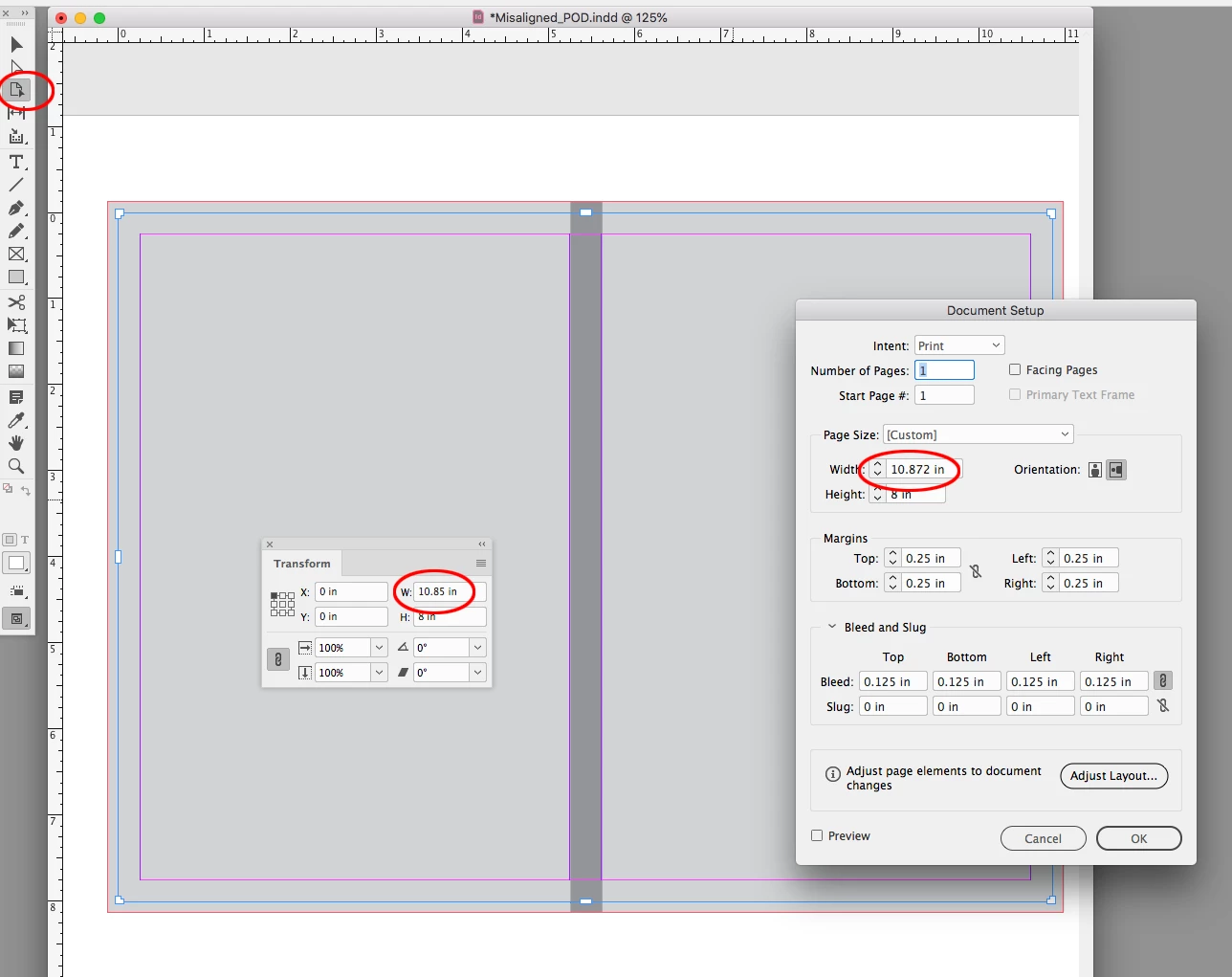
See attachment.
I zoomed in so you can see the descrepency, and I enhanced the bleed lines to make them easier to see.
This topic has been closed for replies.
Correct answer rob day

Your Document size is 10.872" x 8", but the page size is 10.85" x 8". You probably inadvertently scaled the page:


4 replies

Community Expert
June 27, 2020

Hi Rob, hi JR309,

using Adjust Layout would also be a good candidate for scaling pages ( perhaps without knowing it ).

I'm not behind my machine right now so I cannot send any screenshots or do some tests.


Regards,
Uwe Laubender

( ACP )

rob day
Community Expert
rob dayCommunity ExpertCorrect answer
Community Expert
June 27, 2020

Your Document size is 10.872" x 8", but the page size is 10.85" x 8". You probably inadvertently scaled the page:


JR309Author
Known Participant
June 27, 2020

Yeah, I see that now in the Properties pane. Operator error ... though I don't recall ever changing the page size after creating the document at 10.872". I never use the Page tool, because page sizes are always consistent throughout. Seems like "Page Size" in any pane should match the actual page size in a single-page document.
Thanks for your help. This was driving me nuts.

rob day
Community Expert
Community Expert
June 27, 2020

A document can have any number of different sized pages, none of which have to match the Document Setup. You don’t have to use the Pages tool to resize a page, a custom size page could be moved from another document, here I’ve dragged in a Master page from another doc with a different size:


Community Expert
June 27, 2020

Hi JR309,

please share the document ( frames only, no contents ) with us.

Use Dropbox or a similar service and post a download link or add the document as attachment to your initial post by editing the post. We have to look into the document to solve this.


Thanks,
Uwe Laubender

( ACP )

JR309Author
Known Participant
June 27, 2020

Thanks, Uwe. I've uploaded a file to my original post. Filename: Misaligned_POD.indd

Legend
June 27, 2020

There's a .125" bleed all around, so size with bleed is 11.122" x 8.25".


Maybe I'm not understanding correctly, but if the width of each of the front and back covers is 5.5" and the spine is .372", then together they should equal 11.372" before adding the bleed.


EDIT: Sorry, but I read the width wrong. Your figure of 11.122 is correct.