Known Participant
February 17, 2022
Answered

Indesign navigating pages

  • February 17, 2022
  • 3 replies
  • 411 views

I can't remember where I saw this before. I am looking for a way or a quick key that I can go back to a page that I was on before. Say I am on page 100 and I go to page 37. Is there a quick key/combo to return to page 100?
This topic has been closed for replies.
Correct answer jmlevy

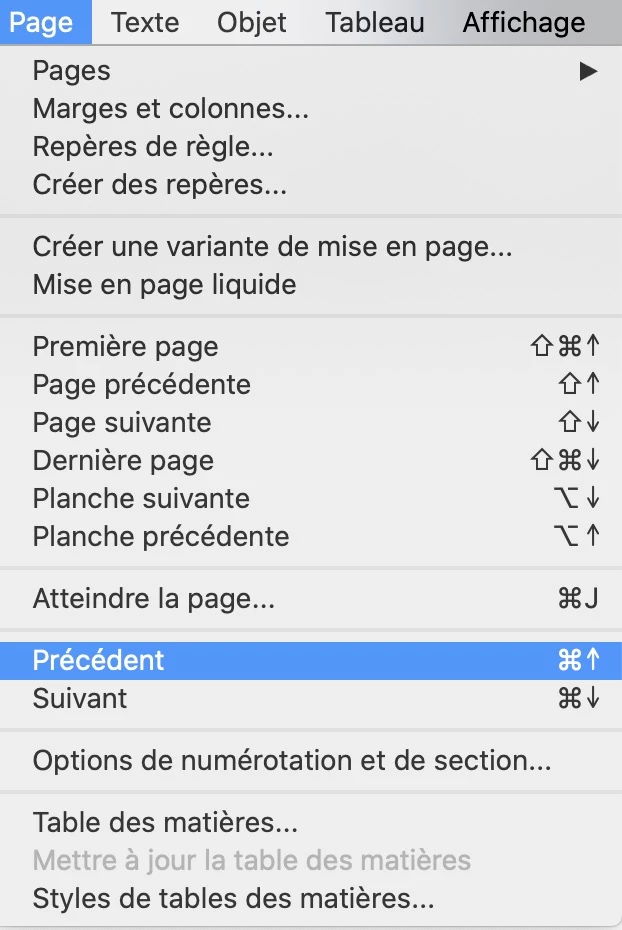
In the Page menu, you should find this. See my french version:

3 replies

Barb Binder
Community Expert
Community Expert
February 17, 2022

Hi @Veronica22551996i6fw :


I am marking @jmlevy's answer as Correct. In English, it's Layout > Go Back.

Ctrl/Cmd + Up Arrow is the shortcut.


~Barb

~Barb at Rocky Mountain Training
James Gifford—NitroPress
Legend
February 17, 2022

This, along with Layout | Go Forward,  is a great little tip. However, there doesn't appear to be a Windows shortcut key, which makes it a tad less useful unless you have keyboard macros.


jmlevy
Community Expert
jmlevyCommunity ExpertCorrect answer
Community Expert
February 17, 2022

In the Page menu, you should find this. See my french version:

John Mensinger
Community Expert
Community Expert
February 17, 2022

There's no "previous" feature that I'm aware of, but to go back to page 100 from 37, I type Ctrl+J, 100,  Enter