
Participant
February 12, 2026
Question

InDesign Not Recognizing Calibri After Windows Update

  • February 12, 2026
  • 17 replies
  • 417 views

Hi,

Getting an issue with indesign and not recognising the calibri system font installed. 

From what I can see, there’s a new version of calibri with a latest windows update. V6.26 > V6.27.
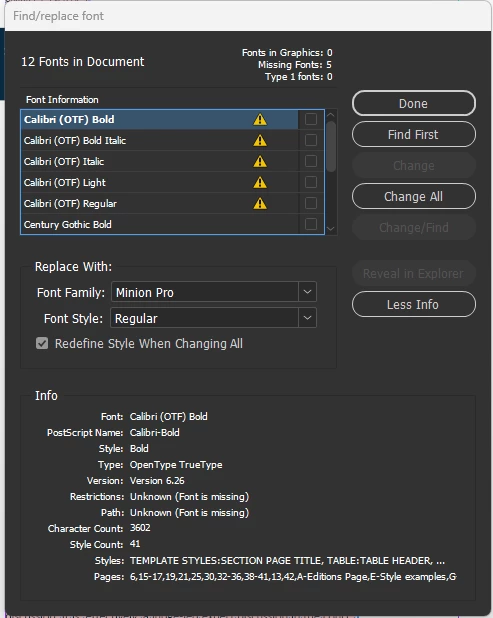
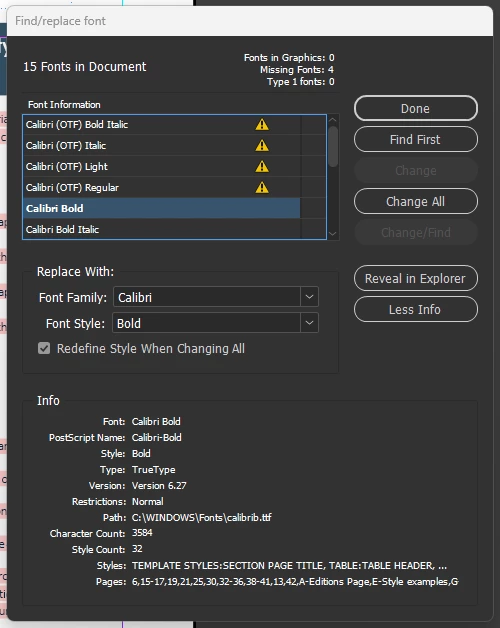


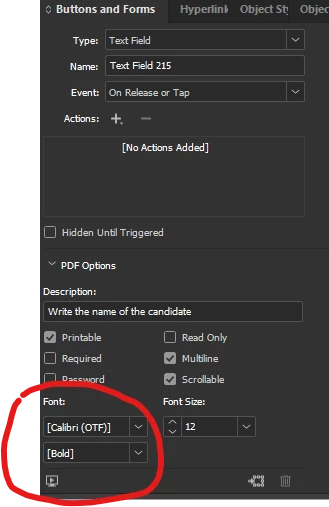
Myself and colleagues are effected, and this is spanning across a lot of our documents. Replacing the font does not fully solve the issue as any forms text fields will not update to the font box.


I’ve seen a similar post regarding this with the same issue on times new roman which is marked as resolved but it most certainly not.


FYI, installing calibri via adobe fonts does not work, we are getting a conflict likely due to it already being a system font.


We also running the latest version of indesign.


Any help on this?

    17 replies

    Dave Creamer of IDEAS
    Community Expert
    Community Expert
    February 12, 2026

    My Calibri fonts do not show up with the (OTF) as part of the file name (nor do I remember ever have the OTF in the file name). Can you confirm that version of Calibri was not installed from a third-party site?

    David Creamer: Community Expert (ACI and ACE 1995-2023)
    BobLevine
    Community Expert
    Community Expert
    February 13, 2026

    Same. This really does sound like a crossplatform issue where a Mac user substituted the Adobe Fonts version instead of the file being packaged with a document fonts folder.

    Without further clarification from those seeing it, it’s impossible to know and there’s no way to add that font to Windows from Adobe fonts without deleting the Microsoft version first.

    Neil Elektra
    Participant
    February 12, 2026

    i also have this. I discovered that the 2025 verson of indesign still works, so we are using this old version for now. Its quite annoying though, as we have been using 2026 for a while so every time we open a file we need to convert it to the old 2025 format

    the fact that 2025 still works and still finds the fonts shows clearly that the fonts are there and installed, but it is InDesign 2026 that does not work. 

    Legend
    February 13, 2026

    Sounds like one possible solution. One theory without deep look:

    When you down-convert a document thru the online conversion service, the particular font might not be installed on the conversion machine. It will then be expressed in a neutral form, similar to placing a word file with that font on a machine that does not have the font.

    This would be close to an IDML roundtrip on a local machine that does not have the font in either version, difficult for a system font unless you go cross platform.

    Re-opening the new down-versioned file on your local machine then discovers the new font version, and accepts it on that turn. Maybe the info is even adjusted to become more specific, on first edit or later? Don’t know.

    Anyway, please try and tell us: when you reopen the new 2025 copy (or a copy) in 2026, could be that this conversion persists and you can continue with 2026.

    Reflow issues because of changed font characteristics will still remain, 2026 features stripped, but you could have discovered a solution for many cases. If it works that way, maybe ​@Abhishek Rao or his team can repurpose the downgrade process to a 2026 - 2026 font cleanup?

    Many if-s and may-bees, I know.

    Neil Elektra
    Participant
    February 13, 2026

    I’ll be honest, i didn’t follow a lot of this. However the gist of it was: you suggested opening the file with old 2025 version (lets be precise here: i opened with 20.5.1 x64), which forced it to convert. Then i saved it. 
    Then i opened with new 2026 version (which is 21.2 x64) and it worked - found the font, all its good. Saved it, opened again in 2026, it worked again. Hurrah. Thanks ! 

    Inspiring
    February 12, 2026

    I share your pain.  I opened one of my many documents with Calibri to find it plastered with pink highlighting. A marathon session, ending at 3am, ensued with Co pilot which gave me umpteen scripts to try and fix the situation, all of which failed.

    Apparently the Calibri fonts installed with Windows 11 25H2  are version 6.27. I then decided to try, with Copilot blessing, and reinstall the Calibri fonts from an image of my C: drive that I’d made a few days ago. That didn't work possibly due to the fact that the versions of Calibri in the image were 6.26 and may well have also been infected with that problem with a recent Windows update.

    Copilot suggested trying to locate versions 5.75 but I was too knackered at that stage and went to bed when I noticed that the sorry issue was exacerbated by how tiny the results text in Google under Firefox looked oddly smaller!

    I came to the conclusion that I'd probably be able to do the replace fonts manoeuvre on any of the documents that that I need to reopen because it would be probably faster than trying to search for and then implement a solution on the internet that may not work.

    Inspiring
    February 12, 2026

    I share your pain.  I opened one of my many documents with Calibri to find it plastered with pink highlighting. A marathon session, ending at 3am, ensued with Co pilot which gave me umpteen scripts to try and fix the situation, all of which failed.

    Apparently the Calibri fonts installed with Windows 11 25H2  are version 6.27. I then decided to try, with Copilot blessing, and reinstall the Calibri fonts from an image of my C: drive that I’d made a few days ago. That didn't work possibly due to thef act that the versions of Calibri in the image were 6.26 and may well have also been infected with that problem with a recent Windows update.

    Copilot suggested trying to locate versions 5.75 but I was too knackered at that stage and went to bed when I noticed that the sorry issue was exacerbated by how tiny the results text in Google under Firefox looked oddly smaller!

    I came to the conclusion that I'd probably be able to do the replace fonts mavoeuvre on any of the documents that that I need to reopen because it would be probably faster than trying to search for and then implement a solution on the internet that may not work.

    Abhishek Rao
    Community Manager
    Community Manager
    February 12, 2026

    Hi ​@Gummo Marx,


    I understand how frustrating this must be, especially with so many documents being affected. Thank you for sharing the details so far.

    To help me look into this further, could you please share the output of the Get-HotFix command from PowerShell so I can check which Windows updates are installed? Also, please let me know the exact InDesign version you’re using.

    In the meantime, kindly confirm whether this issue is limited to InDesign or if you’re seeing it in other Creative Cloud apps like Illustrator or Photoshop, and whether Calibri works correctly in apps like Word or Excel.


    Looking forward to your update.

    Abhishek

    Inspiring
    February 12, 2026

    @Gummo Marx Hello Abhishek.

    I’m on version 17.1.

    Illustrator and Photoshop are places I don’t think I ever use Calibri but I’ve gone in to see - nothing odd happened.  Office 2024 also seems unsaffected.

    Update           KB5066128     NT AUTHORITY\SYSTEM  Mon 29 Dec 25 12:00:00am
    Update           KB5054156     NT AUTHORITY\SYSTEM  Mon 29 Dec 25 12:00:00am
    Security Update  KB5077181     NT AUTHORITY\SYSTEM  Wed 11 Feb 26 12:00:00am
    Security Update  KB5077869     NT AUTHORITY\SYSTEM  Wed 11 Feb 26 12:00:00am

    Abhishek Rao
    Community Manager
    Community Manager
    February 12, 2026

    Hi ​@Tom25894182epyt,


    Thanks for sharing the details and screenshots. Since Calibri is a Windows system font, InDesign relies on the version installed in your C:\Windows\Fonts folder. Please check that the latest Calibri is visible there and in apps like Word and Excel. Then open the affected file in InDesign, allow it to use the installed version, and save the document to update the font reference. If it’s still flagged, please use Type > Find/Replace Font to map it to the current Calibri and save again.

    If the issue persists, I’d appreciate it if you could share the output of the Get-HotFix command from PowerShell along with a screenshot, so I can check which Windows updates are installed. If possible, you may also try uninstalling the recent update and test if that helps.


    Please let me know if this helps and share your update.

    Abhishek

    Mike Witherell
    Community Expert
    Community Expert
    February 12, 2026

    This topic could certainly use more clarity. Here are a couple of generalities that we all deal with concerning fonts:

    If a font gets changed by Microsoft, it will have a different version number. InDesign sees different version numbers of a same-named font as a different font. 

    The same is true if any font maker issues an updated typeface font.

    Sometimes a user computer has the same font in the operating system, while it also may be packaged into a “Document fonts” subfolder. Meanwhile, fonts.adobe.com might be serving the font, too. This can be hard to figure out where the conflict is. 

    Some use font management software which adds to the list of things to investigate.

    Some say you have to delete/reset font caches:

    https://helpx.adobe.com/fonts/kb/troubleshoot-fonts-illustrator-indesign.html

    For years now, Microsoft has been making OpenType fonts that are named .TTF  but they are actually OpenType fonts. This adds to our confusion. as we troubleshoot font mismatches.

    So, on a case-by-case basis, I don’t have a direct answer.

    I wish Adobe would develop a cohesive way to troubleshoot this splintered problem, because it absorbs a lot of time trying to fix it,  and you often don’t know exactly where the problem began if you do fix it.

    Mike Witherell
    Legend
    February 12, 2026

    I have not yet observed dependence on the version, but that could also be. I think it is remembered somewhere in the document’s “used font” record, could be for a reason.

    For sure the font type as displayed in the font info section of the find replace fonts dialog (aka font usage dialog) is relevant. One particular is the difference between OpenType TT and OpenType CFF. It could be just a coincidence that the file extension also changed in such a major change.

    It is an at least well intended and professionally desirable feature that InDesign does not just accept the different fonts and carries on, like others do. It should be even more strict to warn about major version changes in the font.

    Somewhere else in this thread there were other changes mentioned, which are completely explainable for a big overhaul after a long period. New kerning pairs added, others modified, new glyphs, new whatever. At worst new metrics, ugh. Penalty is: reflow when you edit and trigger a recompose, with all further consequences.

    The problem here is that users chose a system font not knowing all the associated risks, for the convenience of its omnipresence, client loves them and uses them, as everybody is using them, so they must be right. Besides even some expert may have fallen into the trap and declared them corporate standard.

    Long term solution is to get away from anything that can break, be it OS update or be it the foundry revoking the license from the cloud based provider (we’ve seen that maybe a year ago). Go shopping for something that you control. Have a contract that you can purchase more seats as you need, and resell to clients.

    Same goes with frequent software updates, pushing out another “minor” version every month comes with the price of reflow risk to those willing to follow suit(e). Deprecate N-2 with assets living on for decades. Composer versioning? Nah.

    The theory behind all of that is even more complicated with selected internal mechanisms that might use the other type while others won’t, still display pink and many more contributing factors. Default replacements between close font styles (Medium vs. Roman), or font styles matching by name but still different under the hood (Hello Variable Fonts, looking at you!). Dependencies on the writing script, native names of font family or font style, fonts without a name for their font style, and so forth.

    Font folders containing the file become relevant, namely the document fonts folder, better avoid it. Fascinating reasoning and complicated like crazy, and I know only a fraction.

    Asking for clarity suggests someone write a book, and that would still only be a snapshot when the next version adds a fix for one case. It won’t give a solution, sorry.

    Attempts to fix everything with a script will also fail, I’ve observed many reasons beyond above list that are script specific. One can get closer with a plug-in, but only for most scenarios while others still can fail. Have a line style specify “semi bold”, and reflow drags in text with a font family that does not support it, just for one example.

    No easy solution, no silver bullet. Make another backup copy of your stable fonts.

    BobLevine
    Community Expert
    Community Expert
    February 12, 2026

    If the font was changed by Microsoft, I’m not at all sure what Adobe can do about it. If you, and your co-workers allow the substitution with the new version, does the issue go away?

    As a side note, between this and the whole Times New Roman issue a while back, I’m pretty happy with my personal policy of avoiding system fonts, unless absolutely necessary.

    The form fields are separate issue and are going to be determined by the fonts available on whatever computer is being used to fill them in. There is no way I can think of for you to control that.

    Participant
    February 12, 2026

    Considering adobe products seem to be the only one with the issue wouldn’t that make it also an adobe issue. Im not getting conflict in any other software. If Im reading correctly latest versions of indesign are converting TTF fonts to OTF? Which I can hazard a guess that would cause problems.

    For substituting, as mentioned, this works on large amounts of text but does not fully resolve the issue, as form fields, of which some docs have a lot of, for some reason do not update. Even when you try to do it individually, the ‘font’ field under buttons and forms panel reverts straight back to the OFT version as it can not differentiate between the new version.

    Glad your personal policy works for you but that does not apply to our clients branding or use case of system fonts.

    BobLevine
    Community Expert
    Community Expert
    February 12, 2026

    I can see why you would think that, and it may well be the case, but InDesign has always been very finicky about fonts as it takes full advantage of every single feature. If it’s an InDesign issue, then post it here: Adobe InDesign as a bug and see if you get any traction on it.

    As for converting TTF to OTF, that’s not really happening. There are two “flavors” of OpenType; TTF and Type 1. All Microsoft system fonts are OTF but they have a TTF extension.

    Again, the fonts in the form fields are always going to be an issue. You might want to pop over to the Acrobat forum and see if anyone has any advice on how to handle this with Acrobat. You can also check out this plugin: FormMagic – Id-Extras.com.