
Participant
January 21, 2025
Question

InDesign not recognizing PPD

  • January 21, 2025
  • 4 replies
  • 292 views

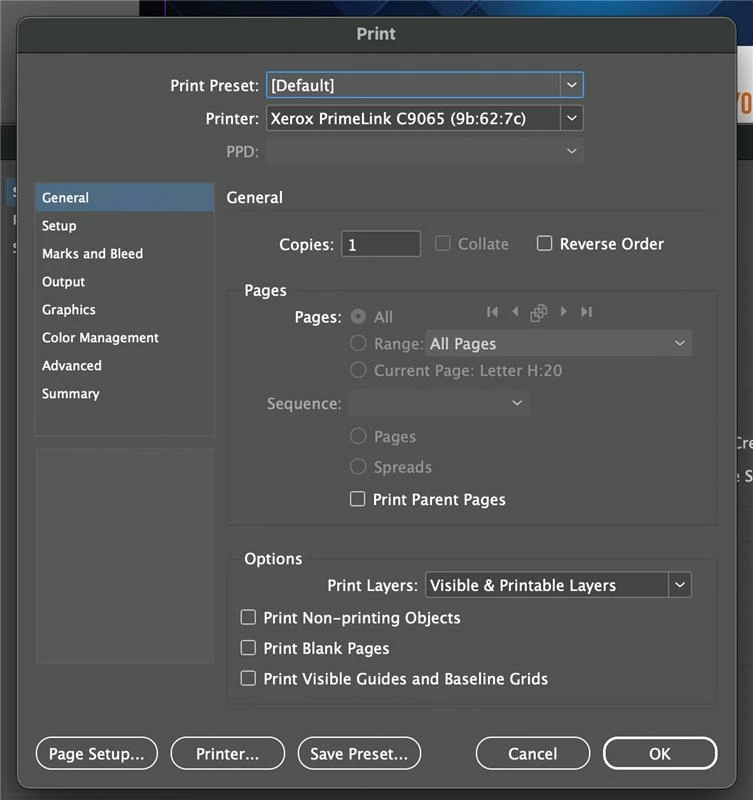
I'm having an issue where I can't print multiple booklets from a single print job on a 2021 M1 iMac. After checking an older iMac that was able to print correctly, I noticed that certain print settings on the problematic iMac were grayed out and couldn't be changed. These settings include options in the "Setup" section, as well as the "PostScript" and "Data Format" dropdown menus in the "Graphics" section. I suspect this is related to the PPD selection dropdown, which is also grayed out and unchangeable on the problem iMac (this box was editable on the older iMac). I’ve already tried reinstalling the drivers from Xerox’s website, but that hasn’t resolved the issue.


4 replies

Robert at ID-Tasker
Legend
January 21, 2025

Export "normal" PDF and try printing booklet from Acrobat. 


it_7963Author
Participant
January 21, 2025

I tried exporting the file to Acrobat and printing it as a booklet, but I'm encountering two new issues when printing multiple copies from the same job:

  1. With the "Collate" option unchecked, the pages are arranged incorrectly (e.g., page 1, page 1, page 2, page 3, page 3, etc.).
  2. With the "Collate" option checked, the pages are arranged correctly, but both copies are printed together as one, instead of being separated. For example, I get page 1-12, followed by another page 1-12, all printed together in one stack.

Additionally, in both cases, the reverse side of the pages is coming out upside down.

Robert at ID-Tasker
Legend
January 21, 2025

@it_7963


That's rather an issue with your printer / driver?