
licensings85428157
Participant
November 30, 2022
Question

InDesign not responding

  • November 30, 2022
  • 3 replies
  • 736 views

HI

We have 2 users that are working on files from the desktop, and in Design is constantly having a problem, especially this recent version 2023.

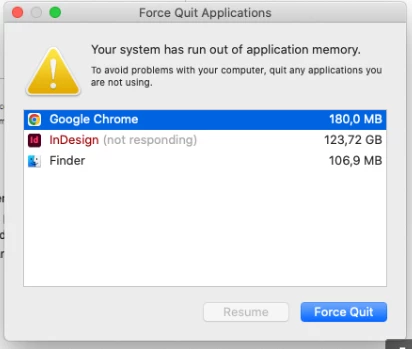
They have 16 GB of ram, and ssd discs,See attached. Are files too large?

Any suggestions?

Thanks

gk


This topic has been closed for replies.

3 replies

BobLevine
Community Expert
Community Expert
November 30, 2022

16GB of RAM is the bare minimum but it shouldn't cause InDesign to freeze. As the others have noted, we really need to know more about the file sizes. Additional info would be the operating system and processor.

Before you do anything else trash your preferences and see if that helps.

Geоrge
Legend
November 30, 2022

123 Gb, really? Don't forget to do indd -> imdl -> indd as Robert says.

Are you embed images inside InDesign file instead of linking (CTRL+D)? 


Remember, never say you can't do something in InDesign, it's always just a question of finding the right workaround to get the job done. © David Blatner
Robert at ID-Tasker
Legend
November 30, 2022

Yeah, embedding is a big no no 😞


Robert at ID-Tasker
Legend
November 30, 2022

How ofter have you done SAVE AS with new name on your INDD file?

Or were you only doing SAVE?

If you are still able to open your INDD file - save it with a new name.

InDesign is always keeping Undo history - unfortunately, it's available ONLY till you close your document - but still kept in your INDD file after you save - so you have to do SAVE AS with a new name from time to time - the frequency depends on the number of changes you've made - but at least daily would be good and you'll have backup copy as a bonus. 


Also, you can do IDMLing - Export your file as IDML - then open it and save with a new name - so you won't overwrite your original file.


licensings85428157
Participant
November 30, 2022

Thank you! We will try that. And yes, files can be still opened, thankfully!

licensings85428157
Participant
December 7, 2022

Update:

Thanks again. it seem "save us" improved situation a lot!