Inspiring
January 11, 2025
Question

Indesign not showing all pages in pages panel

  • January 11, 2025
  • 6 replies
  • 1156 views

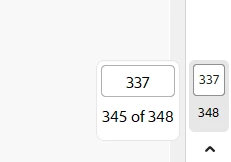
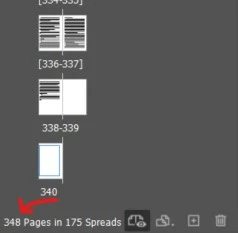
The last few pages in my indesign are not showing up. I've tried the fixes that have been suggested, such as making the panel larger, clearing the data and the preferences. Nothing has worked and when I export to pdf, I can only access the lesser amount even though it's showing that there are more pages. The pdf is telling me that 340 is the max I can go to  but I need those other blank pages. According to the picture below page 345 is equivalent to 337. It makes no sense!


I hope someone has come across this and can offer a solution, this is driving me batty!
 

6 replies

leo.r
Community Expert
Community Expert
January 11, 2025

As others already mentioned, it can be a page numbering issue. Plus if your Acrobat is set to display absolute page numbers (as opposed to "logical" page numbers, or "section numbering" in InDesign terminology), then the page numbers you see in Acrobat can be different from what you see in InDesign (provided your InDesign document is set to display Section Numbering, which is most likely the case).


Participant
January 11, 2025

It sounds like a page numbering issue. Check Layout > Numbering & Section Options to ensure the pages aren’t starting a new section with different numbering. Also, double-check the export range when exporting to PDF. Hope this helps!

Community Expert
January 11, 2025

Are the pages available in the document? I mean they are not visible on the Pages panel but can you navigate to them via scrolling? If nothing that has been suggested works then this surely is document corruption of some kind. Maybe time to move the pages/content to a new document and progressively deleting pages from this document while doing so.

-Manan

-Manan
Community Expert
January 11, 2025

Also wonder if there are any hidden pages which is a new feature

https://helpx.adobe.com/ie/indesign/using/whats-new/2025.html#hide-spread


Community Expert
January 11, 2025

When panels are not responding as respected 

Try resetting your preferences:

Windows: Start InDesign, and then press Shift+Ctrl+Alt. Click Yes when asked if you want to delete preference files.
macOS: While pressing Shift+Option+Command+Control, start InDesign. Click Yes when asked if you want to delete preference files.
A dialog will appear asking to delete the InDesign Preferences, select 'Yes' on this dialog.
Further info and instructions here if needed:
https://helpx.adobe.com/in/indesign/kb/indesign-preferences-support-file-locations.html


helen_72Author
Inspiring
January 11, 2025

Thanks tried all that, it doesn't work either.

Community Expert
January 11, 2025

Ok then if it's not that then it's probably Hidden Spreads.


Hard to know what's going on without seeing the file. 


Feel free to share by clicking on name and contacting me - I can't speak for others, but I can take a look if it helps.

Robert at ID-Tasker
Legend
January 11, 2025

Maybe your file is corrupted - try IDMLing - export as IDML, open, save with a new name - do not overwrite your original file. 


helen_72Author
Inspiring
January 11, 2025

I forgot to mention I had tried this also and it didn't work.