Known Participant
May 31, 2018
Answered

InDesign opens wrong document when I click on icon in Start workspace

  • May 31, 2018
  • 3 replies
  • 1503 views

When I click on a document icon in the Start workspace's recent files presentation, InDesign opens an adjacent file instead of the one I click on. I've tried trashing prefs; didn't work. My next option is to uninstall and reinstall the program, but I thought I'd see if others are having this issue.

Nick
This topic has been closed for replies.
Correct answer Barb Binder

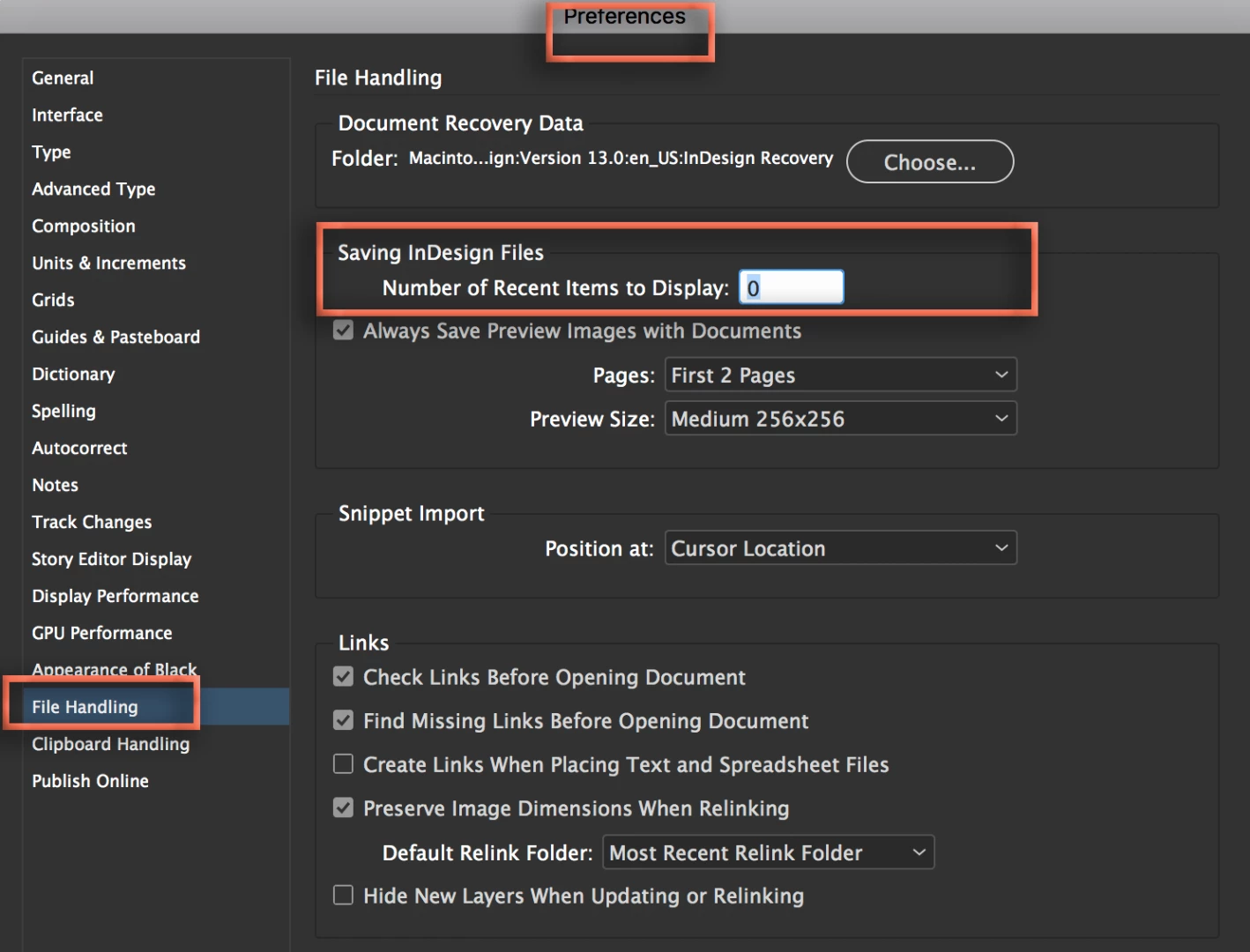
If this is the only issue, why not try clearing the list of recent files before going for the more drastic measures? Preferences > File Handling > Number of Recent Items to Display. Set it to 0, quit and restart InDesign and then restore the desired number.

And before uninstall/reinstall/cc cleaner tool (all reasonable but time-consuming options), try following the steps in this post to delete the cache folder.

CC 2018 InDesign—Don't Import previous settings and preferences

~Barb

3 replies

happie_97
Community Expert
Community Expert
May 31, 2018

Did any of these suggestions solve your issue? If so, please update the forum. This way we will know if you need additional assistance.

Known Participant
June 1, 2018

Thanks for the quick responses everyone! In my impatience I went ahead and uninstalled and reinstalled InDesign after trying Katie's suggestion above. (CC Cleaner offered only the option to "clean" the CC app itself — which I did — and then had to reinstall CC app again.

At any rate, I've opened a few documents and things seem to be OK now. If it happens again, I'll start with changing the File Handling pref as above.

Many thanks.

Nick

Participant
June 11, 2019

Hi Nick,

It's because you dobble click, so what you don't see is that the one beside it takes the second click, wallah it opens too!

So just click once.

Kind regards

Simon

Barb Binder
Community Expert
Barb BinderCommunity ExpertCorrect answer
Community Expert
May 31, 2018

If this is the only issue, why not try clearing the list of recent files before going for the more drastic measures? Preferences > File Handling > Number of Recent Items to Display. Set it to 0, quit and restart InDesign and then restore the desired number.

And before uninstall/reinstall/cc cleaner tool (all reasonable but time-consuming options), try following the steps in this post to delete the cache folder.

CC 2018 InDesign—Don't Import previous settings and preferences

~Barb

~Barb at Rocky Mountain Training
Inspiring
May 31, 2018

Try just using open for now. But when you reset the preferences try restarting your system first. If you have to uninstall and reinstall you may want to run Adobe Cleaner too. Use the CC Cleaner Tool for installation issues