Participant
November 19, 2018
Answered

InDesign Outline Issue

  • November 19, 2018
  • 2 replies
  • 467 views

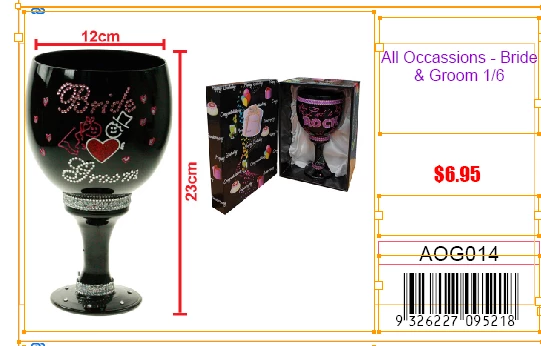
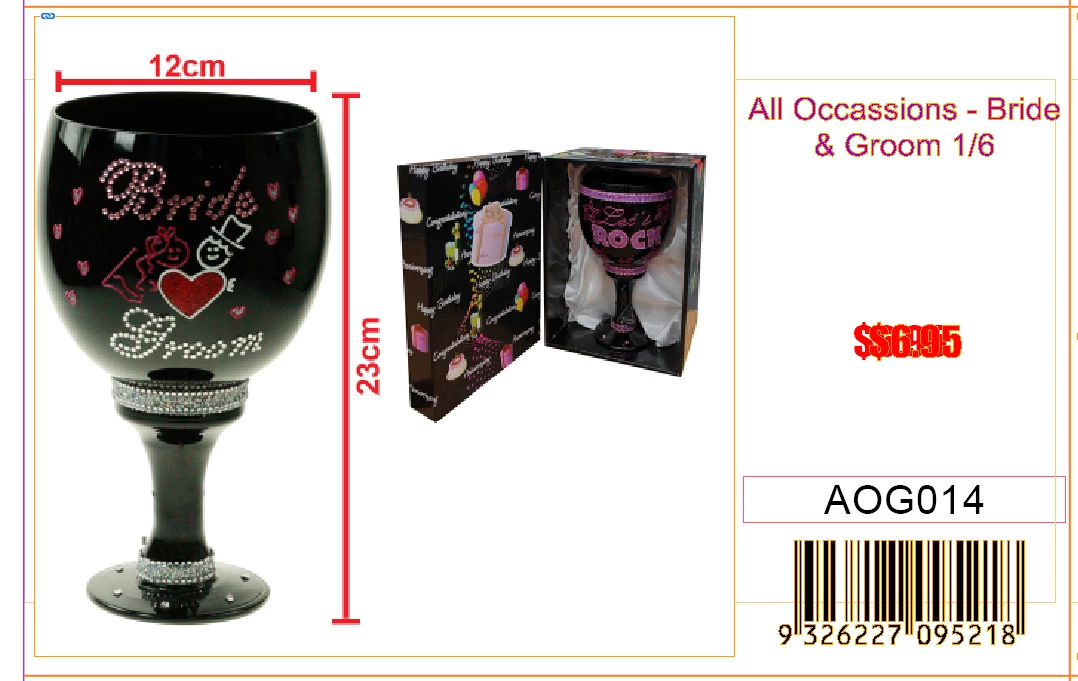
Hi, I have a InDesign template which I have used for years, recently I find when I outline all the text on the page, some part has been copied automatically which is really annoying, does anyone know why does this happened?

Before Outline
After Outline, where you can see the red price part has been copied.
This topic has been closed for replies.
Correct answer Steve Werner

The bug fix is available now from the CC Desktop app. If you don't see it, click on the "three dots" menu at the upper right and choose Check for App Updates.

2 replies

Community Expert
November 20, 2018

triom1730611  wrote

…After Outline, where you can see the red price part has been copied.

Hi triom1730611 ,

did the bugfix version 14.0.1.209 work for you?

When the price part had been duplicated, are both instances outlined?
Or do you still have the original editable text on the page plus the outlined one?

Regards,
Uwe

Bill Silbert
Community Expert
Community Expert
November 19, 2018

Are you using InDesign CC 2019? If so problems with outlining text is a known bug which has been reported and, hopefully, will be fixed when the bug-fix is released. Until then, if you really must convert text to outlines (the process is not really recommended) you may have to go back to CC 2018.

If you are not using CC 2019 then please report which version of InDesign and what operating system you are using.

Participant
November 20, 2018

Yes I am using the 2019 version.... will wait for the bug-fix then.

Thank you so much for letting me know otherwise I will be still struggling to fix it

Steve Werner
Community Expert
Steve WernerCommunity ExpertCorrect answer
Community Expert
November 20, 2018

The bug fix is available now from the CC Desktop app. If you don't see it, click on the "three dots" menu at the upper right and choose Check for App Updates.