
Participating Frequently
November 30, 2021
Question

InDesign Package Fonts issue

  • November 30, 2021
  • 5 replies
  • 2237 views

 File > Package (including the fonts) seems to work fine on Mac

I have no problem opening the indd file in the package folder on a PC/windows even though if I try to open the fonts packages in the Document Fonts folder it shows two of  the TrueType Fonts collection files are invalid. This is confusing??


When others download the Indesign Package folder from Google drive (which includes the Document Fonts folder), it gives an error "missing fonts" when opening the wsame indd file I opened fine on Mac & PC above.

As far as I know, we are all using the latest version of InDesign

The missing fonts are the invalid TrueType Fonts collection Didot & helvetica seen in the screenshot below. I can't find these online to download or I would go this route
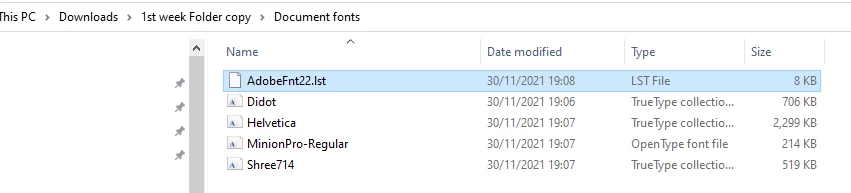
This topic has been closed for replies.

5 replies

Dave Creamer of IDEAS
Community Expert
Community Expert
December 8, 2021

TT Collections from Mac have never been usable on Windows. Plus, they have problems converting (not to mention font licensing issues). 


Switch to OpenType versions or change the font to something similar (depending on one's cash flow vs. how fussy one is).

You could easily spend $500 dollars for the Didot and Helvetica families--more if you want lots of Helvetica variations. 

David Creamer: Community Expert (ACI and ACE 1995-2023)
Participating Frequently
December 8, 2021

I always thought the intention of the Package function in Indesign was so that a publication could be sent to printers & they could open the publication in Indesign without font substitutions?


This info makes that use case questionable in the extreme.


We use PDFs to send to printers based on their requirements (they obviously understood this font issue). 

Dave Creamer of IDEAS
Community Expert
Community Expert
December 8, 2021

Not really. One still has to deal with fonts that are not cross-platform.

  • If going from Mac-to-Mac, you will be OK.
  • If going from Windows-to-Windows, you will be OK.
  • If going from Windows-to-Mac, you should be OK.
  • If going from Mac-to-Windows, you could have problems with fonts.


BTW, even PDFs can be an issue if one uses a font that is encoded not to embed in the PDF.

David Creamer: Community Expert (ACI and ACE 1995-2023)
Willi Adelberger
Community Expert
Community Expert
December 8, 2021

The Mac can read all kind of fonts. Windows does not.

You used Mac Only TTF fonts. Windows is not able to use them.

You should change your used fonts to OTF fonts. That will provide you with the maximum of compatibility as they are identical on both platforms and have the most glyphs..

Participating Frequently
December 8, 2021

Yep, that seems to be the solution!


Thanks all for your help!

Participating Frequently
November 30, 2021

Thanks All,

I found an online converter that picks up all the mebedded TTF fonts in the collection & seems to extract each individual one https://onlinefontconverter.com/


So that might resolve the issue but hey-ho, it still seems to be an anomaly with InDesign?

Participating Frequently
December 8, 2021

I received an email saying there was a post asking "Did it solve your problem?" (but can't see such a post here to reply to?


Actually, no, the online converter did a good job but not 100% correct - it still didn't find & extract some fonts withing the TTC - truefont collection file. It's this TTC file that is causing the  when using the InDesign Package Function on Mac - it doesn't seem to be a valid file when the whole package folder is uploaded to a windows PC.


Thi was attempted on many PCs running windows & it's a ubiqutous problem. I was doing this for my 24 students whom I'm teaching remotely - at least half of them are using PC/windows. Those using Macs had no roblem. 


I worked around it by changing the fonts (which I didn't want to do but was forced into doing because of this unresolvable problem). Just to explain - this Indesign document is a 24 page newsletter that these students will be taking over production of when we are out of lockdown & judge when it is safe to distribute the publication to various cafes, pubs,shops, etc


So this is an InDesign document that was designed a number of years ago & used on Macs in college. I had intended to show the students the compilation of theis newspaper using the xisting stylesheets (which use the problem fonts). But this was not possible given the issue with the fonts & I abandoned the idea - hoping we have time , at some later date, to bring them up to speed.


So, that is the long answer to the question "Did it solve your problem?"


The short answer is no, it didn't solve the issue - where do I report the bug to Adobe?


Participating Frequently
December 8, 2021

BTW, I'm the author of thi sthread - I must have a second Adobe login that I used?

Community Expert
November 30, 2021

Hi John,

open that InDesign document.

Save it to a new name in the folder above the Document fonts folder. In your screenshot its name is "1st week Folder copy". Then close the saved InDesign document. Open it again

Can the document now see the font files stored in the Document fonts folder?


Regards,
Uwe Laubender

( ACP )

Participating Frequently
November 30, 2021

if I understood correctly, I saved the opened indd into a file calle test fonts doc in the 1st week copy folder, closed it & then opened it again - I did all this on the PC/Win computer


No font errors


Just in case it's relevant (I doubt it but who knows with technology?) - I do have 3 images missing on all these file opens which does give this missing links to source error before the missing fonts error. I just skip the missing links message.  

BobLevine
Community Expert
Community Expert
November 30, 2021

Show us that folder using File Explorer on Windows. My guess is those fonts will show as 0KB in size indicating that they are Mac-only.

Participating Frequently
November 30, 2021

Thanks for replying, Bob


The screenshot of the Documents Folder shows the font collections as having size - not sure what you mean about size in File Explorer? If I right click on the document fonts folder & go to Properties it shoes th efolder as being 3.65MB in size


I also tried running these collections through an online fonts converter fontconverter.org (other converters wouldn't read the files, finding them invalid) but this only converted one of the fonts insid ethe packe i.e not the bold or italic versions - so I still have Didot Bold & Helvetic Bold giving missing fonts when I open the Indesign file

Participating Frequently
November 30, 2021

When I look into the Fonts section during Package creation  process, on eithe rMac or PC, it tells me that the status of each of these fonts is OK & protection is No?


The online Fonts converter is converting the regular Didot & Helvetica fonts but not picking up Didot bold or Helvetica Bold or Light, inside their respective font collections.