
Participant
October 7, 2022
Answered

InDesign Page navigation

  • October 7, 2022
  • 3 replies
  • 756 views

Hello,

I have been encountering this problem for a few weeks now but haven't seen any topics addressing how to fix this: regardless of how my work space is set up, my pages panel will not let me access the last page in a document. There are, of course, workaround, such as just scrolling to the last page, or duplicating the page before the last page in order to access the page in question to duplicate it... but its frankly annoying.
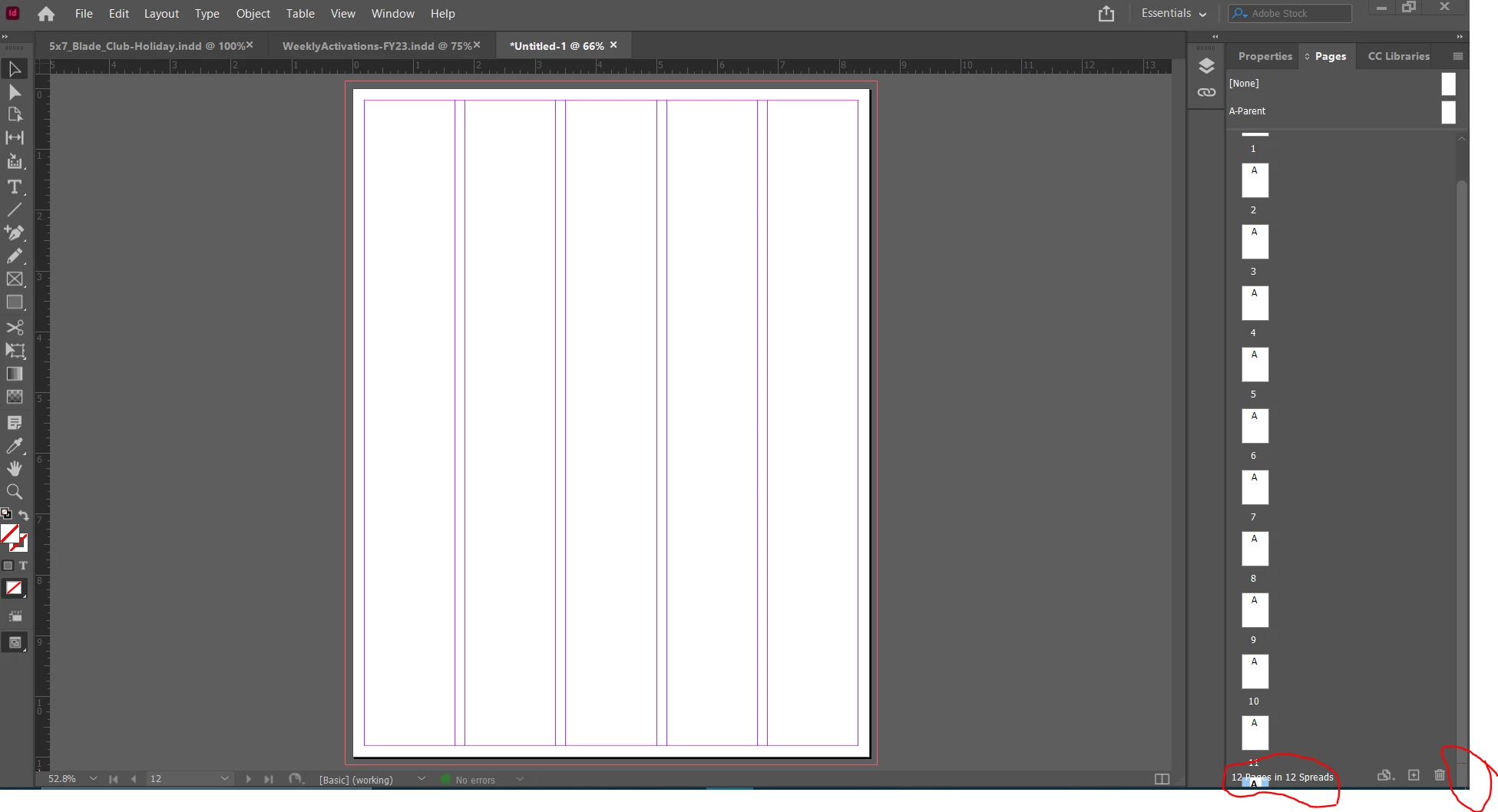
Is anyone else experiencing this issue? InDesign is up to date. I haven't been able to find a solution to accessing the last page through the pages panel.

Please help!


This topic has been closed for replies.
Correct answer Peter Spier

Before reporting a bug, I think you may want to try resetting the preferences, and probably deleting the InDesign cache files

See Reset InDesign Preferences and Other Troubleshooting 

3 replies

Barb Binder
Community Expert
Community Expert
October 8, 2022

@James Gifford—NitroPress:


The preferences/cache files are written to on a daily basis, and I've been told that any frequently-used file can become corrupt over time. That said, the chances of issues cropping up seem to increase when a user imports their preferences from a previous version. I rarely need to rebuild my own preferences, but also I choose to never import preferences when I am upgrading to a new version. I think the reason we offer it up so much is because so many of Adobe's CC subscribers (26 million subscribers as of last year) don't know this. When you consider those numbers, we are recommending this approach to a very small percentage of users.


~Barb

~Barb at Rocky Mountain Training
James Gifford—NitroPress
Legend
October 8, 2022

I can live with that — it's more a perceptual thing than an actual one. These UI flaws are so bizarre and odd that almost anyone who doesn't know about cleaning up prefs and caches will end up here. So it's a high percentage of a small group, not a representative percentage of all users.


My sloppy. Thanks for the counterpoint.


Peter Spier
Community Expert
Peter SpierCommunity ExpertCorrect answer
Community Expert
October 7, 2022

Before reporting a bug, I think you may want to try resetting the preferences, and probably deleting the InDesign cache files

See Reset InDesign Preferences and Other Troubleshooting 

James Gifford—NitroPress
Legend
October 7, 2022

Good point.


However, I'd regard this persistent fragility of ID's preferences to be a bug in itself. I don't have, and can't think of another app that has his fault, to the scale it appears to happen.


Peter Spier
Community Expert
Community Expert
October 7, 2022

Can't say I notice any "persistent fragility" of the InDesign preferences....

I don't think I've had to do a reset in several years.

James Gifford—NitroPress
Legend
October 7, 2022

That behavior is definitely a bug and should be reported as such.


Have you tried changing the various settings for the Pages pane? Click on the three-line/"hamburger" icon at its top right, and look at the settings for View Pages and Panel Options...


...and see if any changes make your page access easier.


Participant
October 7, 2022

Hi James,

Thanks for the suggestion - unfortunately, it did not resolve accessing the last pages. Going into a horizontal view buys me time until the pages become unaccessible, so while a temporary work-around, it does not solve the initial problem.


James Gifford—NitroPress
Legend
October 7, 2022

I don't think I've ever seen a display like that, going under the bottom status items.


Peter may be right: this may be another of the curious little UI glitches caused by corrupted preferences. Try the reset steps in the link he provided.