

Frans van der Vleuten
Known Participant
June 17, 2025
Question

Indesign Page Thumbnails are blank

  • June 17, 2025
  • 2 replies
  • 317 views

Every morning I start with a cup of coffee and an Adobe-problem to solve! 

Today the problem is that my Page Thumbnails turned blank. Out of no where. It has something to do with Adobe fonts? There seem to be a background task running in the background about fonts.
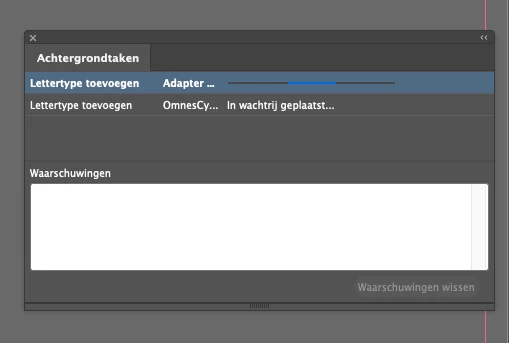
Please Adobe dev's. Fix your flipping problems. This is getting super annoying.

Working without page thumbnails is very tricky, and takes a lot more more and room for error. Please let me know how to fix the problem. 

2 replies

Participant
July 28, 2025

Hey guys, I had the same blue circle scrolling and font queuing issue for months - driving me insane.


The font issue I was able to resolve was the instance of a font that is a Google Font and also an Adobe Font. In my instance, the font problem was "Zilla Slab". I had originally installed the font from Google into my Font Book on my mac months ago, but then recently installed again as an Adobe Font which caused this issue for me in Indesign. Quick steps to fix this here, assuming the issue is similar.


  1. Quit Indesign (Logout and/or restart if needed)
  2. Open Font Book, Remove the font/font family you're having issues with. Completely delete it.
  3. Open Creative Cloud, Remove/Uinstall the font family you're having an issue with
  4. Go to fonts.adobe.com - reinstall the font/font family from the website (not in CC)
  5. Go back to Creative Cloud, make sure to install the font "In Adobe & other local apps" (sometimes this doesn't happen automatically)
  6. Reopen Indesign
  7. Reopen your document with the issue, and your thumbnails should reappear.


Lastly - if you need to share these fonts and documents with clients - just have them do the steps above so they don't experience similar thumbnail previewing issues. You can certainly pass along the font files from google to a printer, etc - but you run the risk of them experiencing the same headache.


Community Expert
June 17, 2025

There's been some others reporting issues with Adobe Fonts syncing too 

You can imagine it's difficult to track down the root cause when it's not happening to everyone and only a few. 


What version of InDesign do you have and what OS? Need specific version numbers please.


Try clearing your background tasks running.

Restart InDesign and see if it's gone.

With no documents open to the preferences and go to the File Handling and disable Auto Adding Fonts


And also see if disabling Auto Activation in Creative Cloud App also helps


Below are some generic fixes that tend to work for various issues.


Restart InDesign & Check Font Sync
Close InDesign completely.

Open Creative Cloud Desktop and go to the Fonts section.

See if there are any fonts stuck syncing or showing errors.

Restart InDesign and check if thumbnails return.


Disable GPU Performance (Temporarily)
Sometimes GPU rendering bugs affect thumbnail previews.

Go to InDesign > Preferences > GPU Performance

Uncheck "GPU Performance" and "Animated Zoom"

Restart InDesign and check if thumbnails reappear.


Clear InDesign Cache
Corrupt cache can lead to blank previews.

Mac: Close InDesign.

Navigate to: ~/Library/Caches/Adobe InDesign/Version [XX.0]

Delete the entire folder.

Relaunch InDesign.


Windows:

C:\Users\[YourName]\AppData\Local\Adobe\InDesign\Version [XX.0]


Reset InDesign Preferences
This can resolve many weird UI or preview issues, though it will reset custom settings.

Quit InDesign.

Hold down Shift + Ctrl + Alt (Windows) or Shift + Control + Option + Command (Mac) while launching InDesign.

Confirm the dialog that asks to delete preferences.


Update or Reinstall InDesign
If the problem started after an update or suddenly, a reinstall might help:

Check for updates in Creative Cloud.

If already up-to-date, try uninstalling and reinstalling InDesign.


If uninstall doesn't work download the Creative Cloud Cleaner Tool


Check for Document-Specific Issues
Try opening a different document. If thumbnails work there:

The issue may be with corrupt assets in one document.

Try saving as IDML (File > Save As > InDesign Markup (IDML)) and reopening the file.